

Choppa: Live Sampler
Elijah Lucian · Music
Independent analytics for this App Store listing. AppTracker is not affiliated with Elijah Lucian.
Chart standing · US
What changed · US
Listing changes AppTracker has observed for this app in this storefront — new versions, price moves, rating shifts, and store copy.
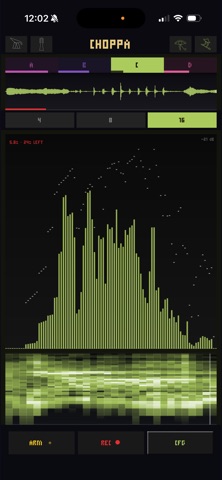
See your input. Set the threshold. - INPUT in the inputs panel is a live meter of what is coming in, with the loudest moment held. - THRESHOLD sets how loud the input must get before an armed REC starts. A tick on the meter shows where it is. OFF records the moment you tap REC. - LEVEL now shows its value. - Fixed: a quiet input could sit under a fixed threshold, and a take would never start.
Ratings breakdown · US
The star breakdown behind this app's rating in this storefront.
In-app purchases · US
No in-app purchases.
Screenshots



Keywords this app targets
Search terms AppTracker associates with this app — estimates, not search volume. ❝ = in the app's title; a highlighted number is its current position for that term.
Similar apps
Competitors and close alternatives, as estimated by AppTracker.
 Chomplr
MSXII Sound Design LLC
Chomplr
MSXII Sound Design LLC
 Resamplr
Scott Paterson
2 shared topics
Resamplr
Scott Paterson
2 shared topics
 Compa: Groovebox Companion
Jordan Mcdonald
Compa: Groovebox Companion
Jordan Mcdonald
 Beatbox & Loop Sound Board ▶ ▶
EyeOS Store Inc.
2 shared topics
Beatbox & Loop Sound Board ▶ ▶
EyeOS Store Inc.
2 shared topics
 Slicr - Slice Beats Chop Audio
Beatshop Labs, LLC
1 shared topic
Slicr - Slice Beats Chop Audio
Beatshop Labs, LLC
1 shared topic
 Performance Sampler: Samposium
Joshua Totemwongse
2 shared topics
Performance Sampler: Samposium
Joshua Totemwongse
2 shared topics
 Chameleon AUv3 Sampler Plugin
Limelight Software
Chameleon AUv3 Sampler Plugin
Limelight Software
 BeatCut - Sampler for Video
Cem Olcay
BeatCut - Sampler for Video
Cem Olcay
About
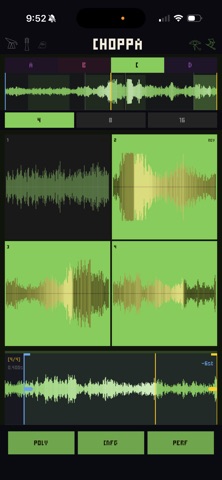
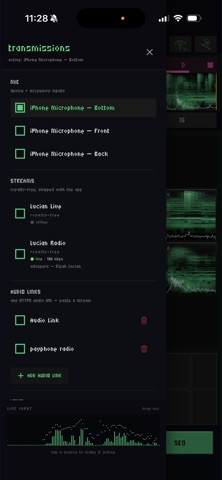
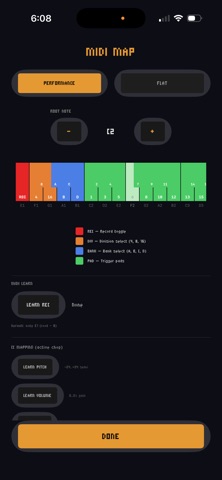
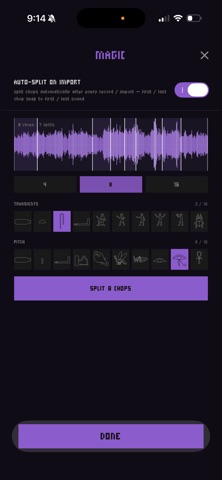
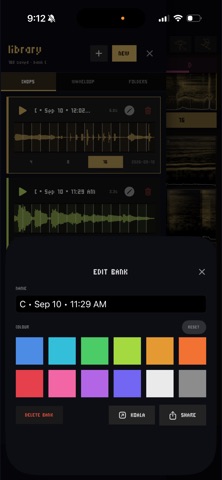
Record into your mic. Chop it to pads. Play it like an instrument. Now scratch them like vinyl and play in chord progressions. Choppa is a lightning-fast audio sampler and slicing tool built for songwriters, beatmakers, and live performers. Record through your mic and instantly map audio across playable trigger pads. Auto-chop on transient or pitch detection — switch between 4 / 8 / 16 pad layouts without losing any of their per-chop settings. PERFORMANCE GESTURES Tap to trigger. Hold to sustain. Drag a single finger up and down on a pad to slide pitch in real time — ±2 octaves without lifting. Drop a second finger anywhere on the screen and any held chop slows like a record being touched. Move the second finger and you scratch in either direction. Lift to release the platter — a force-based exponential inertia model (modeled on real turntable physics, not a linear fade) ramps back to nominal speed. Spread your fingers wider and the scratch responds more gently — a "grip pressure" metaphor borrowed from real decks. The chop view and minimap both work as scrub surfaces. The minimap ignores chop boundaries entirely — drag freely across the whole loop as one continuous tape. CHORD PLAY PERF mode has two flavours: SCRATCH for turntable gestures and CNFG for chord play. CNFG's MONO/POLY toggle controls whether each pad press chokes the previous (one voice at a time) or lets multiple voices stack while held — piano-key hold-to-play for chord progressions, sustained harmonies, and layered counter-melodies. CHOPPING Auto-chop detects transients or pitch boundaries automatically when you record or import a sample, with sensitivity knobs for each. Drag chop edges manually, set per-section pitch and gain, enable reverse, and pick between off / forward loop / ping-pong on any chop. Three pad-count layers (4 / 8 / 16) are fully independent — switch between them and all per-chop settings stay intact. INPUT SOURCES Pick what feeds Choppa: any mic capsule (front / back / bottom / USB / AirPods), the two royalty-free streams that ship with the app, or any HTTPS audio URL you paste in. Record from any of them. RECORD MODE A dedicated REC mode for capture work, with an ARM safety pin — destructive full re-record requires a deliberate ARM tap so a stray REC press can't write over a take. Punch-in records into a single chop's region only, with single-level undo — perfect for fixing a flubbed beat without losing the rest. WIRELESS TO YOUR DAW Ableton Link Audio — Choppa's master mix appears as a track-input source in Live, Loopy Pro, AUM, GarageBand iOS, and any Link 4 peer on the same Wi-Fi. Tempo syncs at the same time. No USB cable, no virtual audio device. PLUGIN INSIDE YOUR DAW Full AUv3 plugin support — load Choppa inside GarageBand, Logic Pro for iPad, AUM, Loopy Pro, or any Audio Unit host as either an Instrument (play chops via host MIDI) or an FX (capture the host's audio for chopping). MIDI mappings persist per host. LIBRARY + SHARE Every recording auto-saves into an App Group library shared between Choppa standalone and the AUv3 plugin — record a sample on your phone, load it in your DAW the next time you open it. Share to Choppa from any other app and pick which bank receives the sample, plus the chop count, before it lands. EXPORT Export source WAV, individual chops, .choppa single-bank presets, or full .choppap multi-bank projects. Import from other Choppa users or any audio file. Built by WaveLoop. Get off the grid.
What's new · 1.13.1
See your input. Set the threshold. - INPUT in the inputs panel is a live meter of what is coming in, with the loudest moment held. - THRESHOLD sets how loud the input must get before an armed REC starts. A tick on the meter shows where it is. OFF records the moment you tap REC. - LEVEL now shows its value. - Fixed: a quiet input could sit under a fixed threshold, and a take would never start.
Details