

RigSense: RV Boondocking
Topo Intel LLC · Travel
Independent analytics for this App Store listing. AppTracker is not affiliated with Topo Intel LLC.
Chart standing · US
What changed · US
Listing changes AppTracker has observed for this app in this storefront — new versions, price moves, rating shifts, and store copy.
RigSense sends a notification with the temperature when it's time to check on a pet, if notifications are on. With no cabin sensor, it uses the outside temperature. Old weather can show a warning, but never an all-clear. The switch is in alert settings, and it is on by default. The tunnel check covers every tunnel within 15 miles of your spot that bans propane or hazardous materials. Low bridge and tunnel warnings show on free accounts too. A new tire sensor asks which wheel it is on. Switching to another account or deleting yours clears that account's data from this iPhone. Signing out keeps whatever exists only on this phone, such as spots that haven't synced yet. Fuel search in Find Resupply on the Camp tab is free now, as Find Fuel on the Route tab is. The other Find Resupply categories still need RigSense Connected. When several severe alerts arrive, the most severe one shows first, and an alert clears once it has ended.
Ratings breakdown · US
The star breakdown behind this app's rating in this storefront.
Screenshots


About
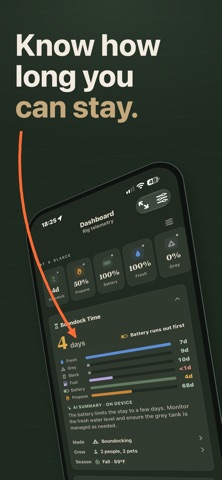
RigSense tells you how long you can stay. Enter your levels or pair your sensors, and it counts the days until your water, power, propane or tanks run out, or your stay limit is up. HOW LONG YOU CAN STAY • One countdown covers fresh water, battery, propane, the grey and black tanks, and the stay limit. • The card names what runs out first, like "Water runs out first." • It starts from your rig profile and learns from the stays you finish. On the planning screen, a confidence label shows how far along it is. • A level you haven't entered reads "Not set up," never a made-up number. YOUR HARDWARE IN ONE PLACE • Bluetooth: Mopeka propane sensors, SeeLevel tank monitors, Ruuvi tags, SOK batteries, TireMinder and generic Bluetooth tire sensors, Power Watchdog, LevelMate, and Victron devices. • Victron VRM in the cloud, or a Victron GX on your rig's Wi-Fi. Peplink routers and Starlink dishes on your local network. • Live readings on your gauges come with RigSense Connected. CHECK A SPOT BEFORE YOU GO • Drop a pin for Location Insight. Weather alerts, fire risk, flood risk and the forecast are free. • Map layers: public land (BLM, Forest Service, National Parks, Fish & Wildlife, state land), active fire perimeters and satellite hotspots, FEMA flood zones, river flood stages and active floods, National Weather Service warning areas, rain, clouds, temperature, pressure, rivers and lakes, and dark sky. • More than 5,500 federal campgrounds from Recreation.gov, with a rig-length filter. With Connected, watch a sold-out campground and RigSense checks it for openings, then notifies you when it finds one. FIND WHAT YOU NEED • Find fuel nearby for free. With Connected, also find dump stations, water fill, propane, groceries, laundry, ice and trash, near you or on your way out. • Check Feasibility checks the road to a spot against your rig. Low bridge and tunnel warnings within 15 miles are free. Connected adds the verdict, closed and posted bridges, and propane bans. • Download a topographic map region for when the signal drops. SAFETY ALERTS, FREE • National Weather Service alerts, with the warned area drawn on the map. Air quality alerts, and an optional alert when the pressure changes fast. TOOLS FOR CAMP • A pet safety card checks how hot or cold your parked rig is getting against each pet's breed, and sends a notification when it's time to check on a pet, if notifications are on. The most sensitive pet sets the level. • Solar compass with an AR camera view, the sun's path and your panel window. • Leveling guide, generator runtime at altitude, and a tire pressure calculator. • Setup, pack-up and Leave No Trace checklists. Maintenance reminders by date, with mileage logged. A history of your stays. • Ask RigSense answers questions about your rig. It needs an iPhone with Apple Intelligence. CONVOYS Join friends with an invite code. Your position is shared only if you turn it on. Convoys need a free account. FREE AND RIGSENSE CONNECTED Free: the countdown with levels you enter, safety alerts, the free Location Insight rows, the tools, convoys, 10 saved spots, one offline map region and one campground search a day. Map layers and Location Insight need a free account. RigSense Connected adds live sensor readings, the full Location Insight with cell coverage, Starlink and dark sky, the cell and Starlink map layers, the other resupply finders, campground availability alerts, unlimited saved spots, offline regions and campground searches, Stay Trends, and community spots. $3.99 a month or $29.99 a year, each with a 14-day free trial. Subscriptions renew unless canceled at least 24 hours before the period ends. PRIVACY No ads, and no third-party tracking or analytics. Usage stats go only to RigSense. You can turn them off, or delete your account, in Settings. Ask RigSense runs on your iPhone. Requires an iPhone with iOS 26.2 or later. Terms of Use (EULA): https://getrigsense.com/terms Privacy Policy: https://getrigsense.com/privacy
What's new · 1.0.16
RigSense sends a notification with the temperature when it's time to check on a pet, if notifications are on. With no cabin sensor, it uses the outside temperature. Old weather can show a warning, but never an all-clear. The switch is in alert settings, and it is on by default. The tunnel check covers every tunnel within 15 miles of your spot that bans propane or hazardous materials. Low bridge and tunnel warnings show on free accounts too. A new tire sensor asks which wheel it is on. Switching to another account or deleting yours clears that account's data from this iPhone. Signing out keeps whatever exists only on this phone, such as spots that haven't synced yet. Fuel search in Find Resupply on the Camp tab is free now, as Find Fuel on the Route tab is. The other Find Resupply categories still need RigSense Connected. When several severe alerts arrive, the most severe one shows first, and an alert clears once it has ended.
Details