

PocketNOC - Network Monitoring
WeaveHub Technologies LLC · Business
Independent analytics for this App Store listing. AppTracker is not affiliated with WeaveHub Technologies LLC.
Chart standing · US
What changed · US
Listing changes AppTracker has observed for this app in this storefront — new versions, price moves, rating shifts, and store copy.
iPhone Duo support • PocketNOC now adapts to the iPhone Duo. On the open display, a navigation rail replaces the tab bar in landscape and Alerts, Nodes and Modules show the list beside the detail, with the divider on the crease. • Fold or unfold mid-task and your place is kept: the open alert or node stays in front when you fold, and its list reappears beside it when you unfold. • In the open portrait posture the familiar tab bar stays and the Dashboard lays out in two columns. • The folded display works exactly as before. Also in this release • The sign-in screen pairs a brand panel with the form on wide displays. • The app lock screen uses the standard gold Unlock button.
Screenshots



About
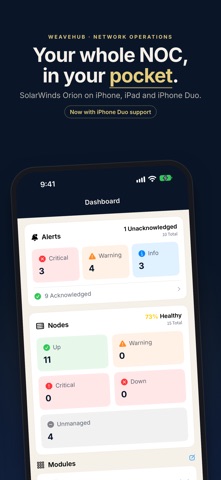
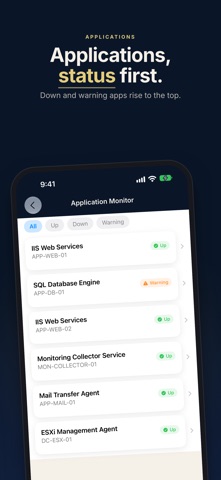
Get paged at 2 AM? Open PocketNOC instead of your laptop. Monitor your entire SolarWinds infrastructure from your iPhone — view node health, triage alerts, acknowledge issues, and track performance metrics in real time. PocketNOC brings your SolarWinds monitoring dashboard to your iPhone. Get instant visibility into your network infrastructure, respond to critical alerts on the go, and keep your systems running smoothly — all from your pocket. KEY FEATURES • Real-time dashboard with alert severity counts and node status • Browse, filter, and acknowledge active alerts by severity • Push notifications for critical, warning, and informational alerts • Home screen widgets — Status Beacon, Alert Dashboard, and Pinned Nodes • Node health with CPU, memory, response time, and storage charts • Service management — view and restart Windows services • Node actions — reboot servers with confirmation • Custom alert sounds per severity level • Pin favorite nodes and create custom node groups • Alert grouping by node, type, or time window BUILT FOR NETWORK OPERATIONS PocketNOC connects directly to your SolarWinds platform API. Your monitoring data never passes through third-party servers — it flows directly between your infrastructure and your device. Auto-detects licensed SolarWinds modules: NPM, SAM, NTA, NCM, IPAM, and DPA. Every screen is purpose-built for SWIS data — no generic dashboards. SECURE BY DESIGN • Keychain-encrypted credentials with device-only protection • Face ID, Touch ID, or passcode app lock • Zero Trust gateway support (Cloudflare Access, Zscaler ZPA) • Zero cloud exposure — your data stays on your network FREE TO EXPLORE Sign in and view your dashboards, alerts, and node health free — no subscription required. Upgrade to PocketNOC Pro to acknowledge alerts, put nodes in maintenance mode, reboot servers, and enable push notifications. TRY BEFORE YOU CONNECT Explore the app with built-in demo mode — no SolarWinds instance required. Note: Requires SolarWinds Orion platform (v2020.2+). Active Directory accounts should use DOMAIN\username format for full access. A valid TLS certificate is required. PocketNOC is not affiliated with or endorsed by SolarWinds. Terms of Use: https://pocket-noc.com/terms Privacy Policy: https://pocket-noc.com/privacy
What's new · 1.25.0
iPhone Duo support • PocketNOC now adapts to the iPhone Duo. On the open display, a navigation rail replaces the tab bar in landscape and Alerts, Nodes and Modules show the list beside the detail, with the divider on the crease. • Fold or unfold mid-task and your place is kept: the open alert or node stays in front when you fold, and its list reappears beside it when you unfold. • In the open portrait posture the familiar tab bar stays and the Dashboard lays out in two columns. • The folded display works exactly as before. Also in this release • The sign-in screen pairs a brand panel with the form on wide displays. • The app lock screen uses the standard gold Unlock button.
Details