

CapyMaths — Primary Maths UK
RIVERMAP AI SOLUTIONS LTD · Education
Independent analytics for this App Store listing. AppTracker is not affiliated with RIVERMAP AI SOLUTIONS LTD.
Chart standing · US
What changed · US
Listing changes AppTracker has observed for this app in this storefront — new versions, price moves, rating shifts, and store copy.
A simpler first day for new families. When you set up CapyMaths, the first thing we now suggest is small: sign your child in and try three questions together. Five minutes is plenty for day one. The Skills Check is still on the home screen for when you want a full picture of their level. New children start with a daily goal of 20 questions, the goal parents pick most often. You can change it or switch it off when you add a child. Capybara World and its games open each day once the goal is reached. On a child's first day, the "Feed me" step now lets them into Capybara World to buy food and feed their capybara before the goal is met. The games stay locked until then. In the Skills Check, questions whose answers need a decimal point or a minus sign now show those keys, so your child can type answers like 0.95 or -3. Some answers that had the right value but were written differently, such as 0.600 for 0.6, were marked wrong in practice. They are now marked right. Fixed on iPhone and iPad: tapping a number key and then the key just above it, such as 1 then 4, could enter the first number twice. Each tap now enters the key you pressed. In long multiplication, typing now starts in the first row of working in every practice mode.
In-app purchases · US
What this app sells inside itself, grouped by kind and priced for this storefront.
Screenshots



About
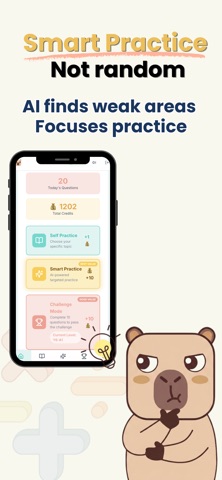
Your child's maths practice shouldn't be guesswork. CapyMaths finds exactly where they need help — aligned to the UK National Curriculum from Year 1 to Year 6, with dedicated SATs Prep and 11+ Maths sections. Created by a dad for his own daughters, now available for every UK family. 45,000+ QUESTIONS — YEAR 1 TO 11+ Every question mapped to UK National Curriculum objectives: - Year 1-6: 28,000+ questions covering number bonds, place value, addition, subtraction, multiplication, division, fractions, decimals, measurement, geometry and more - SATs Prep: 8,900+ questions across arithmetic, reasoning, fractions, measurement, geometry and ratio — aligned to KS2 SATs Papers 1, 2 & 3 - 11+ Maths: 7,400+ multiple-choice questions in GL Assessment style, covering number, algebra, sequences, ratio, geometry, data and multi-step problem solving SMART PRACTICE WITH AI WEEKLY FOCUS Every week, AI reviews your child's work and picks the topics they need most. Smart Practice then adapts in real time — difficulty adjusts as your child progresses, and time and skip data help uncover hidden weaknesses. FOUR WAYS TO PRACTISE - Self Practice — choose any topic from your child's year group - Smart Practice — an AI-picked weekly focus, with questions adapted to your child - Challenge Mode — timed challenges to build speed and confidence - Skills Check — short checks that build a map of what your child has truly mastered RETRY ZONE — MASTER YOUR MISTAKES Every wrong answer, from any practice mode, is automatically captured. Your child retries it later; two correct answers and it's graduated. No more repeating what they already know — just focused practice on real weak spots. CAPYBARA COMPANION Your child earns River Coins through practice, then uses them to feed, dress and care for their virtual capybara. Unlock backgrounds and equipment, keep a daily care streak, play 15 mini-games, add friends and send gifts. It turns "I don't want to" into "can I do more?" PARENT DASHBOARD & AI REPORTS See exactly which topics your child finds tricky. Weekly AI-generated reports delivered to your inbox with strengths, weaknesses and specific recommendations. The dashboard shows weekly trends, Retry Zone progress, a full Skills Map across six strands of maths, and detailed weakness analysis. Download PDF reports anytime. FEATURES PARENTS LOVE - Daily practice goals — set targets and lock games until they're met - Configurable coin rewards — choose how many coins each practice mode awards - "I don't understand" tracking — see which topics your child skips - Year group and series restrictions — control what your child practises - Practice timer — monitor time per question - Scratch pad — built-in whiteboard for working out - Family account — manage multiple children, easy switching - Report a question — flag anything directly from the app WHY PARENTS CHOOSE CAPYMATHS - 45,000+ questions, 100% UK National Curriculum aligned - AI weekly focus and AI reports, not just random questions - SATs Prep & 11+ Maths included - Step-by-step explanations to learn from mistakes - Real parent visibility with weekly AI insights - Built by a parent, for parents - A fraction of the cost of tutoring BUILT FOR UK FAMILIES We use British English, British currency in word problems, and British teaching methods. Written methods follow the formal approaches specified by the Department for Education. Your child won't see "math" or "grade" — just proper maths for their Year group. Download today and give your child the smart maths practice they deserve. Privacy Policy: https://capymaths.com/privacy Terms of Use (EULA): https://www.apple.com/legal/internet-services/itunes/dev/stdeula/ Support: info@rivermapai.com
What's new · 1.2.10
A simpler first day for new families. When you set up CapyMaths, the first thing we now suggest is small: sign your child in and try three questions together. Five minutes is plenty for day one. The Skills Check is still on the home screen for when you want a full picture of their level. New children start with a daily goal of 20 questions, the goal parents pick most often. You can change it or switch it off when you add a child. Capybara World and its games open each day once the goal is reached. On a child's first day, the "Feed me" step now lets them into Capybara World to buy food and feed their capybara before the goal is met. The games stay locked until then. In the Skills Check, questions whose answers need a decimal point or a minus sign now show those keys, so your child can type answers like 0.95 or -3. Some answers that had the right value but were written differently, such as 0.600 for 0.6, were marked wrong in practice. They are now marked right. Fixed on iPhone and iPad: tapping a number key and then the key just above it, such as 1 then 4, could enter the first number twice. Each tap now enters the key you pressed. In long multiplication, typing now starts in the first row of working in every practice mode.
Details