

Helmbeam: Stock Research
Scydex Ltd · Finance
Independent analytics for this App Store listing. AppTracker is not affiliated with Scydex Ltd.
Chart standing · US
What changed · US
Listing changes AppTracker has observed for this app in this storefront — new versions, price moves, rating shifts, and store copy.
A new way to start • The first time you open Helmbeam, a short chat sets you up. Name a stock you bought, sold or are watching, pick the date on a calendar, and see what the company had reported by then and what it has reported since. • Not sure where to start? Follow a worked example, then pick a company of your own. • Read earnings reports yourself? Call a company's latest report stronger, weaker or mixed, and see your call beside Helmbeam's reading. • Tracking a company now happens in one sheet on its company page. Watchlist • Business trends show as letters: U for up, D for down, S for steady. • The date of the last close sits under the price. • Each card has one Notes footer, with Remove from watchlist beside it. • Trader members can filter the watchlist by Flow. Glossary • The glossary now explains every label, filter and figure in the app. • Settings has a Sections button that jumps to any part of the page. Fixes • Clearer labels on the company page and in Flow. P/E shows "--" when earnings are zero or below. • In the walkthrough, swiping and Next show the same cards, and a finished walkthrough starts from the beginning. • If Helmbeam can't connect, you see a plain message instead of technical error text. • Switching tabs and scrolling long lists is smoother.
In-app purchases · US
What this app sells inside itself, grouped by kind and priced for this storefront.
Screenshots



Keywords this app targets
Search terms AppTracker associates with this app — estimates, not search volume. ❝ = in the app's title; a highlighted number is its current position for that term.
Similar apps
Competitors and close alternatives, as estimated by AppTracker.
 Insight: Stock Research
Insight Investing LTD
1 shared topic · 3 shared title words
Insight: Stock Research
Insight Investing LTD
1 shared topic · 3 shared title words
 TipRanks Stock Market Analysis
TipRanks Ltd.
2 shared topics · 1 shared title word
TipRanks Stock Market Analysis
TipRanks Ltd.
2 shared topics · 1 shared title word
 Stock Master: Investing Stocks
Apponance, Inc.
1 shared topic · 1 shared title word
Stock Master: Investing Stocks
Apponance, Inc.
1 shared topic · 1 shared title word
 Stocks Live + Stock Tracker
Cinnamon Mobile LLC
1 shared topic
Stocks Live + Stock Tracker
Cinnamon Mobile LLC
1 shared topic
 Company 360: Stock Analysis
John Mirochnik
1 shared topic · 1 shared title word
Company 360: Stock Analysis
John Mirochnik
1 shared topic · 1 shared title word
 Earnings Season
Point618 Design Inc.
1 shared topic
Earnings Season
Point618 Design Inc.
1 shared topic
 StockWhether: Stock Alerts
STEVEN RIORDAN
2 shared topics · 1 shared title word
StockWhether: Stock Alerts
STEVEN RIORDAN
2 shared topics · 1 shared title word
 Stocks Tracker:Real-time stock
Dajax LLC
1 shared topic · 1 shared title word
Stocks Tracker:Real-time stock
Dajax LLC
1 shared topic · 1 shared title word
About
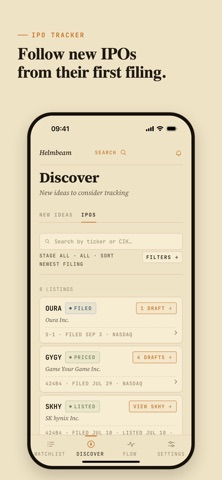
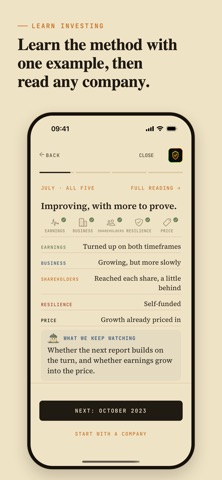
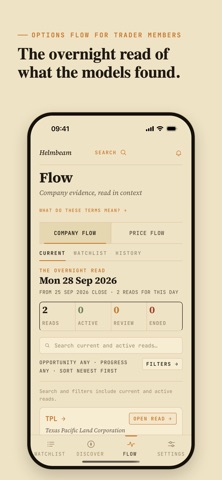
Most stocks people own came from a story: a group chat, a video, a friend who sounded very sure. When the company reports earnings, the news reaches them a day late as a headline, and it's hard to say what actually changed. Ask why they own the stock, and plenty can't remember. Helmbeam is stock research and a portfolio tracker for the companies you own or watch. It keeps track of what you own, why you own it, and what to watch at the next earnings report. STOCK ALERTS WHEN A COMPANY REPORTS Add the stocks in your portfolio, or ones you're watching, to your watchlist. When a company reports earnings, Helmbeam alerts you with what changed and reminds you why you're tracking it, so you don't have to keep checking. EVERY EARNINGS REPORT, READ THE SAME WAY Each quarterly report is read through five lenses, always in this order: • Earnings: how strong operating profit is, and which way it's heading • Business: whether revenue growth is durable, and whether it's speeding up or slowing • Shareholders: whether growth reaches each share, after dilution and stock-based pay • Resilience: whether the business can fund itself • Price: what the stock price asked of the business on the report date Each lens gets one plain line of stock analysis, and every reading ends with what to watch at the next report. A DATED HISTORY OF EVERY STOCK Helmbeam keeps every reading with its date, and none are rewritten. Open a company's timeline, jump to any year, or follow one lens across every earnings report. FUNDAMENTAL ANALYSIS FROM SEC FILINGS Under each reading sit the reported financials: revenue, margins, cash flow and the balance sheet, each taken from the company's own SEC filings, along with the stock's valuation. NEW TO INVESTING? LEARN WITH ONE EXAMPLE Learn the method with our example, Netflix, then research any of close to 4,000 US-listed stocks the same way. STOCK SCREENER: DISCOVER Discover shows setups Helmbeam's models have matched across the market. Screen by growth, company size, liquidity, resilience and recency to find stocks you weren't looking for. IPO TRACKER AND RESEARCH Follow new and upcoming IPOs from their first filing. Read each one through the Owner Lens: who owns it, how it's positioned, and how its story unfolds after the IPO. FLOW FOR TRADER MEMBERS Helmbeam Trader adds Flow, a nightly read of what the models found, with the options activity behind each read. Every Flow read is logged the day it's published and scored when it resolves, the misses along with the hits. The next time someone sounds very sure about a stock, you'll know where to look first. PLANS Start free and track one company. Or try Pro free for 14 days: track up to 12 companies and get timelines, Discover and earnings alerts. Pro then renews monthly unless you cancel before the trial ends. Trader tracks up to 25 companies and adds Flow. Helmbeam Pro and Helmbeam Trader are auto-renewing subscriptions. Prices are shown in the app before you buy. A subscription renews unless you cancel at least 24 hours before the end of the current period. Manage or cancel anytime in your App Store account settings. Helmbeam is a research tool. It is not investment advice or a recommendation to buy, sell or hold any security. Past performance does not guarantee future results. Powered by SourceKeel. A product of Scydex Ltd. Privacy Policy: https://helmbeam.com/privacy-policy Terms of Use (EULA): https://www.apple.com/legal/internet-services/itunes/dev/stdeula/
What's new · 2.2.1
A new way to start • The first time you open Helmbeam, a short chat sets you up. Name a stock you bought, sold or are watching, pick the date on a calendar, and see what the company had reported by then and what it has reported since. • Not sure where to start? Follow a worked example, then pick a company of your own. • Read earnings reports yourself? Call a company's latest report stronger, weaker or mixed, and see your call beside Helmbeam's reading. • Tracking a company now happens in one sheet on its company page. Watchlist • Business trends show as letters: U for up, D for down, S for steady. • The date of the last close sits under the price. • Each card has one Notes footer, with Remove from watchlist beside it. • Trader members can filter the watchlist by Flow. Glossary • The glossary now explains every label, filter and figure in the app. • Settings has a Sections button that jumps to any part of the page. Fixes • Clearer labels on the company page and in Flow. P/E shows "--" when earnings are zero or below. • In the walkthrough, swiping and Next show the same cards, and a finished walkthrough starts from the beginning. • If Helmbeam can't connect, you see a plain message instead of technical error text. • Switching tabs and scrolling long lists is smoother.
Details