

Motion Stitch: Align Photos
Momentarium LLC · Photo & Video
Independent analytics for this App Store listing. AppTracker is not affiliated with Momentarium LLC.
Chart standing · US
What changed · US
Listing changes AppTracker has observed for this app in this storefront — new versions, price moves, rating shifts, and store copy.
What’s New in Version 1.1 • Auto-Smooth Lighting: Eliminate flicker in your time-lapses! Choose any photo as a benchmark reference, and Motion Stitch will automatically balance exposure and brightness across all frames in your project. • Per-Frame Brightness Fine-Tuning: Need precise control? Adjust individual frames with a dedicated brightness slider featuring instant, real-time 60 FPS live preview. • Instant Previews: Editing a single frame’s brightness no longer forces a re-render of the entire project—enjoy zero wait times and seamless playback. • One-Tap Undo & Reset: Easily reset frame exposure to original values or roll back batch smoothing at any time. • Seamless Exports: All custom lighting corrections are automatically baked into your high-resolution MP4 video and animated GIF exports. • Performance improvements and minor UI refinements throughout the editor.
Ratings breakdown · US
The star breakdown behind this app's rating in this storefront.
In-app purchases · US
What this app sells inside itself, grouped by kind and priced for this storefront.
Screenshots




About
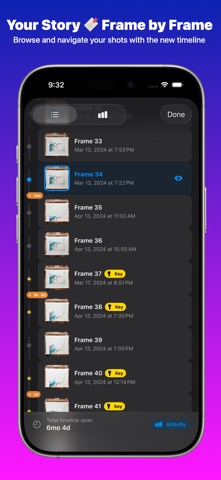
Stop making shaky time-lapses. Start using Motion Stitch. Take photos of your projects but find the final video "jumps" around? Whether embroidering, painting, building furniture, or tracking fitness, manually aligning dozens of frames is nearly impossible. Motion Stitch is an intelligent tool designed to stabilize photo sequences into centered, professional videos and GIFs. Our "Smart Wave" algorithm learns from manual adjustments to align your project automatically. HOW IT WORKS: Import: Select photos from your library Align: Adjust one frame; AI tracks texture and geometry across the rest Shoot: Add photos via the camera using "Ghost Overlay" to match positions perfectly Export: Save as a smooth MP4 or shareable GIF at any speed (FPS) KEY FEATURES: • AUTO-ALIGN AI: Intelligent object detection and perspective correction • SMART WAVE: Correct one frame and the app ripples the fix to neighboring frames • CAMERA GHOSTING: See a transparent outline of your last shot for a perfect fit • MAGNETIC SNAPPING: Points snap to object edges for surgical precision • VARIABLE FPS: Control speed from slow crawls to cinematic looks • PROJECT MANAGEMENT: Manage multiple builds, crafts, or transformations at once ORGANIZE YOUR JOURNEY Motion Stitch is your project vault. Whether working on a weekend craft or a year-long renovation, our Project Management system lets you organize and revisit progress. Every photo is safely stored in its project folder, keeping your library clean and structured. LONG-TERM PROGRESS TRACKING Some stories take time. With persistent project storage, start an embroidery today and add the final stitch months later. The app remembers your position and keeps the "Ghost Overlay" ready so you can pick up exactly where you left off. Watch your craft evolve frame by frame in one secure app. BUILT FOR ALL CREATORS Motion Stitch handles the unique rhythm of DIY and homemade projects: • DIY Enthusiast: Document complex models, tiling, or car restorations • Craft Artist: Perfect for pottery, clay sculpting, or weaving where the transition is pure magic • Home Improver: Capture room renovations and turn months of work into a cinematic masterpiece YOUR STORY, STABILIZED The beauty of a project is the "Before and After." Save projects in Motion Stitch and export versions as you go. Share a progress GIF or export a 4K stabilization video for the final reveal. Re-edit, change speed, or add new frames whenever inspiration strikes. Don't let hard work get lost in your camera roll. Turn your passion into a stabilized visual legacy. MAXIMIZE YOUR SOCIAL MEDIA IMPACT In the age of short-form video, quality is everything. Motion Stitch gives you a professional edge by creating stabilized content that looks like it was shot on a motorized slider. Export in high resolution for TikTok, Instagram Reels, and YouTube Shorts. Your followers won't just see the final result—they’ll witness the dedication behind every single step with surgical clarity and cinematic flow. THE SATISFACTION OF THE REVEAL There is a unique joy in watching raw materials transform into a masterpiece in seconds. Whether it’s a messy renovation becoming a sanctuary or a simple sketch coming to life, Motion Stitch ensures the focus remains on your craft, not the camera movement. Our algorithm eliminates the "vibration" typical of handheld time-lapses, making every transition smooth, professional, and mesmerizing to watch. JOIN THE COMMUNITY OF MAKERS Creators worldwide are using Motion Stitch to document their growth and businesses PERFECT FOR: • Handmade & DIY: Embroidery, knitting, woodworking • Art & Illustration: Drawing timelapses, clay sculpting • Home & Garden: Renovations, plant growth • Life Tracking: Fitness, pregnancy, "photo a day" challenges Stitch your motion with professional stability. Type of subscriptions: • Auto-renewable: Week/Year EULA & Privacy Policy: https://momentarium.app/legal
What's new · 2.1
What’s New in Version 1.1 • Auto-Smooth Lighting: Eliminate flicker in your time-lapses! Choose any photo as a benchmark reference, and Motion Stitch will automatically balance exposure and brightness across all frames in your project. • Per-Frame Brightness Fine-Tuning: Need precise control? Adjust individual frames with a dedicated brightness slider featuring instant, real-time 60 FPS live preview. • Instant Previews: Editing a single frame’s brightness no longer forces a re-render of the entire project—enjoy zero wait times and seamless playback. • One-Tap Undo & Reset: Easily reset frame exposure to original values or roll back batch smoothing at any time. • Seamless Exports: All custom lighting corrections are automatically baked into your high-resolution MP4 video and animated GIF exports. • Performance improvements and minor UI refinements throughout the editor.
Details