

Timely - Reminders That Pester
ANDREW ROBERT REED · Productivity
Independent analytics for this App Store listing. AppTracker is not affiliated with ANDREW ROBERT REED.
Chart standing · US
What changed · US
Listing changes AppTracker has observed for this app in this storefront — new versions, price moves, rating shifts, and store copy.
• Add a link: give a reminder a web address. The row shows the site's name and icon, and a tap opens it. • Reminders that travel with you: when you change time zones, upcoming reminders keep their clock time, so 8 AM medication stays at 8 AM. Prefer home time? Tap "Keep original times" on the banner. • Location reminders by voice (Timely Pro): tell Siri "remind me to take out the trash when I get home" and Timely uses your saved Home. • Answer Siri on your AirPods (iOS 27): when Siri reads a Timely reminder, say "mark it done" or "snooze it for 10 minutes." You can also ask Siri to complete, reschedule, rename or delete any reminder by name. • Siri gets dates right more often: "next Tuesday," "every other Friday" and "at 3" now land where you meant. • Fixes: high priority alarms now move when you snooze, edit or complete a repeating reminder, instead of ringing at the old time. Renaming a snoozed reminder no longer moves its whole series.
Price & rating history · US
Reconstructed from the listing changes AppTracker has observed in this storefront. A field is charted once it has changed more than once, and each line starts at the value it moved from.
Average rating · ★ 5.00 now · 2 changes on record
Ratings breakdown · US
The star breakdown behind this app's rating in this storefront.
In-app purchases · US
What this app sells inside itself, grouped by kind and priced for this storefront.
Screenshots


About
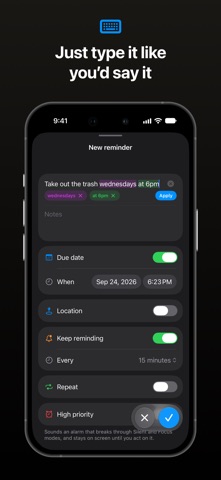
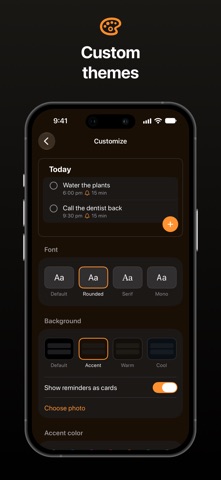
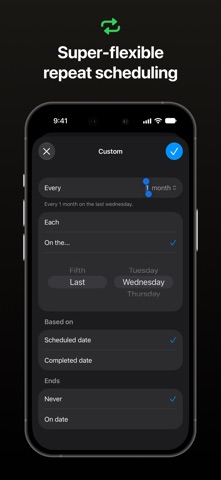
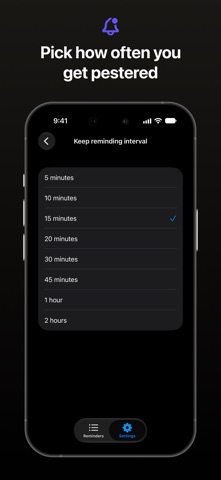
Most reminder apps nudge you once, then give up. Easy to miss, easy to ignore — and the thing doesn't get done. Timely keeps reminding you until you actually mark it complete. Persistent notifications Pick how often you're reminded per task: every 5 minutes, every 15, every hour. Timely keeps nudging until it's done. Configure it task-by-task. High priority alarms For the things you truly can't miss, turn on High priority and Timely sounds an audible alarm at the due time, breaking through Silent and Focus modes, and staying on screen until you act on it. Part of Timely Pro. Location-based reminders Get reminded when you arrive somewhere or leave it: take out the trash when you get home, grab milk when you leave work. Give a reminder a due date too, and whichever comes first wins. Part of Timely Pro. Make it yours Choose a font, an accent color and a background for your list, or use one of your own photos, and show your reminders as cards. Part of Timely Pro. Add reminders by voice Just ask Siri: “Add a to-do in Timely.” Say what you want, when, and how often — hands-free. When Siri reads a reminder on your AirPods, say “mark it done” or “snooze it.” Natural language input Type it like you'd say it. "Call mom every Sunday." Timely parses the date, time, and repeat settings automatically, and "when I get home" sets it to one of your saved places. Also on your Mac Timely has a native Mac app that lives in your menu bar, reminds you there, and shares one list with your iPhone. Timely Pro is a universal purchase, so one subscription covers both. Flexible repeat scheduling Daily, weekly, custom intervals, or complex patterns. Build the exact schedule you need. Perfect for Medications, water breaks, habits, chores, appointments, follow-ups — anything you can't afford to forget. — Privacy Policy: https://www.andyreed.design/timely/privacy-policy Terms of Use: https://www.apple.com/legal/internet-services/itunes/dev/stdeula/
What's new · 1.530
• Add a link: give a reminder a web address. The row shows the site's name and icon, and a tap opens it. • Reminders that travel with you: when you change time zones, upcoming reminders keep their clock time, so 8 AM medication stays at 8 AM. Prefer home time? Tap "Keep original times" on the banner. • Location reminders by voice (Timely Pro): tell Siri "remind me to take out the trash when I get home" and Timely uses your saved Home. • Answer Siri on your AirPods (iOS 27): when Siri reads a Timely reminder, say "mark it done" or "snooze it for 10 minutes." You can also ask Siri to complete, reschedule, rename or delete any reminder by name. • Siri gets dates right more often: "next Tuesday," "every other Friday" and "at 3" now land where you meant. • Fixes: high priority alarms now move when you snooze, edit or complete a repeating reminder, instead of ringing at the old time. Renaming a snoozed reminder no longer moves its whole series.
Details