

DrawMaps
Shenzhen Yuzhu Intelligent Co., Ltd · Graphics & Design
Independent analytics for this App Store listing. AppTracker is not affiliated with Shenzhen Yuzhu Intelligent Co., Ltd.
Chart standing · US
What changed · US
Listing changes AppTracker has observed for this app in this storefront — new versions, price moves, rating shifts, and store copy.
• Try drawing as a guest, then sign in to publish your practice. • Share a link to the exact place you are creating. • Faster, bounded map loading and more resilient saves with offline recovery. • Refined glass controls, clearer save status, and improved accessibility. • Fixes for undo/redo, stale drawings and dense map areas.
In-app purchases · US
No in-app purchases.
Screenshots

About
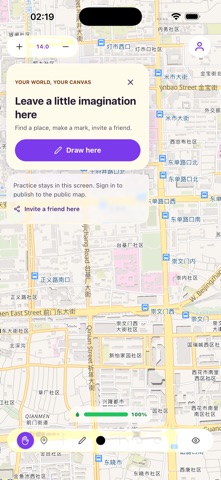
DrawMaps is a shared global canvas built on a real-world map. Explore the map and try drawing as a guest. Sign in to publish your practice, save drawings, place public pins, and join a creative map shared with people around the world. DRAW ON THE WORLD Use freehand drawing tools directly on the map. Choose colors, brush size, and opacity, switch naturally between pencil and eraser, then pan and zoom to work at the scale you need. PUBLIC MAP PINS Place colored pins with short messages to mark ideas, discoveries, meet-up points, or places that matter to you. Drawings, pins, names, and messages are public by default. FAIR INK SYSTEM The ink allowance keeps the shared canvas responsive and gives everyone a fair opportunity to create. Ink regenerates over time and is never a currency or paid item. FAST SHARED CANVAS DrawMaps loads map content by visible tiles and securely synchronizes your contributions through its cloud backend. The interface stays focused on the map with compact, glass-inspired controls. ACCOUNT AND SAFETY CONTROLS Sign in with Apple or email, customize your avatar, review your contribution statistics, report inappropriate content, and block users. You can permanently delete your account and associated content from inside the app. EXPORT AND LANGUAGES Export a view of the map and use DrawMaps in English, Simplified Chinese, or Japanese. DrawMaps does not request GPS location permission. The coordinates saved by the service are locations you intentionally choose on the map. Map content is collaborative artwork and should not be used for navigation, emergencies, or other high-risk decisions.
What's new · 1.3.0
• Try drawing as a guest, then sign in to publish your practice. • Share a link to the exact place you are creating. • Faster, bounded map loading and more resilient saves with offline recovery. • Refined glass controls, clearer save status, and improved accessibility. • Fixes for undo/redo, stale drawings and dense map areas.
Details