

UsageScope: AI Usage Tracker
Jaemin Song · Developer Tools
Independent analytics for this App Store listing. AppTracker is not affiliated with Jaemin Song.
Chart standing · US
What changed · US
Listing changes AppTracker has observed for this app in this storefront — new versions, price moves, rating shifts, and store copy.
• Limit reset history: see the resets each Claude and Codex account received, used and expired. Open an account and tap History under Limit resets. Your iPhone keeps the history from now on. • Fixes and improvements.
Screenshots



About
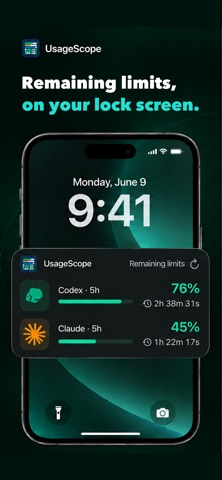
Track usage, remaining limits, and reset times across your AI services with UsageScope for iPhone. • Many AI services, one place. • Your usage, over time. • Remaining limits, on your lock screen. • Your usage. Your rank. Connect supported AI services, including Codex, Claude, Gemini, GitHub Copilot, and other available providers. Review usage history by period, follow your optional usage ranking, and explore practical command guides in Learn. Use widgets, Live Activities, and reset notifications to check limits without reopening the app. Available data, refresh timing, and reset schedules depend on the provider and iOS background activity. Some connections and token-history sources require UsageScope on a Mac; Mac-to-iPhone sync uses your private iCloud account and QR pairing. AI services require their own accounts or credentials. UsageScope does not include AI service access or additional usage quota. Service names and logos belong to their respective owners. The app includes app-opening ads. An optional monthly Remove Ads subscription removes ads while active. Manage or restore it in Settings. App analytics and crash reporting have separate opt-out controls. App interface language availability is independent of this store listing. Support: https://www.usagescope.com/support#ios Privacy Policy: https://www.usagescope.com/privacy Terms of Use: https://www.apple.com/legal/internet-services/itunes/dev/stdeula/
What's new · 1.2.22
• Limit reset history: see the resets each Claude and Codex account received, used and expired. Open an account and tap History under Limit resets. Your iPhone keeps the history from now on. • Fixes and improvements.
Details