

TagWeaver - MP3/FLAC Tagger
ONNELLAB · Productivity
Independent analytics for this App Store listing. AppTracker is not affiliated with ONNELLAB.
Chart standing · US
What changed · US
Listing changes AppTracker has observed for this app in this storefront — new versions, price moves, rating shifts, and store copy.
- Added an appearance setting to choose System, Light, or Dark mode. - Refined library navigation and save feedback. - Improved visual consistency and accessibility with the latest ONNELLAB design rules.
Ratings breakdown · US
The star breakdown behind this app's rating in this storefront.
In-app purchases · US
What this app sells inside itself, grouped by kind and priced for this storefront.
Screenshots



About
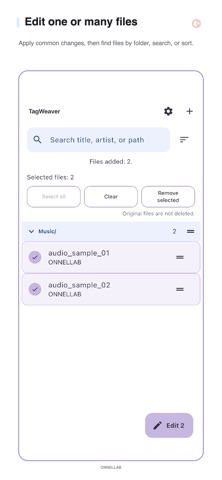
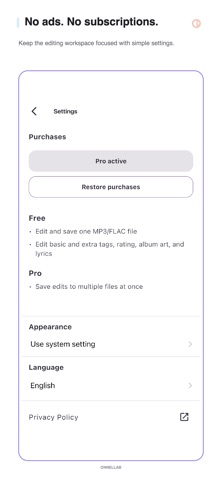
TagWeaver is an offline MP3 ID3 and FLAC tag editor. Choose a file to edit title, artist, album, track and disc numbers, year, composer, genre, rating, basic and extra metadata, album art, plain lyrics, and synced LRC lyrics. Only the changes you explicitly choose are saved. The Library groups files you add by relative folder. Search, path sorting, a quick index, and manual order help you find and arrange those files; folder sections can be collapsed or expanded. In the editor, review a read-only change preview and apply sequential track numbering before you explicitly save. Free - Edit and save one MP3 or FLAC file at a time - Edit basic and extra metadata - Add or remove album art - Edit plain lyrics and synced LRC lyrics Pro - Apply common tag changes across multiple files - Batch-save multiple MP3/FLAC files - One-time purchase with no subscription or ads Useful for editing music metadata, ratings, cover art, lyrics, and timed LRC lyrics, or making the same tag change across several audio files. Buy Pro once; the store shows the current local price before purchase. Privacy and processing: no login or account, no file uploads, no ads, and no tracking. Processing stays on your device, and files change only when you explicitly save. TagWeaver is not a music player or automatic library organizer.
What's new · 2.5.3
- Added an appearance setting to choose System, Light, or Dark mode. - Refined library navigation and save feedback. - Improved visual consistency and accessibility with the latest ONNELLAB design rules.
Details