

Range Finder・Tape Measure
ZeroPlay Ltd. · Utilities
Independent analytics for this App Store listing. AppTracker is not affiliated with ZeroPlay Ltd.
Chart standing · US
What changed · US
Listing changes AppTracker has observed for this app in this storefront — new versions, price moves, rating shifts, and store copy.
Bug fixes and performance improvements for a smoother experience.
Ratings breakdown · US
The star breakdown behind this app's rating in this storefront.
In-app purchases · US
What this app sells inside itself, grouped by kind and priced for this storefront.
Screenshots


About
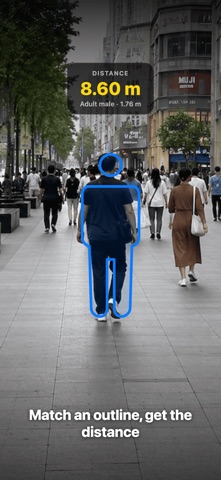
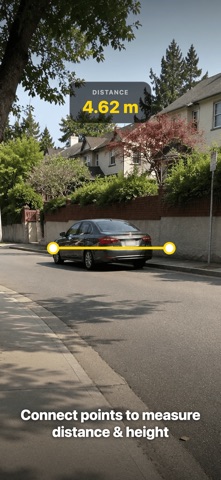
Measure distance, area and perimeter with the camera you already carry. Range Finder gives you three ways to get a number, so you are not stuck when the target is too far for AR or you have no tape at hand. REFERENCE MODE — MEASURE THINGS THAT ARE FAR AWAY Most camera measuring apps stop working a few meters out. Reference mode does not use AR at all — it works as a camera rangefinder. Pick an object whose real height you know — a person, a car, a traffic cone, a door, a suitcase — line the outline up with what you see through the camera, and the distance appears. Pinch to zoom and drag with one finger to fit the outline precisely. It keeps going long after a tape measure runs out and where a short-range AR ruler gives up — the building across the river, the tree next door, the sign on the other side of the road. DISTANCE MODE — POINTS, LINES AND BENT PATHS Drop two AR points and read the straight line between them. Range Finder also splits that line along gravity, so you get the vertical height and the horizontal distance separately instead of one diagonal number. Keep adding points and it measures a multi-segment polyline — useful for a wall that turns a corner or a path that is not straight. AREA MODE — SURFACES AND PERIMETER TOGETHER Place three or more points, and the shape closes into a polygon. You get the area and the perimeter in the same result card, which is what you actually need when you are pricing flooring, turf, paint or fencing. REFERENCE OBJECTS Reference outlines cover people (adult and child), cars, SUVs, pickups, vans and trucks, city and folding bikes, scooters, traffic cones, bollards, fire hydrants, doors, suitcases and backpacks, office chairs, standing desks, bookshelves, fridges, washing machines, microwaves, bottles and cans, basketballs and bowling pins. A reference height can be adjusted to match the object in front of you. MEASUREMENT HISTORY YOU CAN ACTUALLY USE Every finished distance and area measurement can be saved with a screenshot, the value and a timestamp. Rename entries, mark favorites, filter them, and share a single record or a whole filtered set as CSV. The last 200 measurements are kept on the device. FEATURES • Reference distance from a known height, no AR required • Distance calculator for two AR points, with vertical and horizontal breakdown • Multi-point polyline for bent paths and total segment length • Area calculator: polygon area with perimeter in the same reading • Reference outlines for people, vehicles, doors and cones, with adjustable heights • Metric and imperial units, adjustable decimal places • Crosshair aiming, guide lines and on-screen prompts • Saved history with screenshot, favorites, rename and CSV export • Haptic feedback and a language picker PRIVACY AND LIMITS Everything is calculated on your device. There is no account, no sign-up, and your measurements and screenshots never leave the phone. Range Finder does not use GPS, maps or satellite imagery — it measures what the camera can see, not a plot drawn on a map. It is not a laser instrument either: AR and reference readings are estimates, good enough to plan, price and compare, not a substitute for a calibrated instrument when an official figure is required. Point, measure, save. Download Range Finder and get the number you need. Terms of Use: https://zeroplay.io/docs/legal/terms-of-service Privacy Policy: https://zeroplay.io/docs/legal/privacy-policy
What's new · 1.2
Bug fixes and performance improvements for a smoother experience.
Details