

Routerra Teams
Anatolii Trubin · Navigation
Independent analytics for this App Store listing. AppTracker is not affiliated with Anatolii Trubin.
Chart standing · US
What changed · US
Listing changes AppTracker has observed for this app in this storefront — new versions, price moves, rating shifts, and store copy.
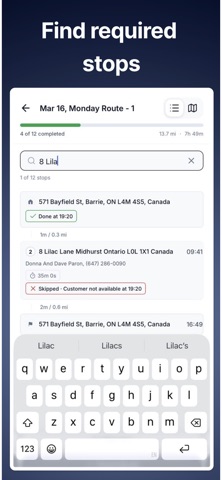
New drive mode The stop card is clearer: Delivered and Not delivered buttons, the recipient's name and a Call button. After you close a stop, the app moves on to the next one right away, and Undo is there if you tapped by mistake. It also checks with you before you complete a stop far from its address or change a stop that is already closed. Your navigation app, your way Choose Google Maps, Waze or Apple Maps the first time you tap Navigate, and change it any time under Settings › Drive mode. Satellite view Switch the drive map and the route map to satellite imagery. Also in this release: search stops by recipient name, more accurate arrival times, a notice when your dispatcher changes a stop's status, and more reliable sync.
In-app purchases · US
No in-app purchases.
Screenshots



About
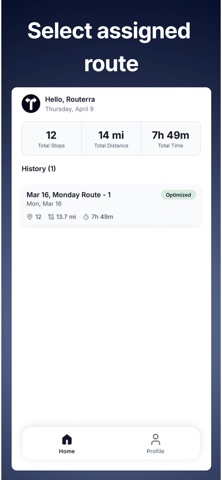
IMPORTANT: This app requires an active Routerra Teams account managed by a dispatcher. It does not work as a standalone app. If you are looking to optimize delivery routes for your own business, visit routerra.io. Routerra Teams Driver is the field companion app for last-mile delivery drivers. Your dispatcher plans and assigns optimized routes - this app puts those routes in your hands. What you can do: - View all assigned routes and scheduled stops - Navigate turn-by-turn to each delivery address - Mark stops as delivered, failed, or skipped - Track your progress through the route in real time - See stop details, notes, and delivery instructions Designed for delivery teams Built for couriers, field service drivers, and last-mile delivery professionals whose routes are managed centrally by a dispatcher or logistics coordinator.
What's new · 1.12.0
New drive mode The stop card is clearer: Delivered and Not delivered buttons, the recipient's name and a Call button. After you close a stop, the app moves on to the next one right away, and Undo is there if you tapped by mistake. It also checks with you before you complete a stop far from its address or change a stop that is already closed. Your navigation app, your way Choose Google Maps, Waze or Apple Maps the first time you tap Navigate, and change it any time under Settings › Drive mode. Satellite view Switch the drive map and the route map to satellite imagery. Also in this release: search stops by recipient name, more accurate arrival times, a notice when your dispatcher changes a stop's status, and more reliable sync.
Details