

File Scanner - Scanjar
Vikram Singh · Utilities
Independent analytics for this App Store listing. AppTracker is not affiliated with Vikram Singh.
Chart standing · US
What changed · US
Listing changes AppTracker has observed for this app in this storefront — new versions, price moves, rating shifts, and store copy.
Version 1.5 includes general performance and stability improvements, plus interface refinements for a smoother document-scanning experience.
In-app purchases · US
What this app sells inside itself, grouped by kind and priced for this storefront.
Screenshots


About
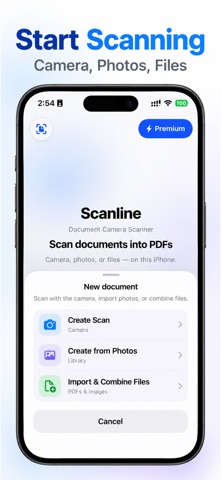
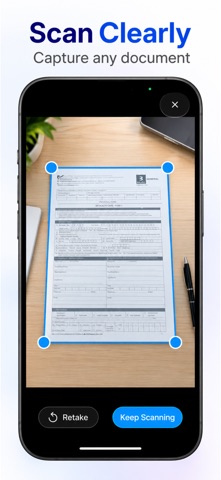
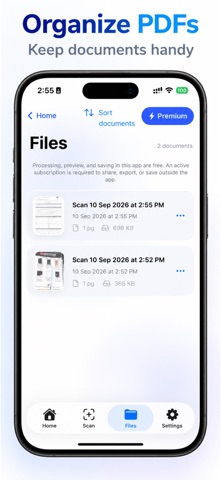
Scanlin is an ID scanner, document scanner, color scanner, and photo-to-PDF tool for turning paper documents and pictures into organized PDFs. Scan ID cards, receipts, forms, letters, notes, and other paperwork with the document camera. You can also import a photo, image, or PDF file, then combine pages into one document. Capture one page or keep scanning to create a multi-page PDF. Preview the result before deciding what to do next: • Adjust document edges with a perspective crop. • Enhance scanned pages for clearer reading. • Add pages to an existing PDF. • View documents in the built-in PDF preview. • Keep PDFs in the in-app library, then search, sort, rename, or delete them. Pro unlocks the actions you need when a document is ready to leave the app: • Share and export PDFs through the system share sheet. • Save copies outside the app to compatible locations and apps. • Use OCR for picture-to-text recognition and copy extracted text. Scans are processed on your device. Camera permission is used only when you choose camera capture. No account is required to scan, import, preview, or organize documents. Start with the document in front of you, review every page, and choose Pro when PDF export, sharing, outside saving, or OCR text extraction supports your workflow. Privacy: https://1kbapps.com/scanlin/ Terms: https://www.apple.com/legal/internet-services/itunes/dev/stdeula/
What's new · 1.5
Version 1.5 includes general performance and stability improvements, plus interface refinements for a smoother document-scanning experience.
Details