

Medical Scribe: PatientNotes
INHYPE LIVE LIMITED · Medical
Independent analytics for this App Store listing. AppTracker is not affiliated with INHYPE LIVE LIMITED.
Chart standing · US
What changed · US
Listing changes AppTracker has observed for this app in this storefront — new versions, price moves, rating shifts, and store copy.
Find any session, fast Search now looks through every session, including your notes and transcripts. Type a medication, symptom or name and see exactly where it was mentioned. Notes that are easier to read and copy Notes open as clear sections, each with its own Copy button for pasting into your records. Prefer the whole note? Switch to Full note; we’ll remember your choice. Copy note always copies everything. A cleaner session screen Sessions open straight on the note. Record sits at the top, so it never covers your work. The transcript now has search, and back-to-back lines from the same speaker read as one turn. Know your patient before you record The patient summary now shows on the session’s Context tab, and documents flag handwriting worth double-checking. Simpler Tasks and Patients Every task view fits on screen, completed tasks can be undone, and long-press gives quick actions. Patients sort by last visit, with sessions and Record at the top of each patient’s page. Templates made easier Create a template by describing it, dictating it, photographing your paper form or uploading a file. Try any template on a real session before you use it, and start a draft over whenever you like. More settings, right in the app Choose the language you speak and the language notes are written in, draw your signature with your finger, set up your letterhead with a preview, change your password, see where you’re signed in, export your data and connect Semble. Faster and more reliable Tabs load quicker, and a dropped connection no longer interrupts the template assistant. Turning off two-factor authentication now works on iPhone.
Ratings breakdown · US
The star breakdown behind this app's rating in this storefront.
Screenshots


About
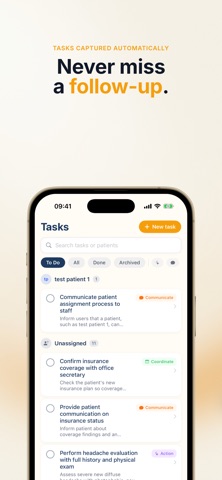
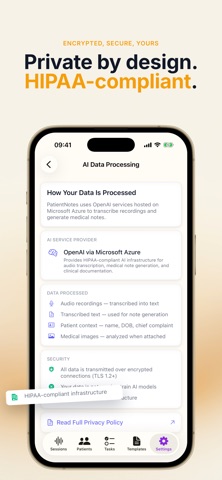
PatientNotes turns patient conversations into structured clinical notes — automatically. Spend more time with patients, less time typing. HOW IT WORKS 1. Record your patient visit (or upload audio) 2. AI transcribes and identifies speakers 3. Choose a note template (SOAP, H&P, Progress Note, and more) 4. Get a complete, structured clinical note in seconds 5. Review, edit, and export SMART NOTE GENERATION • AI-generated notes from visit recordings • 20+ built-in clinical templates including SOAP, H&P, Progress Notes, Discharge Summaries, and Referral Letters • Create custom templates or use the AI Template Assistant to build one tailored to your specialty • Regenerate notes with different templates — your transcript is always preserved • Pin and set default templates for faster workflows ACCURATE TRANSCRIPTION • Real-time audio transcription during visits • Speaker diarization — automatically identifies clinician vs. patient • Support for multiple languages including English, Spanish, German, French, and Portuguese • Upload pre-recorded audio files PATIENT MANAGEMENT • Organized patient records with visit history • Quick patient search • Link visits, notes, and tasks to patients TASK & BILLING SUPPORT • AI-suggested billing codes from visit context • Task management linked to visits and patients • Track follow-ups and action items BUILT FOR CLINICIANS • Works for physicians, nurses, NPs, PAs, therapists, and allied health professionals • Specialty-aware note generation • Clean, intuitive interface designed for clinical workflows SECURITY & COMPLIANCE • HIPAA-compliant infrastructure • Two-factor authentication with recovery codes • Trusted device management • Secure, encrypted data storage FLEXIBLE PLANS • 7-day free trial with full access • Monthly and annual subscription options • Use across all your devices PatientNotes is built by clinicians, for clinicians. Join thousands of healthcare professionals who are reclaiming their time. Questions? Contact us at hello@patientnotes.ai Terms of Use: https://patientnotes.ai/terms Privacy Policy: https://patientnotes.ai/privacy
What's new · 2.3
Find any session, fast Search now looks through every session, including your notes and transcripts. Type a medication, symptom or name and see exactly where it was mentioned. Notes that are easier to read and copy Notes open as clear sections, each with its own Copy button for pasting into your records. Prefer the whole note? Switch to Full note; we’ll remember your choice. Copy note always copies everything. A cleaner session screen Sessions open straight on the note. Record sits at the top, so it never covers your work. The transcript now has search, and back-to-back lines from the same speaker read as one turn. Know your patient before you record The patient summary now shows on the session’s Context tab, and documents flag handwriting worth double-checking. Simpler Tasks and Patients Every task view fits on screen, completed tasks can be undone, and long-press gives quick actions. Patients sort by last visit, with sessions and Record at the top of each patient’s page. Templates made easier Create a template by describing it, dictating it, photographing your paper form or uploading a file. Try any template on a real session before you use it, and start a draft over whenever you like. More settings, right in the app Choose the language you speak and the language notes are written in, draw your signature with your finger, set up your letterhead with a preview, change your password, see where you’re signed in, export your data and connect Semble. Faster and more reliable Tabs load quicker, and a dropped connection no longer interrupts the template assistant. Turning off two-factor authentication now works on iPhone.
Details