

PCheckAI: Pregnancy Test AI
akira kawata · Health & Fitness
Independent analytics for this App Store listing. AppTracker is not affiliated with akira kawata.
Chart standing · US
What changed · US
Listing changes AppTracker has observed for this app in this storefront — new versions, price moves, rating shifts, and store copy.
Improved consistency and stability throughout the image analysis and result display flow.
Price & rating history · US
Reconstructed from the listing changes AppTracker has observed in this storefront. A field is charted once it has changed more than once, and each line starts at the value it moved from.
Average rating · ★ 4.43 now · 4 changes on record
Screenshots




About
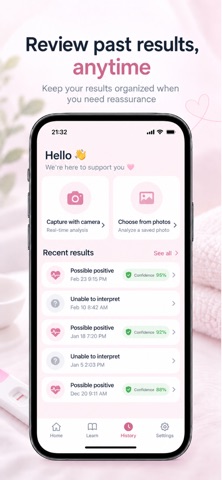
Pregnancy test results are not always easy to read. “Is there really a second line?” “Is this a faint positive?” “Should I test again later?” “Why does the line look different from last time?” PCheckAI is designed to help you review pregnancy test photos and organize the information you need when the result feels unclear. Simply take a photo with your camera or choose an existing image from your photo library. PCheckAI analyzes the image and presents the result in an easy-to-understand format. 【Check Pregnancy Test Photos】 Use your camera to capture a test or select a photo you already took. PCheckAI reviews the visible test and control lines and provides guidance to help you understand what the image may show. When an image is unclear or the result cannot be interpreted reliably, the app can indicate that the result is uncertain or unable to be determined rather than forcing a conclusion. 【Review Test and Control Lines】 In addition to the overall result, you can review information about: Test Line (T) Control Line (C) Visible line strength Image quality Confidence information when available This can be helpful when a line looks very faint or when you are unsure whether you are seeing a real line. 【Keep a History of Your Tests】 Save your test results and review them later in one place. Instead of searching through your photo library every time, you can look back at previous results and dates directly from the app. This is useful when you have tested more than once and want to keep your results organized. 【Know When to Consider Retesting】 Pregnancy test results can vary depending on timing and other factors. PCheckAI provides general retesting guidance so you can better understand when another test may be worth considering. If you are unsure about a result, you can review the information and decide whether to test again later. 【Learn How Pregnancy Tests Work】 PCheckAI also includes educational content to help you better understand pregnancy tests. Topics include: What hCG is How pregnancy tests detect hCG How to read test results Faint lines and evaporation lines When to consider retesting Basic information about pregnancy test timing You can use the Learn section whenever you want more context about what you are seeing. 【Tips for Clearer Photos】 Image quality can affect analysis. PCheckAI provides simple guidance such as: Use bright lighting Keep the test straight Avoid blurry photos These tips can help you capture an image that is easier to review. 【PCheckAI May Be Helpful If You】 Have a faint pregnancy test line Are unsure whether a second line is visible Want to review a test photo again Want to keep previous test results organized Have taken multiple pregnancy tests Want general guidance about retesting Want to learn more about how pregnancy tests work PCheckAI is designed as a support tool for reviewing and organizing pregnancy test information. It does not diagnose pregnancy and is not a medical device. Results, line analysis, confidence information, and retesting guidance are provided for reference only. For confirmation of pregnancy, medical concerns, unusual symptoms, or questions about your health, please consult a qualified healthcare professional.
What's new · 1.2.5
Improved consistency and stability throughout the image analysis and result display flow.
Details