

Label Mate
Joseph Liechty · Reference
Independent analytics for this App Store listing. AppTracker is not affiliated with Joseph Liechty.
Chart standing · US
What changed · US
Listing changes AppTracker has observed for this app in this storefront — new versions, price moves, rating shifts, and store copy.
- PRINT STRAIGHT FROM YOUR COLLECTION AGAIN. I heard your feedback! Every record in your Discogs collection and wantlist has a print button again, so you can go straight to a label without opening the player first. apologies, i thought i was streamlining, but i broke some workflows. - Fixed: after scanning a label, Print and Details in the player sometimes ignored taps until you closed the player and opened it again. - The Munbyn FM226 is now in Recommended Gear, with the label rolls that fit it.
Price & rating history · US
Reconstructed from the listing changes AppTracker has observed in this storefront. A field is charted once it has changed more than once, and each line starts at the value it moved from.
Average rating · ★ 4.86 now · 7 changes on record
Ratings breakdown · US
The star breakdown behind this app's rating in this storefront.
In-app purchases · US
What this app sells inside itself, grouped by kind and priced for this storefront.
Screenshots




Keywords this app targets
Search terms AppTracker associates with this app — estimates, not search volume. ❝ = in the app's title; a highlighted number is its current position for that term.
Similar apps
Competitors and close alternatives, as estimated by AppTracker.
 Vinyl Snap & Record Scanner
Bouazza El Amri
1 shared topic
Vinyl Snap & Record Scanner
Bouazza El Amri
1 shared topic
 Vinyl Solutions: Play Discogs
Aaron Heine
Vinyl Solutions: Play Discogs
Aaron Heine
 VinylBox: Collect & Sell Vinyl
Daven Gomes
VinylBox: Collect & Sell Vinyl
Daven Gomes
 Vinyl Buddy: Record Collection
Justin Michael Willemsen
Vinyl Buddy: Record Collection
Justin Michael Willemsen
 VinylStudio: Record Mockups
Denys Lunov
VinylStudio: Record Mockups
Denys Lunov
 Identify Record & Scan: Vinlyo
BASAK GEDIK
Identify Record & Scan: Vinlyo
BASAK GEDIK
 Record Scanner - Vinyl & CD
ARTUR DROZDZ
Record Scanner - Vinyl & CD
ARTUR DROZDZ
 Record Picker
Yves Durand
Record Picker
Yves Durand
About
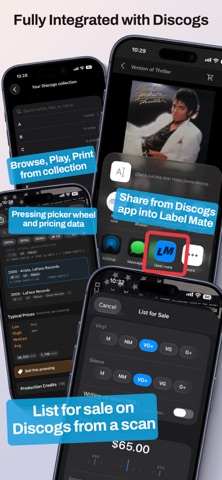
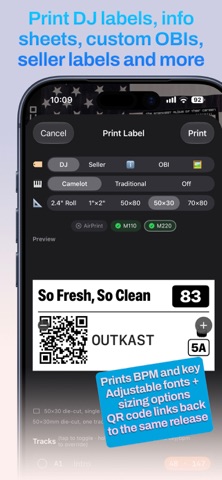
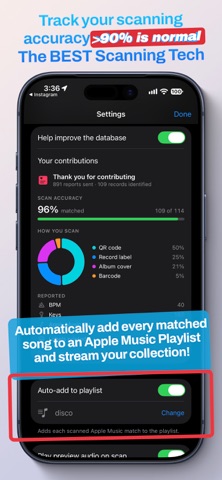
Scan a vinyl record with your phone and instantly hear the music. Print labels for vinyl gig prep, selling, and fun No typing. No searching. Made for DJs, by a DJ. PLAYBACK • Preview first - listen to one track immediately, to get a vibe. Tap in for full tracklist. • Full tracks via Apple Music or YouTube with album artwork and tracklist • Unified queue: play an entire album with playback controls and waveform view • Per-track artist resolution for "various artists" compilations • Save everything you scan to an Apple Music playlist of your choosing DJ TOOLS AND PRINTING • Musical key and BPM detection and tap tempo (verify with Doctor Beat + Doctor Key) • Swipe up the album art on the player for a pitch-adjust / 4 bar looper • BPM on label printing for gig preparation among various label print size options • Credits display for advanced release details • Print stickers of album artwork • Preview Loop for quick bpm check • Custom OBI strips place your image across the spines • Music receipt printing for a gig keepsake for that person asking "what song is this?" FOR COLLECTORS • Discogs marketplace pricing, haves/wants ratio, artwork display • Scan history with artwork, timestamps, and export to CSV • 1 tap add/remove from Discogs have/want lists • List for sale on your Discogs storefront • Auto-add to Discogs collection on any successful scan, for users who aren't picky about exact release. SUPPORTED PRINTERS • Phomemo m110 + m220 + d30 • AirPrint compatible Brother QL line continuous roll printers • Rollo • A4/A3/Letter/Legal card-stock compatible standard sheet printers PRO • Free tier includes 5 scans per day and 3 prints per day, go unlimited with Pro An Apple Music subscription is required for full playback and saving to your library; 30-second previews work without one. Apple's Standard Terms of Use apply: https://www.apple.com/legal/internet-services/itunes/dev/stdeula/
What's new · 1.9.8
- PRINT STRAIGHT FROM YOUR COLLECTION AGAIN. I heard your feedback! Every record in your Discogs collection and wantlist has a print button again, so you can go straight to a label without opening the player first. apologies, i thought i was streamlining, but i broke some workflows. - Fixed: after scanning a label, Print and Details in the player sometimes ignored taps until you closed the player and opened it again. - The Munbyn FM226 is now in Recommended Gear, with the label rolls that fit it.
Details