

manywalls: Artist Portfolio
Basaltbytes · Graphics & Design
Independent analytics for this App Store listing. AppTracker is not affiliated with Basaltbytes.
Chart standing · US
What changed · US
Listing changes AppTracker has observed for this app in this storefront — new versions, price moves, rating shifts, and store copy.
Sign-in fix Signing in could stay on the "signing in" spinner, or open the "Claim your public artist space" screen and freeze there. This happened most often with "Continue with Apple". The app now waits until your session is ready before opening your artworks. If that takes too long, the loading screen shows "Try again" and "Sign Out". Photo editor Photos taken with the camera keep their orientation on import, so an artwork no longer arrives sideways. The straighten preview now uses the same code that produces the saved image, so what you see is what gets saved. Full-size photos are decoded natively: they open faster and use less memory.
Ratings breakdown · US
The star breakdown behind this app's rating in this storefront.
In-app purchases · US
What this app sells inside itself, grouped by kind and priced for this storefront.
Screenshots



About
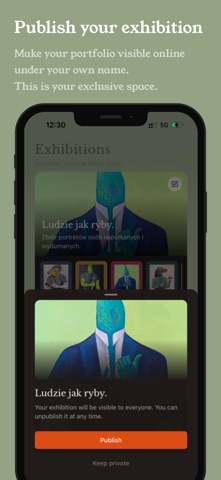
manywalls gives visual artists a beautiful, focused way to publish and share their work. Build real exhibitions, not just a portfolio page, and share them directly with juries, curators, and grant committees. Instead of grids and thumbnails, you compose exhibitions wall by wall: each one a full-screen moment for a single artwork, a text, or intentional silence. The result is a linear, paced experience that respects your work and the way you want it to be seen. WHO IT'S FOR Artists working with physical pieces - painters, sculptors, printmakers. Students, amateur artists or pro applying to residencies, grants, or exhibitions. If you need a serious, professional presentation and care about sequence, presence, and meaning, this is your tool. HOW IT WORKS You compose exhibitions on your phone. Each exhibition is a sequence of walls: • Photograph your work or select from your library • Magic Crop detection and perspective fix to prepare your artwork photos. • Write text walls for context or narrative • Choose wall tones from a curated palette and add a frame • Arrange the sequence - drag, reorder, refine When you publish, your exhibition gets a shareable link (yourname.manywalls.art) that works on phone, tablet, and desktop. Full screen, one wall at a time, no distractions. Share it with juries, curators, grant committees, or anyone you want to experience your work the way you intended. WHAT MAKES IT DIFFERENT • One artwork per wall - every piece gets the space it deserves • Linear navigation - your sequence, your pace, your narrative • A focused viewer experience - full-screen, one artwork at a time, no algorithmic feed in the way • Wall tones as context - support the work or push against it • Text and silence - empty walls and written walls carry equal weight • Clean image tools - crop, rotate, and optionally remove backgrounds FREE AND PREMIUM manywalls is free to use. Free tier includes: • Your shareable artist page with your manywalls sub-domain. • Up to 1 public exhibition • Up to 12 artworks Optional Premium unlocks: • Unlimited public exhibitions • Unlimited artwork uploads • All premium wall-tones unlocked • All premium frames unlocked Premium billing options: • Weekly, Monthly, and Annual are auto-renewing subscriptions billed through Apple until canceled • Manage or cancel subscriptions in App Store subscription settings • Restore purchases is available in-app YOUR EXHIBITION, YOUR LINK Each exhibition has its own public URL. Send it in an application, embed it in an email, or share it wherever it matters. What people see is a quiet, focused experience. You can also share the link to your Artist page which contains all your current published exhibition. Sign in with Apple or Google to get started. art should be encountered, not consumed. Terms of Use (EULA): https://www.apple.com/legal/internet-services/itunes/dev/stdeula/
What's new · 1.6.1
Sign-in fix Signing in could stay on the "signing in" spinner, or open the "Claim your public artist space" screen and freeze there. This happened most often with "Continue with Apple". The app now waits until your session is ready before opening your artworks. If that takes too long, the loading screen shows "Try again" and "Sign Out". Photo editor Photos taken with the camera keep their orientation on import, so an artwork no longer arrives sideways. The straighten preview now uses the same code that produces the saved image, so what you see is what gets saved. Full-size photos are decoded natively: they open faster and use less memory.
Details