

AudioBookSync
Hans-Peter Jordi · Books
Independent analytics for this App Store listing. AppTracker is not affiliated with Hans-Peter Jordi.
Chart standing · US
What changed · US
Listing changes AppTracker has observed for this app in this storefront — new versions, price moves, rating shifts, and store copy.
Your reading progress now makes it into the car, and Apple Watch finally controls your headphone volume. • Pick up listening where you stopped reading: read the e-book on your iPad in the evening, and the next morning your audiobook knows where you left off – CarPlay starts right at the passage you read, with no prompt and no detour via the screen. Previously playback started from the old listening position there, and a reading position could only be carried over on the device itself. So that a late look-up in the book doesn't quietly rewind your listening position, the app never jumps back more than ten minutes. • Apple Watch: control headphone volume directly. Swipe up one page in the player and turn the Digital Crown – that changes your AirPods' volume, not just the in-app level. Until now the app's control could only make playback quieter, never louder than the system volume. • A heads-up instead of a dead end: the camera text search and the jumps between text and audio need your audiobook's speech analysis. If it's missing, the app now tells you up front – instead of letting you take a photo and then finding nothing – and offers to start the analysis right away. Newly added books point this out once.
In-app purchases · US
What this app sells inside itself, grouped by kind and priced for this storefront.
Screenshots


About
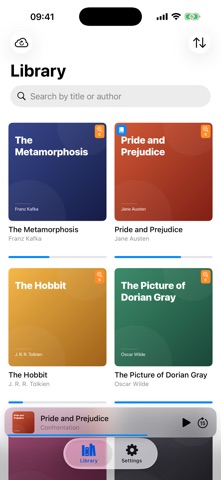
AudioBookSync is the intelligent audiobook player that bridges listening and reading. LISTEN YOUR WAY • Plays M4B, MP3 and MP3 folders • Background playback with lock-screen controls • Adjustable speed (0.5× to 3×) • Adaptive skip-back when resuming — AudioBookSync remembers where you stopped • Sleep timer (including "end of chapter") • Bookmarks with notes FIND ANY SPOT IN YOUR BOOK • Point the camera at a page — OCR + fuzzy matching jump the audio to the exact passage • Works with printed books, screenshots and handwritten pages • Fully on-device: no cloud, no upload, no tracking • Choose between Apple Speech (fast) or Whisper (local, best for German) READ WHERE YOU STOP LISTENING • Built-in EPUB reader with themes (Light/Dark/Sepia), 8 fonts, adjustable size and margins • "Listen here" button jumps from reader to the matching audio position • Seamless cross-navigation: open the book in either mode CARPLAY + HOME-SCREEN WIDGET • CarPlay: full library, chapter navigation and Now Playing while driving • Home-screen widget: current book with progress ring and quick actions • No subscription, no upsell — included with the free version iCLOUD DRIVE LIBRARY • Drop your audiobooks into iCloud Drive → AudioBookSync → Audiobooks • Bookmarks and library state stay on your device • Nothing ever leaves your iCloud account AUDIOBOOKSYNC PRO — OPTIONAL ONE-TIME PURCHASE The free version keeps one audiobook active at a time. Switch books for free at any time, or unlock Pro for: • Unlimited audiobooks — use your entire library at once • Multi-device sync — listening progress syncs automatically between iPhone and iPad via your private iCloud Drive • Shared transcription index — transcribe a book once, every other device picks up the index • Apple Watch — slice off a section of your audiobook, send it to your Apple Watch and listen offline — leave the iPhone at home. Position syncs back to iPhone and iPad automatically. NO ADS. NO SUBSCRIPTION. NO TRACKING. Your library, your bookmarks, your progress — all stored in your iCloud Drive.
What's new · 1.5
Your reading progress now makes it into the car, and Apple Watch finally controls your headphone volume. • Pick up listening where you stopped reading: read the e-book on your iPad in the evening, and the next morning your audiobook knows where you left off – CarPlay starts right at the passage you read, with no prompt and no detour via the screen. Previously playback started from the old listening position there, and a reading position could only be carried over on the device itself. So that a late look-up in the book doesn't quietly rewind your listening position, the app never jumps back more than ten minutes. • Apple Watch: control headphone volume directly. Swipe up one page in the player and turn the Digital Crown – that changes your AirPods' volume, not just the in-app level. Until now the app's control could only make playback quieter, never louder than the system volume. • A heads-up instead of a dead end: the camera text search and the jumps between text and audio need your audiobook's speech analysis. If it's missing, the app now tells you up front – instead of letting you take a photo and then finding nothing – and offers to start the analysis right away. Newly added books point this out once.
Details