

NetDebug Toolkit: Ping & DNS
Vineet Choudhary · Utilities
Independent analytics for this App Store listing. AppTracker is not affiliated with Vineet Choudhary.
Chart standing · US
What changed · US
Listing changes AppTracker has observed for this app in this storefront — new versions, price moves, rating shifts, and store copy.
NEW • Path MTU Discovery : find the largest packet a route actually carries, and catch the MTU black holes that let a connection start and then stall. Names the constricting hop and gives a safe inner MTU for WireGuard, IPsec, OpenVPN, GRE, and PPPoE. IMPROVED • HTTP(S) Check : security headers graded A-F, HTTP/3 probed for real rather than trusted, IPv4 and IPv6 measured separately, plus a full DNS / TCP / TLS / time-to-first-byte breakdown. • Speed/Latency Baseline : size presets now reach 96 MB. CHANGED • The website and Universal Links moved to netdebug.app. netdebug:// links are unaffected. Questions or bug reports? https://netdebug.app/support.html
Ratings breakdown · US
The star breakdown behind this app's rating in this storefront.
In-app purchases · US
What this app sells inside itself, grouped by kind and priced for this storefront.
Screenshots






Keywords this app targets
Search terms AppTracker associates with this app — estimates, not search volume. ❝ = in the app's title; a highlighted number is its current position for that term.
Similar apps
Competitors and close alternatives, as estimated by AppTracker.




About
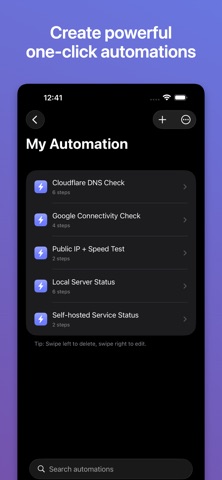
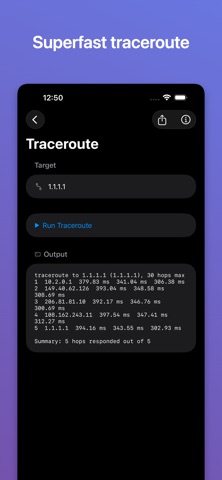
NetDebug Toolkit is the all-in-one network diagnostics suite for developers, sysadmins, IT teams, and power users. 20 pro-grade tools on iPhone, iPad, and Apple TV. Fast. Focused. No account. No tracking. Diagnose connectivity, DNS, routing, ports, certificates, throughput, and local-network services from one clean interface: NETWORK CORE • Ping : ICMP or HTTP HEAD reachability with timing and packet-loss stats • Traceroute : hop-by-hop route inspection • HTTP(S) Check : status, redirect chain, headers, TLS summary • Speed/Latency Baseline : download/upload presets from 1 MB to 64 MB • iperf3 Client : TCP throughput against an external iperf3 server (upload or download) • Public IP + Geo / ASN / ISP : current WAN IP with carrier and location detail • Path MTU Discovery : largest packet a route carries, black-hole detection, the constricting hop, and safe inner MTU for VPN DNS & DOMAIN • DNS Lookup : forward (host to A/AAAA) and Reverse DNS (IP to PTR), auto-detected from input • DNS Record Explorer : A, AAAA, CNAME, MX, TXT, NS, SRV via DNS-over-HTTPS (custom resolver supported) • Whois : RDAP or IANA WHOIS mode, with chained referrals SECURITY & TLS • TLS Certificate Inspector : full chain, validity, SANs, signature algorithm, weak-cert signals • Subnet Calculator : IPv4 and IPv6, usable host range, broadcast, gateway hints PORTS & CONNECTIVITY • Port Scan : custom ports or ranges • TCP/UDP Connect : per-port reachability with built-in UDP profiles (DNS, NTP, SNMP, SIP, RADIUS, TFTP, memcached) • NTP Time Check : clock offset vs. any NTP server with delay, stratum, and leap details • External Port Check : "can the internet reach me?" TCP port-forwarding test from an outside server (open/closed/filtered) • Run History & Trends : every run is saved on-device with charts of latency, speed, and more over time (free; longer retention with a purchase) LOCAL NETWORK • LAN Scan : fast or deep subnet host discovery • mDNS / Bonjour Browser : AirPlay, HomeKit, Matter, printers, SMB, SSH, and more • UPnP / NAT-PMP Discovery : router gateway port-mapping introspection • Wake-on-LAN Sender : send magic packets to wake compatible devices POWER-USER WORKFLOW • Saved Hosts : store frequently used IPs, hostnames, and MAC addresses with per-host tool defaults • My Automation : chain multiple tools into one-tap workflows with a combined PDF, PNG, or text run report • Export & Import : portable JSON files for automations and saved hosts (iOS share sheet, tvOS QR-code download) • Universal Links & Deeplinks : open any tool from a URL with pre-filled inputs, auto-run, and auto-export, e.g. https://netdebug.developerinsider.co/open/ping?target=1.1.1.1&export=pdf • Copy Deeplink : every tool and saved automation can copy its own shareable Universal Link • Built-in tool docs : quick-reference markdown for every tool APPLE TV / tvOS • Full feature parity : every tool, Saved Hosts, My Automation, and all three in-app purchases ship on Apple TV • LAN-only QR-code export : Apple TV serves run reports and JSON exports over a one-shot HTTP server; scan the QR with your phone to download LOCALIZED IN 21 LANGUAGES English, Arabic, Bengali, Chinese (Simplified), Dutch, French, German, Hindi, Hinglish, Indonesian, Italian, Japanese, Korean, Polish, Portuguese (Brazil), Russian, Spanish, Thai, Turkish, Ukrainian, Vietnamese. OPTIONAL IN-APP PURCHASES One-time, non-consumable, with Family-Sharing support and a single Restore Purchases action: • Remove Ads : disable all banner and interstitial ads • Unlimited Automations : lift the free-tier limit • Remove Ads + Unlimited Automations bundle : discounted starter pack Important: Use only on systems and networks you are authorized to test. Results are best-effort and may vary by network conditions, target configuration, and third-party service availability. Questions or bug reports? https://netdebug.app/support.html
What's new · 2.2
NEW • Path MTU Discovery : find the largest packet a route actually carries, and catch the MTU black holes that let a connection start and then stall. Names the constricting hop and gives a safe inner MTU for WireGuard, IPsec, OpenVPN, GRE, and PPPoE. IMPROVED • HTTP(S) Check : security headers graded A-F, HTTP/3 probed for real rather than trusted, IPv4 and IPv6 measured separately, plus a full DNS / TCP / TLS / time-to-first-byte breakdown. • Speed/Latency Baseline : size presets now reach 96 MB. CHANGED • The website and Universal Links moved to netdebug.app. netdebug:// links are unaffected. Questions or bug reports? https://netdebug.app/support.html
Details