

WikiVibe: Wikipedia Reader
Kinetic Origin Limited Liability Company · Reference
Independent analytics for this App Store listing. AppTracker is not affiliated with Kinetic Origin Limited Liability Company.
Chart standing · US
What changed · US
Listing changes AppTracker has observed for this app in this storefront — new versions, price moves, rating shifts, and store copy.
Choosing an AI personality now works the same everywhere. - The personality list inside an article now matches the one in Settings — same descriptions, same icons, same layout - Locked personalities show their own icon instead of just a padlock, and tapping one always offers a way to unlock - Deleting a highlight or a downloaded article asks first, so a stray swipe can't wipe something you meant to keep - The "Go Premium" prompt and the "couldn't load that article" message now have a close button - The privacy policy now names the AI provider and spells out exactly what gets sent if AI features are used
Ratings breakdown · US
The star breakdown behind this app's rating in this storefront.
In-app purchases · US
What this app sells inside itself, grouped by kind and priced for this storefront.
Screenshots





About
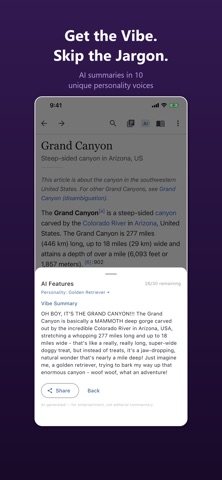
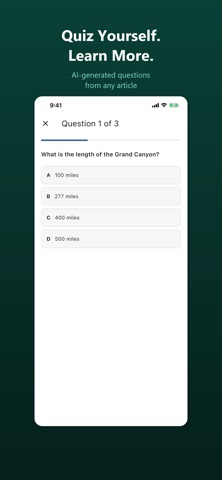
WikiVibe is the Wikipedia reader you've been waiting for. Dive into millions of articles in a fast, distraction-free interface designed for focused reading and deep exploration. Browse Wikipedia in English, Spanish, German, French, or Russian — switch anytime in Settings. Whether you're researching, following a curiosity rabbit hole, or catching up on today's events, WikiVibe makes every session a pleasure. Pick a reading theme — System, Light, Dark, or Sepia — and adjust font size until it feels right. Browse the daily featured article, discover what happened on this day in history, see trending articles, and enjoy Wikimedia's Picture of the Day. Tap Random Article and let serendipity take the wheel. Long-press any link for a quick preview without losing your place. DISCOVER AND EXPLORE - Featured Article — Curated daily highlights from Wikipedia's editors - On This Day — Fascinating events that happened on this date in history - Most Read — See what the world is reading right now - Picture of the Day — Stunning images from Wikimedia Commons - Random Article — Discover something unexpected with one tap - Link Preview — Long-press any link for a summary before you commit - Home Screen Widget — Today's featured article, right on your home screen - 5 Languages — Browse in English, Spanish, German, French, or Russian READING TOOLS - 4 Reading Themes — System, Light, Dark, and Sepia - Adjustable Font Size — Find your perfect reading size - Table of Contents — Jump to any section in long articles instantly - Find in Page — Search for specific words or phrases within any article - Image Viewer — Zoom into images for a closer look - Toggle Images — Switch to text-only reading when you want focus - Auto-Hide Toolbar — More screen for reading (optional) - Share — Send articles to friends with one tap AI-POWERED READING COMPANION - Vibe Summary — Get a personality-flavored take on any article from 10 AI voices - AI Chat — Ask follow-up questions about any article and get answers in character - ELI5 — Simplify dense topics into plain, easy-to-understand language - Quiz Me — Auto-generated multiple choice questions to test your knowledge - 10 AI Personalities — Sarcastic, Hippie, Gen-Z, Golden Retriever, Nihilist, and more - Daily Commentary — A fresh AI take on the featured article every day - Optional — Toggle all AI features off in Settings if you prefer pure reading ORGANIZE YOUR KNOWLEDGE - Reading Lists — Save articles you want to come back to - Reading History — Pick up where you left off, even days later - Search History — Quickly revisit past queries without retyping FREE WITH NO ADS WikiVibe is free to download with no ads — ever. The free tier includes everything you need for a great reading experience. Free tier includes search, read, share, 4 themes, featured content, 1 reading list (15 articles), history, and 5 AI requests/day with Sarcastic personality. Premium (one-time upgrade) unlocks: - Unlimited reading lists with unlimited articles - Offline article saving — read anywhere, even without a connection - Highlights and notes — mark up what matters - All 10 AI personalities and 30 requests/day - Future features included at no extra cost PRIVACY FIRST No accounts. No sign-ups. No tracking. No analytics. No ads. WikiVibe requires an internet connection. Wikipedia may not be accessible in all regions. All Wikipedia content is provided under the Creative Commons Attribution-ShareAlike 4.0 License. WikiVibe is not affiliated with the Wikimedia Foundation. FROM KINETIC ORIGIN Love the personalities? They're in our other apps too. Vibe Weather uses them for sarcastic forecasts. Vibe Journal uses them for writing prompts and reflections. Vibe Timer uses them to keep you focused. Vibe Zen uses them for guided meditation. Same 10 voices, different experiences. Vibe Shield blocks ads and trackers in Safari. Find them all at kineticorigin.com — Questions? support@kineticorigin.com
What's new · 1.8.8
Choosing an AI personality now works the same everywhere. - The personality list inside an article now matches the one in Settings — same descriptions, same icons, same layout - Locked personalities show their own icon instead of just a padlock, and tapping one always offers a way to unlock - Deleting a highlight or a downloaded article asks first, so a stray swipe can't wipe something you meant to keep - The "Go Premium" prompt and the "couldn't load that article" message now have a close button - The privacy policy now names the AI provider and spells out exactly what gets sent if AI features are used
Details