

Neighbr - Help or Find Help
Jashandeep Singh · Lifestyle
Independent analytics for this App Store listing. AppTracker is not affiliated with Jashandeep Singh.
Chart standing · US
What changed · US
Listing changes AppTracker has observed for this app in this storefront — new versions, price moves, rating shifts, and store copy.
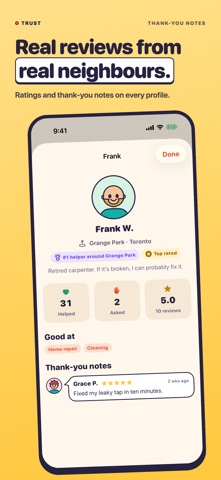
Neighbr 3.1 makes it easier, safer and more yours. • NEW — Widgets: see your job's next step, or who nearby needs a hand, right on your Home Screen and Lock Screen. • Chat suggestions that fit whether you asked or you're helping, and change as the job goes on. • Notifications open exactly what they're about, group by conversation, and the app icon shows what's unread. • Make it yours: four seasonal themes — Winter, Spring, Summer and Autumn — plus Sunny, Ocean and Plum, each in light and dark. Or pick "Match the season" and it changes by itself through the year. • Easier to use: the next step is always a big button at the bottom, settings come in a few simple groups with search, and you can choose larger text, extra contrast and fewer animations. • Reviews at a glance: profiles show the average rating, how many reviews, how people rated communication, quality and being on time, and recent thank-you notes. • Skills: add what you're good at — snow shovelling, dog walking, tech help — so neighbours know who to ask. Offers show them too. • Tap any neighbour's face to see their profile, with Report and Block always close by. • Safer meet-ups: a short "Before you meet" checklist, "Share my plans with a friend", and "Emergency? Call 911" in every ••• menu. • A friendlier map: quicker taps, a working "Centre on me", and the request you picked stays on screen. • Asking is clearer: choose "A favour (free)" or "I'll pay" first, and find your spot by typing a street or using your area. • Plans changed after picking a helper? You can cancel kindly — they're told. • Helpers can withdraw an offer, or step away if plans change — the asker is told kindly and can pick someone else. • One daily round-up for helper alerts is back (Me › Notifications). • Smoother sign-in, a calm note when you're offline, and nothing spins forever without a connection.
Screenshots



About
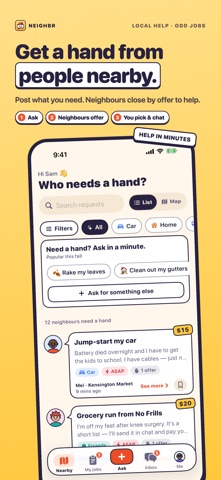
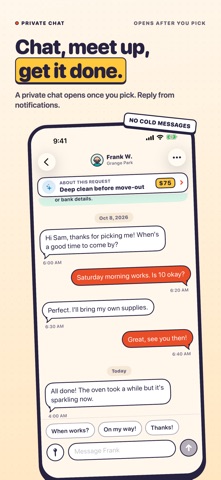
Need a hand? Ask the people next door. Neighbr connects you with neighbours nearby for everyday help and odd jobs — shovelling snow, raking leaves, moving a couch, walking the dog, picking up groceries, setting up a printer or giving your car a boost. Neighbours who want to help, or earn a little extra cash, offer to do it. You pick who. HOW IT WORKS 1. Ask — say what you need and what it's worth, or ask a favour. It takes under a minute, and seasonal quick asks make it one tap. 2. Neighbours offer — people nearby see your request and offer to help, with their rating, reviews and neighbourhood. 3. You pick and chat — choose your helper and a private chat opens to sort out when and where. 4. Done — confirm it's finished and leave a thank-you note. WANT TO HELP OUT? • See who needs a hand on the map or in a simple list • Offer in one tap and set your price • Get a ping when someone nearby needs help — you choose how far and what kinds of help, and it stays quiet overnight • Climb the Top helpers list in your neighbourhood NEW IN 3.1 • Home Screen and Lock Screen widgets: your next step at a glance • Seasonal themes — Winter, Spring, Summer and Autumn, plus Sunny, Ocean and Plum — or let it "Match the season" • Tap any face to see a neighbour's reviews at a glance, their skills and thank-you notes • Add your own skills so neighbours know what you're good at • Safer meet-ups: a before-you-meet checklist, share your plans with a friend, and 911 one tap away • Simple settings with larger text, extra contrast and fewer animations • Show your neighbourhood name — never your address SAFE AND PRIVATE BY DESIGN • Neighbours only see the rough area of a request, never your address • Chat opens only after you pick someone — no cold messages • Two-way ratings and reviews, plus block and report in one tap • Any payment is between you and your neighbour — Neighbr never touches your money and charges no fees Not ready to sign up? Tap "Look around first" to explore a sample neighbourhood. Made in Canada by The Big Head. Questions or ideas? info@thebighead.ca
What's new · 3.1
Neighbr 3.1 makes it easier, safer and more yours. • NEW — Widgets: see your job's next step, or who nearby needs a hand, right on your Home Screen and Lock Screen. • Chat suggestions that fit whether you asked or you're helping, and change as the job goes on. • Notifications open exactly what they're about, group by conversation, and the app icon shows what's unread. • Make it yours: four seasonal themes — Winter, Spring, Summer and Autumn — plus Sunny, Ocean and Plum, each in light and dark. Or pick "Match the season" and it changes by itself through the year. • Easier to use: the next step is always a big button at the bottom, settings come in a few simple groups with search, and you can choose larger text, extra contrast and fewer animations. • Reviews at a glance: profiles show the average rating, how many reviews, how people rated communication, quality and being on time, and recent thank-you notes. • Skills: add what you're good at — snow shovelling, dog walking, tech help — so neighbours know who to ask. Offers show them too. • Tap any neighbour's face to see their profile, with Report and Block always close by. • Safer meet-ups: a short "Before you meet" checklist, "Share my plans with a friend", and "Emergency? Call 911" in every ••• menu. • A friendlier map: quicker taps, a working "Centre on me", and the request you picked stays on screen. • Asking is clearer: choose "A favour (free)" or "I'll pay" first, and find your spot by typing a street or using your area. • Plans changed after picking a helper? You can cancel kindly — they're told. • Helpers can withdraw an offer, or step away if plans change — the asker is told kindly and can pick someone else. • One daily round-up for helper alerts is back (Me › Notifications). • Smoother sign-in, a calm note when you're offline, and nothing spins forever without a connection.
Details