

Redact — Censor & Blur Photos
Nikolay Strikhar · Photo & Video
Independent analytics for this App Store listing. AppTracker is not affiliated with Nikolay Strikhar.
Chart standing · US
What changed · US
Listing changes AppTracker has observed for this app in this storefront — new versions, price moves, rating shifts, and store copy.
Every tool in Redact is now free, including AI detection, blur and pixelate. You get 3 free exports to start and 1 free export every day after that. If you redact a lot, Redact Pro unlocks unlimited exports with a single purchase. It's not a subscription.
Screenshots



About
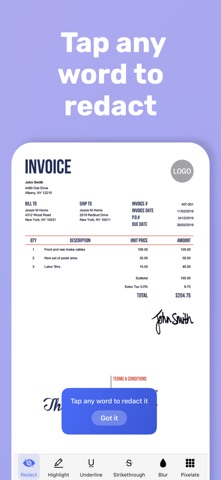
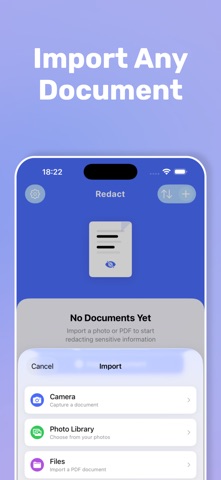
Redact sensitive text in photos and PDFs in seconds. Redact uses AI to automatically find and hide SSNs, emails, phone numbers, names, dates, addresses, and license plates — so nothing slips through. Unlike basic blur tools, Redact is purpose-built for text redaction. Tap any word to instantly black it out. Drag across a line to redact it all. Or let AI do the work — it scans your document, groups everything by category, and lets you apply redactions with a single tap. SMART AI DETECTION • Automatically finds Social Security numbers, emails, phone numbers, dates, names, addresses, and license plates • Detects international license plate formats — US, UK, German, French, Spanish, and more • Groups detected items by category with easy toggle controls • Apply all redactions at once or pick exactly what to hide • Works across every page of multi-page PDFs 6 MARKUP TOOLS • Redact — solid black bar, permanently covers text • Highlight — colored overlay for emphasis • Blur — gaussian blur for soft concealment • Pixelate — mosaic effect for photos and screenshots • Underline — mark important passages • Strikethrough — cross out text clearly FREEFORM DRAWING • Draw directly over areas without detected text — perfect for license plates in photos, handwritten notes, or images where OCR can't reach • Works with all markup tools including blur and pixelate • Smart detection: automatically switches to freeform mode when no text is found SMART MATCH • Redact a name once, Redact finds every other instance across all pages • "Found 12 more matches — apply to all?" One tap. Done. BUILT FOR REAL DOCUMENTS • Import photos, screenshots, and multi-page PDFs • Full PDF support with page-by-page navigation • Pinch to zoom up to 5x for precise word-level redaction • Export as flattened PDF or JPEG — redactions are permanently burned into pixels, impossible to recover PRIVACY BY DESIGN • 100% on-device processing — nothing uploaded, no servers, no cloud • Exported files contain zero hidden text layers • What you redact stays redacted. Period. ORGANIZE YOUR WORK • Document gallery with thumbnails, search, and sort • Auto-save with instant resume • Rename and manage documents easily Perfect for redacting screenshots before sharing, censoring personal info in scanned documents, hiding sensitive data in medical or legal PDFs, blurring license plates in photos, and removing private text before posting online. Download Redact and take control of what the world sees. Terms of Use: https://www.apple.com/legal/internet-services/itunes/dev/stdeula/ Privacy Policy: https://masteringthetarot.com/privacy-policy/
What's new · 1.2.0
Every tool in Redact is now free, including AI detection, blur and pixelate. You get 3 free exports to start and 1 free export every day after that. If you redact a lot, Redact Pro unlocks unlimited exports with a single purchase. It's not a subscription.
Details