

Eva - Calendar & Daily Planner
Dmitriy Biserov · Productivity
Independent analytics for this App Store listing. AppTracker is not affiliated with Dmitriy Biserov.
Chart standing · US
What changed · US
Listing changes AppTracker has observed for this app in this storefront — new versions, price moves, rating shifts, and store copy.
Hi! This is the biggest Eva update yet (◕‿◕) Here's everything, in order. Eva in your browser Eva now has a web version and real sync across devices. Open it on a laptop or another phone — tasks, habits, notes, diary, weight and "Last time" stay the same everywhere. There's a device list, a "sign out everywhere" button, and switches for exactly what gets synced. Notes A big new section. Notes with folders, checklists and photos. You can format text right inside a note — bold, italic, strikethrough — and highlight it with a marker in five colors. Word count and reading time sit at the bottom. A note can get a reminder or turn into a task. There are widgets, quick capture, and a share-sheet entry from other apps. Deleted notes stay in the bin for 14 days. Astrology and natal chart A natal chart from your date, time and place of birth, today's transits, a lunar calendar, and a plain-language explanation of what each planet actually does. If astrology isn't your thing, one switch at the very top of Settings hides all of it. Spot the Difference A new daily game in the digest, with a leaderboard. A short warm-up for every day. Shows and movies A watchlist and a record of what you've watched: where to stream it and what to watch next. Habits Three tracker views, including a multi-month grid. You can see how often each habit repeats, drag them into your own order, and a 7-day strip right in the list makes marking yesterday a single tap. Habits can also live in the Eisenhower matrix now. Wallpapers New styles: glass, frost, outline and large text. Named presets of your own, and more room on the screen. Widgets A large widget with the month next to today's tasks, a month calendar without tasks, arrows to page through months, a calendar week, a text size setting, and an interactive focus widget with play/pause/stop. Calendar and cycle Lunar phases and day hints, backfilling existing tasks when you turn on two-way sync, and a full day entry for your cycle: intimacy, symptoms, mood and notes, written to Health. Storage A new screen: see what Eva keeps on disk, and clear out what you don't need. Little things "Last time" is grouped into categories, tasks drag between list sections, the task list font is adjustable, there's a haptics switch, a floating tab bar on iOS 26, and the weather got more accurate. And the main thing: I closed over 370 bugs in this update. I also spent time on keeping your data safe — nothing gets lost across updates or crashes. P.S. Thank you for your reviews. I read every single one, and it truly means a lot to me) P.P.S. You can write to me through "Settings" on the home screen. I'm always open to your ideas.
Price & rating history · US
Reconstructed from the listing changes AppTracker has observed in this storefront. A field is charted once it has changed more than once, and each line starts at the value it moved from.
Average rating · ★ 4.98 now · 7 changes on record
Ratings breakdown · US
The star breakdown behind this app's rating in this storefront.
In-app purchases · US
No in-app purchases.
Screenshots




About
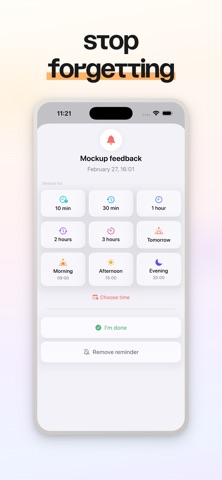
"Remind me in an hour to check my email" - Eva understands plain language and creates the task at the right time. Calendar, tasks, habits, cycle, TV shows and a smart morning briefing - one app instead of ten. AI ASSISTANT A helper that understands text, voice and photos: - Snap a photo of your movie ticket and Eva creates the event with a reminder - "Wake up at 7, breakfast at 8, meeting at 12, pool in the evening" - "Move all my tasks to tomorrow" One sentence and your tasks land in the calendar at the right time. Smart search finds them even with a typo. AI DIGEST Every morning Eva builds a personal briefing - 30+ blocks, turn on just the ones you want and reorder them: - Weather, what to wear, pressure and geomagnetic storms - Daylight and golden hour, air quality, allergy index - Personal horoscope, biorhythms, Mercury retrograde - Holidays: official, folk, professional and fun - Name days, fact of the day, an affirmation and a kind message - Life hack of the day: home, kitchen, productivity, biohacking - Today's tasks, countdowns, year progress - Wallpaper of the day and memories - photos from this day in past years - Cinnamon coffee on Thursdays, memory training, sleep, cycle CALENDAR Month, week, day - switch with one gesture. Tasks with color tags, notes and reminders. Repeat any way you like: daily, on weekdays, monthly or set your own interval. Make the calendar yours with a color, gradient or photo background. TASKS AND LISTS Separate lists for shopping, ideas and goals. Move tasks to past dates, default reminders, a sound on completion and templates for frequent tasks in one tap. HABITS Create them, tie them to days, group them and keep your streaks going. Repeat "every N weeks," auto-mark missed days, overall stats and sync with Apple Health. Never forget your vitamins or morning workout. TV SHOWS AND MOVIES Track premieres and new episodes. A huge database - add a title to your list, Eva reminds you ahead of time and counts down to release in the app. BIRTHDAYS Add them by hand or import from Contacts. Eva shows each person's age, an emoji and a photo, and reminds you in advance. FOCUS TIMER Pomodoro or your own intervals, plus 12 background sounds. Link the timer to a task and Eva turns on Do Not Disturb. See progress on the Lock Screen with Live Activity. TASKS ON THE LOCK SCREEN Generate wallpapers with the day's tasks, weather, habits and a quote. Pick the background, font and colors - or use your own photo. Unlock your phone and your plan is right there. WATER TRACKER Track water and caffeine. Your own drink catalog, hourly chart, sync with Apple Health, an interactive widget and a Siri command. MOOD Five levels, custom emoji, and stats by week, month and year. Just check in and Eva remembers. 5-YEAR JOURNAL One question a day. See how you answered it one and two years ago. CYCLE Track your cycle in the calendar. Eva predicts it from your history and reminds you in advance. Syncs with Apple Health. SHIFT SCHEDULE 2/2, 1/3, 5/2 or any pattern of your own. Shifts show up with color tags in the calendar, so no more counting in your head. DAY COUNTER How many days smoke-free or sugar-free - or how long since your last haircut or clean-up. Eva counts and reminds you when it's time. WIDGETS Tasks on the Home Screen and Lock Screen, a pinned task above the clock, Live Activity in the Dynamic Island. Choose icons, themes and what to show - all in view without opening the app. INTEGRATIONS Sync with Apple Calendar, Reminders and Apple Health. Import from Google Calendar and ICS files. AND THERE'S MORE Plenty of handy extras that didn't fit above: - Eisenhower matrix - tasks by importance and urgency - Countdown to any event you choose - Alternate icons and themes - Siri and Shortcuts commands, one-tap wallpapers - Backup Eva. One planner instead of ten apps. I build it for myself and my wife, and I want it to feel just as good for you. If something's missing, write to me and I'll add it.
What's new · 1.7
Hi! This is the biggest Eva update yet (◕‿◕) Here's everything, in order. Eva in your browser Eva now has a web version and real sync across devices. Open it on a laptop or another phone — tasks, habits, notes, diary, weight and "Last time" stay the same everywhere. There's a device list, a "sign out everywhere" button, and switches for exactly what gets synced. Notes A big new section. Notes with folders, checklists and photos. You can format text right inside a note — bold, italic, strikethrough — and highlight it with a marker in five colors. Word count and reading time sit at the bottom. A note can get a reminder or turn into a task. There are widgets, quick capture, and a share-sheet entry from other apps. Deleted notes stay in the bin for 14 days. Astrology and natal chart A natal chart from your date, time and place of birth, today's transits, a lunar calendar, and a plain-language explanation of what each planet actually does. If astrology isn't your thing, one switch at the very top of Settings hides all of it. Spot the Difference A new daily game in the digest, with a leaderboard. A short warm-up for every day. Shows and movies A watchlist and a record of what you've watched: where to stream it and what to watch next. Habits Three tracker views, including a multi-month grid. You can see how often each habit repeats, drag them into your own order, and a 7-day strip right in the list makes marking yesterday a single tap. Habits can also live in the Eisenhower matrix now. Wallpapers New styles: glass, frost, outline and large text. Named presets of your own, and more room on the screen. Widgets A large widget with the month next to today's tasks, a month calendar without tasks, arrows to page through months, a calendar week, a text size setting, and an interactive focus widget with play/pause/stop. Calendar and cycle Lunar phases and day hints, backfilling existing tasks when you turn on two-way sync, and a full day entry for your cycle: intimacy, symptoms, mood and notes, written to Health. Storage A new screen: see what Eva keeps on disk, and clear out what you don't need. Little things "Last time" is grouped into categories, tasks drag between list sections, the task list font is adjustable, there's a haptics switch, a floating tab bar on iOS 26, and the weather got more accurate. And the main thing: I closed over 370 bugs in this update. I also spent time on keeping your data safe — nothing gets lost across updates or crashes. P.S. Thank you for your reviews. I read every single one, and it truly means a lot to me) P.P.S. You can write to me through "Settings" on the home screen. I'm always open to your ideas.
Details