

Remio - Remote Desktop
Long Ngo Huynh · Utilities
Independent analytics for this App Store listing. AppTracker is not affiliated with Long Ngo Huynh.
Chart standing · US
What changed · US
Listing changes AppTracker has observed for this app in this storefront — new versions, price moves, rating shifts, and store copy.
• Use your iPhone or iPad as a second display — An extra screen for a Mac, a Windows PC or a Linux computer. Tap Second display under your main computer on Home, or choose Use as second display in a computer's long-press menu. The desktop extends onto this device and you move windows over to it. It works over your local network only and needs Remio Host 3.2.2 on a Mac or a Windows PC, or Remio Host 3.2 on Linux (GNOME or X11). If it can't start, Remio says what to change. • Your computers on the Home Screen, the Lock Screen and in Control Center — Add the Computer widget for one computer, or the Computers widget to see two, four or eight. Tap one and Remio connects to it. The Connect to Computer control works from Control Center, the Lock Screen, the Action button and Shortcuts. Desktop previews stay hidden while your device is locked. • Built for iPhone Duo — Open it, fold it, close it: the session carries on without reconnecting. Stand it half-open and Desk mode puts your computer on the top half and the keyboard below the hinge. Improvements • Coming back to a session keeps the last picture on screen instead of flashing black. • If another device takes over your computer while Remio is in the background, coming back no longer takes it straight back (needs Remio Host 3.2.2 on a Mac or a Windows PC). • On a 120 Hz iPhone or iPad in Low Power Mode or when it runs hot, Remio asks your computer for 60 frames per second instead of frames your screen can't show. • If the video decoder stops mid-session, Remio restarts it and the picture comes back. • A second display opens in Direct Touch, never raises the keyboard by itself, and leaves out the controls that only suit controlling a computer. • The Resolution panel works on a second display, and Arrange displays opens the computer's display settings so you can place the screen where it sits on your desk. • When two devices connect to the same computer at the same moment, the one that loses is told right away that another device took over (needs Remio Host 3.2.2 on a Mac or a Windows PC). • On a shaky connection, a lost piece of the picture is replaced much sooner instead of leaving the picture frozen for up to three seconds. • With HDR on and Remio Host 3.2.2 on a Mac with Apple silicon, the picture arrives in HDR from the first frame. • Rotating your device or opening and closing an iPhone Duo shows a soft blur while the computer redraws, instead of a stretched picture. • The Lock Screen card says Reconnecting while your connection is repaired. • Online computers are listed by name after your favorites, so Home stops shuffling. • The Resolution slider only offers sizes your computer can really draw. • With a keyboard attached and a Mac as the computer, press ⌥ in place of ⌘ to close or minimize a window, hide an app or take a screenshot. • Report a bug in Settings opens Remio's own report form, with screenshots and the app log, instead of an email. • The slow-connection notice fits short screens, and more screens read in the app's language. Bug fixes • Fixed Remio freezing while iOS asked to Allow Paste. • Fixed the "Couldn't connect" alert showing a short code instead of what went wrong and what to try. • Fixed a still screen on a Windows or Linux computer making the picture refresh every few seconds. • Fixed the picture coming back at the wrong size after Remio rebuilt a dropped connection. • Fixed a session ending without a picture when the video decoder failed to start. • Fixed a drag getting stuck on the computer when the system interrupted your touch. • Fixed Korean syllables falling apart while typing. • Fixed a large file sent from your iPhone or iPad failing near the end after Remio went to the background.
Price & rating history · US
Reconstructed from the listing changes AppTracker has observed in this storefront. A field is charted once it has changed more than once, and each line starts at the value it moved from.
Average rating · ★ 4.56 now · 3 changes on record
Ratings breakdown · US
The star breakdown behind this app's rating in this storefront.
Screenshots



About
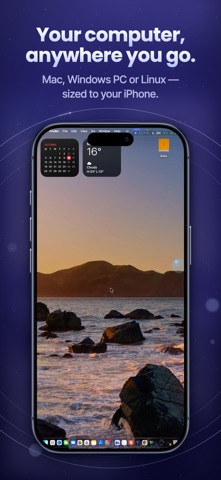
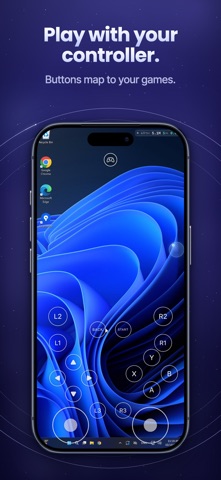
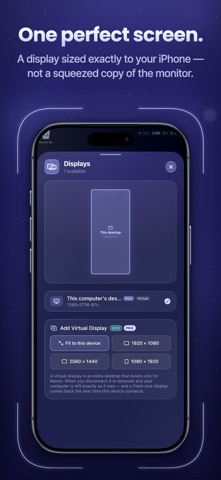
The free remote desktop for iPhone and iPad — sized to your screen, up to 6K at 120 FPS. Remio is a free, 100% native remote desktop. Reach your Mac, Windows PC or Linux machine and it feels like you're sitting at it — every touch lands right away and text stays crisp. ▸ FREE TO USE Remio and Remio Host are free to use, at home or at work. No time limit, no ads, no commercial-use detection, no card to enter. ▸ CONNECT IN SECONDS Scan a QR or type a six-digit code. No account, no router config, no IT department. Install the free Remio Host on your computer, open Remio, and you're in. ▸ FEELS LIKE YOUR MACHINE • The remote desktop reshapes itself to your window — live, pixel-perfect, like it's your machine. Rotate your iPhone or iPad and it follows. • One perfect screen — a dedicated virtual display sized exactly to your device, not a squeezed copy of the host's monitor • Up to 6K at 120 FPS with hardware H.265, end to end • About 8 ms of processing latency on your local network — the rest is your display's own refresh • HDR from a Mac with Apple silicon — on an iPhone or iPad with an HDR screen, your desktop shows the brightness and color it really has • Close the MacBook lid. Keep working. No dummy HDMI dongle — ever. ▸ TOUCH THAT MAKES SENSE • Trackpad mode turns your screen into a precision trackpad. Direct Touch lets you tap exactly where you see it. • Tap to click, two-finger tap to right-click, scroll, pinch to zoom, press and hold to drag • Three-finger swipes move between desktops and open Mission Control. Put any shortcut on a three- or four-finger tap. • The on-screen keyboard never covers what you're typing, and it opens the moment you tap a text field on your computer • Keyboard shortcuts carry through — with a real Windows key for Windows and Linux computers • Point, tap and scroll with Apple Pencil. Bring a keyboard or trackpad to your iPad and it just works. • Play with your controller — buttons map to your games ▸ A SECOND SCREEN FOR YOUR COMPUTER Make your iPhone or iPad an extra display for your Mac, Windows PC or Linux computer and move windows over to it. It extends your desktop instead of copying it, your computer's own screens stay on, and it runs over your own Wi-Fi or wired network. Needs Remio Host 3.2.2 on a Mac or a Windows PC, or Remio Host 3.2 on Linux (GNOME or X11). ▸ BUILT FOR IPHONE DUO Fold it halfway and it's a mini laptop — your computer on top, the keyboard below the hinge. Open it flat for the whole desktop. The session carries on as you open, close and fold. ▸ EVERYTHING WITHIN REACH Tap the Remio button and every control sits on one board — keyboard, zoom, volume, files, apps, displays and settings. Drag anything to where your thumb lives; Remio remembers the layout. • Hear your computer's audio right on your device — in sync with the screen • Copy on one device, paste on the other — text with any computer, pictures too with a Mac • Send files straight to your computer • Pick which of your computer's screens to view • Blank your computer's screen while you work, or lock it from here • Picture in Picture keeps your computer in view while you use other apps • Your session stays on the Lock Screen and in the Dynamic Island while you're elsewhere ▸ PRIVATE BY DESIGN Video, audio, input, clipboard and files are encrypted end to end — even the relay only sees ciphertext. Direct peer-to-peer by default; encrypted relay only when your network demands it. No ads, no data brokers — your screen content is never logged or inspected. ▸ WORKS WITH YOUR COMPUTERS Remio Host — free at remio.net — runs on macOS, Windows and Linux. Remio also runs on Mac, Windows PCs, Apple TV and Apple Vision Pro. Terms of Use: https://remio.net/terms Privacy Policy: https://remio.net/privacy
What's new · 3.2.2
• Use your iPhone or iPad as a second display — An extra screen for a Mac, a Windows PC or a Linux computer. Tap Second display under your main computer on Home, or choose Use as second display in a computer's long-press menu. The desktop extends onto this device and you move windows over to it. It works over your local network only and needs Remio Host 3.2.2 on a Mac or a Windows PC, or Remio Host 3.2 on Linux (GNOME or X11). If it can't start, Remio says what to change. • Your computers on the Home Screen, the Lock Screen and in Control Center — Add the Computer widget for one computer, or the Computers widget to see two, four or eight. Tap one and Remio connects to it. The Connect to Computer control works from Control Center, the Lock Screen, the Action button and Shortcuts. Desktop previews stay hidden while your device is locked. • Built for iPhone Duo — Open it, fold it, close it: the session carries on without reconnecting. Stand it half-open and Desk mode puts your computer on the top half and the keyboard below the hinge. Improvements • Coming back to a session keeps the last picture on screen instead of flashing black. • If another device takes over your computer while Remio is in the background, coming back no longer takes it straight back (needs Remio Host 3.2.2 on a Mac or a Windows PC). • On a 120 Hz iPhone or iPad in Low Power Mode or when it runs hot, Remio asks your computer for 60 frames per second instead of frames your screen can't show. • If the video decoder stops mid-session, Remio restarts it and the picture comes back. • A second display opens in Direct Touch, never raises the keyboard by itself, and leaves out the controls that only suit controlling a computer. • The Resolution panel works on a second display, and Arrange displays opens the computer's display settings so you can place the screen where it sits on your desk. • When two devices connect to the same computer at the same moment, the one that loses is told right away that another device took over (needs Remio Host 3.2.2 on a Mac or a Windows PC). • On a shaky connection, a lost piece of the picture is replaced much sooner instead of leaving the picture frozen for up to three seconds. • With HDR on and Remio Host 3.2.2 on a Mac with Apple silicon, the picture arrives in HDR from the first frame. • Rotating your device or opening and closing an iPhone Duo shows a soft blur while the computer redraws, instead of a stretched picture. • The Lock Screen card says Reconnecting while your connection is repaired. • Online computers are listed by name after your favorites, so Home stops shuffling. • The Resolution slider only offers sizes your computer can really draw. • With a keyboard attached and a Mac as the computer, press ⌥ in place of ⌘ to close or minimize a window, hide an app or take a screenshot. • Report a bug in Settings opens Remio's own report form, with screenshots and the app log, instead of an email. • The slow-connection notice fits short screens, and more screens read in the app's language. Bug fixes • Fixed Remio freezing while iOS asked to Allow Paste. • Fixed the "Couldn't connect" alert showing a short code instead of what went wrong and what to try. • Fixed a still screen on a Windows or Linux computer making the picture refresh every few seconds. • Fixed the picture coming back at the wrong size after Remio rebuilt a dropped connection. • Fixed a session ending without a picture when the video decoder failed to start. • Fixed a drag getting stuck on the computer when the system interrupted your touch. • Fixed Korean syllables falling apart while typing. • Fixed a large file sent from your iPhone or iPad failing near the end after Remio went to the background.
Details