

Mirror Now: Your Hand Mirror
JayApp · Lifestyle
Independent analytics for this App Store listing. AppTracker is not affiliated with JayApp.
Chart standing · US
What changed · US
Listing changes AppTracker has observed for this app in this storefront — new versions, price moves, rating shifts, and store copy.
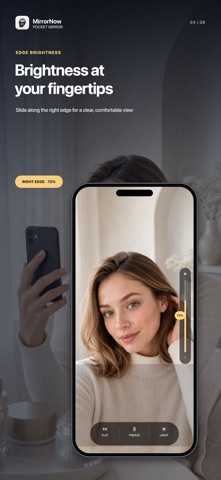
We’ve made MirrorNow more useful for checking the little details. • Freeze the view, then zoom in up to 3x. • Choose from Warm, Cool, and Soft lighting tones. • Swipe along the right edge to adjust screen brightness. • Switch between a familiar mirror view and the way others see you. • Camera recovery is now more reliable after interruptions. • Image quality adjusts more smoothly to your device’s condition. Freezing the view does not capture or save a photo.
In-app purchases · US
No in-app purchases.
Screenshots




Keywords this app targets
Search terms AppTracker associates with this app — estimates, not search volume. ❝ = in the app's title; a highlighted number is its current position for that term.
Similar apps
Competitors and close alternatives, as estimated by AppTracker.
 A Real Mirror
Winkpass Creations, Inc.
2 shared topics · 1 shared title word
A Real Mirror
Winkpass Creations, Inc.
2 shared topics · 1 shared title word
 @Mirror Plus
Evolutive Apps S.L.
1 shared topic · 1 shared title word
@Mirror Plus
Evolutive Apps S.L.
1 shared topic · 1 shared title word
 Mirror : Natural Mirror 4K
sky-nexus Inc.
1 shared topic · 1 shared title word
Mirror : Natural Mirror 4K
sky-nexus Inc.
1 shared topic · 1 shared title word
 Mirror&BeforeAfter-BA mirror
Permission Inc.
1 shared topic · 1 shared title word
Mirror&BeforeAfter-BA mirror
Permission Inc.
1 shared topic · 1 shared title word
 Mirrored - The Mirror Effects
Sebastien BUET
Mirrored - The Mirror Effects
Sebastien BUET
 RuShi Camera
寒 严
RuShi Camera
寒 严
 CamScreen: Photo Monitor
亚奇 陈
CamScreen: Photo Monitor
亚奇 陈
 Real Selfie - A WYSIWYG Camera
Roger Oba
Real Selfie - A WYSIWYG Camera
Roger Oba
About
MirrorNow turns your iPhone into a clean, real-time mirror for quick daily checks. Designed for speed and clarity, MirrorNow uses the front camera with an always-mirrored preview so what you see feels natural. The app focuses on the essentials: smooth live viewing, sharp image quality, and simple controls that stay out of your way. Key features Real-time mirrored front-camera preview Adaptive quality tuning for smoother performance in different lighting and thermal conditions Pinch-to-zoom control (1.0x to 2.0x) Quick brightness adjustment with an on-screen guide Fast recovery from camera interruptions Privacy-first by design
What's new · 1.1.0
We’ve made MirrorNow more useful for checking the little details. • Freeze the view, then zoom in up to 3x. • Choose from Warm, Cool, and Soft lighting tones. • Swipe along the right edge to adjust screen brightness. • Switch between a familiar mirror view and the way others see you. • Camera recovery is now more reliable after interruptions. • Image quality adjusts more smoothly to your device’s condition. Freezing the view does not capture or save a photo.
Details