

Beside: Body Doubling Focus
Softroni LLC · Productivity
Independent analytics for this App Store listing. AppTracker is not affiliated with Softroni LLC.
Chart standing · US
What changed · US
Listing changes AppTracker has observed for this app in this storefront — new versions, price moves, rating shifts, and store copy.
Beside now keeps going when you lock your phone. - Background play: soundscapes and the timer keep running with the screen off or another app open - Pause and resume from the Lock Screen, Control Center, or your headphones - Get a notification when a timed session finishes - New Keep Screen On setting to keep your scene visible while you focus - Daily reminders now arrive at the time you choose in Settings - New Mix with Other Audio setting to play alongside music or podcasts - Volume levels are now remembered for each scene Thank you for the reviews asking for background play. Keep the feedback coming!
Price & rating history · US
Reconstructed from the listing changes AppTracker has observed in this storefront. A field is charted once it has changed more than once, and each line starts at the value it moved from.
Average rating · ★ 5.00 now · 2 changes on record
Ratings breakdown · US
The star breakdown behind this app's rating in this storefront.
Screenshots


About
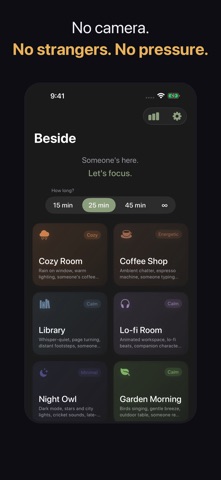
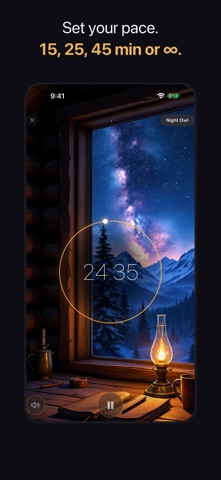
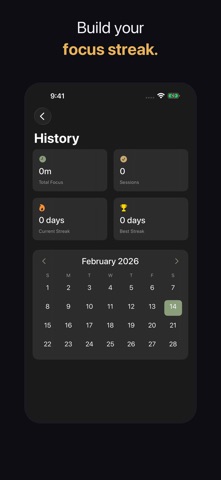
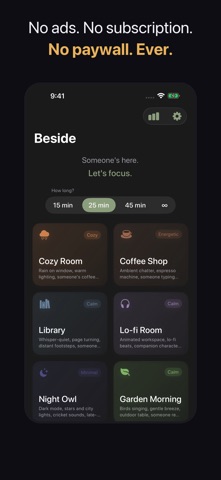
Someone's here. Let's focus. Beside creates the feeling of someone working next to you -- without cameras, strangers, or interruptions. Body doubling is a proven ADHD and productivity technique, and now it's free on your iPhone. No account. No subscription. No paywall. Ever. HOW IT WORKS Open the app. Pick a scene. Start focusing. That's it. Each scene surrounds you with ambient sounds and subtle visual cues -- a coffee cup steaming nearby, pages turning, someone typing at the next desk. You never see another person, but you feel their presence. That's body doubling. 6 HANDCRAFTED SCENES Cozy Room -- Rain on the window, warm lighting, a desk lamp glowing nearby Coffee Shop -- Espresso machine hum, gentle chatter, someone typing beside you Library -- Whisper-quiet, pages turning, the calm focus of a study hall Lo-fi Room -- Chill beats, a companion at their desk, late-night creative energy Night Owl -- City lights, cricket sounds, your late-night study partner Garden Morning -- Birds, a gentle breeze, someone reading next to you FOCUS TIMER Set a session for 15, 25, or 45 minutes -- or go infinite. Lock your phone or switch apps and your scene keeps playing, with controls on the Lock Screen. A gentle notification lets you know when time's up. No pressure. TRACK YOUR PROGRESS See your focus history on a calendar. Build streaks. Watch your focus time grow over days and weeks. WHY BESIDE? - 100% free -- No ads, no subscriptions, no in-app purchases - No camera -- Your camera is never used. Period. - No account required -- Open the app and start focusing immediately - No strangers -- Ambient presence, not video calls with random people - No scheduling -- Focus whenever you want, not when a session is available - Works offline -- No internet needed once downloaded - Dark mode -- Easy on the eyes, day or night - Private -- No data collection, no analytics, no trackers BUILT FOR - ADHD adults who use body doubling to get things done - Students studying alone in their room - Remote workers missing the presence of coworkers - Anyone who focuses better when someone else is around Body doubling shouldn't cost $7-40/month. It shouldn't require a camera. And it shouldn't mean scheduling sessions with strangers. Beside is focus, simplified.
What's new · 1.1
Beside now keeps going when you lock your phone. - Background play: soundscapes and the timer keep running with the screen off or another app open - Pause and resume from the Lock Screen, Control Center, or your headphones - Get a notification when a timed session finishes - New Keep Screen On setting to keep your scene visible while you focus - Daily reminders now arrive at the time you choose in Settings - New Mix with Other Audio setting to play alongside music or podcasts - Volume levels are now remembered for each scene Thank you for the reviews asking for background play. Keep the feedback coming!
Details