

Itsytv: Apple TV Remote
Nikolajs Ustinovs · Utilities
Independent analytics for this App Store listing. AppTracker is not affiliated with Nikolajs Ustinovs.
Chart standing · US
What changed · US
Listing changes AppTracker has observed for this app in this storefront — new versions, price moves, rating shifts, and store copy.
• Fixed pairing on tvOS 27
Price & rating history · US
Reconstructed from the listing changes AppTracker has observed in this storefront. A field is charted once it has changed more than once, and each line starts at the value it moved from.
Average rating · ★ 4.86 now · 4 changes on record
Ratings breakdown · US
The star breakdown behind this app's rating in this storefront.
In-app purchases · US
No in-app purchases.
Screenshots


Keywords this app targets
Search terms AppTracker associates with this app — estimates, not search volume. ❝ = in the app's title; a highlighted number is its current position for that term.
Similar apps
Competitors and close alternatives, as estimated by AppTracker.
 RemoTV: Universal TV Remote
EpicScale Inc
2 shared topics · 3 shared title words
RemoTV: Universal TV Remote
EpicScale Inc
2 shared topics · 3 shared title words
 Samsung Smart TV remote myTifi
Martijn Koopman
2 shared topics · 3 shared title words
Samsung Smart TV remote myTifi
Martijn Koopman
2 shared topics · 3 shared title words
 Remote, Mouse & Keyboard Pro
Remote Sunrise LTD
2 shared topics · 1 shared title word
Remote, Mouse & Keyboard Pro
Remote Sunrise LTD
2 shared topics · 1 shared title word
 Universal Remote・TV Control
Ozuna Limited
3 shared topics · 2 shared title words
Universal Remote・TV Control
Ozuna Limited
3 shared topics · 2 shared title words
 GTV Remote
Suresh Verma
1 shared topic · 1 shared title word
GTV Remote
Suresh Verma
1 shared topic · 1 shared title word
 TV Remote & Universal Control™
To Ngoc Mai
1 shared topic · 3 shared title words
TV Remote & Universal Control™
To Ngoc Mai
1 shared topic · 3 shared title words
 Universal TV Remote Control・
toggle apps
1 shared topic · 3 shared title words
Universal TV Remote Control・
toggle apps
1 shared topic · 3 shared title words
 TV Remote • Universal Control
WarthogLab
1 shared topic · 3 shared title words
TV Remote • Universal Control
WarthogLab
1 shared topic · 3 shared title words
About
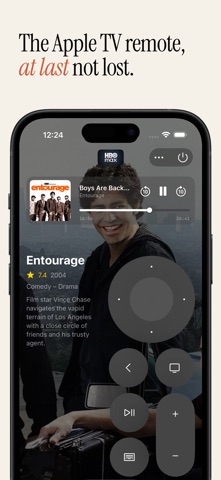
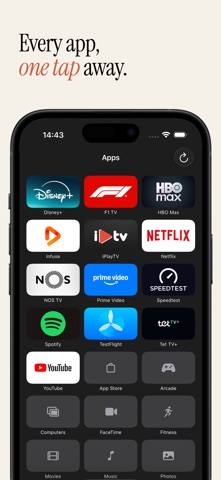
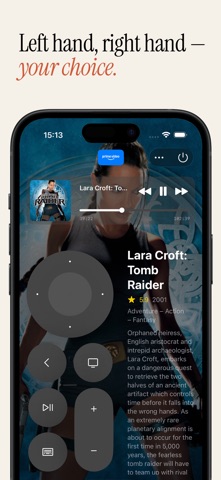
Itsytv is a remote control for Apple TV that shows you what's playing. Connect to any Apple TV on your network and control it with a familiar touch interface. The circular d-pad supports taps, swipes, and directional input. All the buttons you need are right there – back, home, play/pause, volume, and a keyboard for search fields. ERGONOMIC DESIGN Built for both left-handed and right-handed use. Drag the remote to whichever side of the screen feels natural. You can also reposition it vertically to find the most comfortable spot for your grip. NOW PLAYING WITH SEEK BAR See what's on at a glance. The now playing bar shows artwork, title, and artist with transport controls for skip, play, and pause. Drag the seek bar to scrub to any point in the content directly from your phone – no need to hold down the d-pad like on the Siri Remote. WHAT'S PLAYING When you're watching something, Itsytv looks up the show or movie and displays the backdrop, plot summary, rating, genres, and cast – all without leaving the remote. Tap the info area to see the full detail view with cast photos and credits, then tap again to return to the remote. APP LAUNCHER Browse and launch apps installed on your Apple TV. Drag to rearrange them in your preferred order. After launching an app, Itsytv can automatically switch back to the remote tab so you're ready to navigate. KEYBOARD INPUT Type directly into search fields and text inputs on your Apple TV. When a hardware keyboard is connected, use arrow keys, return, escape, space, and volume shortcuts to control your Apple TV without touching the screen. UNIVERSAL APP Works on macOS (menu bar app) and iPhone/iPad. FEATURES - Ergonomic design for left-handed and right-handed use - Circular d-pad with tap, swipe, and directional input - Play/pause, volume, back, home, and power buttons - Now playing bar with artwork, seek bar, and transport controls - On-screen keyboard for text input and search - Hardware keyboard support with arrow keys and shortcuts - App launcher with drag-to-reorder - Content info with backdrop, plot, rating, genres, and cast - Scrollable detail view with full cast and crew - Automatic reconnection to your last Apple TV - Multiple Apple TV support with quick switching - Works on iPhone and iPad REQUIREMENTS - Apple TV (4th generation or later) - iPhone or iPad on the same Wi-Fi network - One-time pairing with a PIN code shown on your TV
What's new · 1.5.1
• Fixed pairing on tvOS 27
Details