

Speaker Tools – Audio Test
家宝 戴 · Productivity
Independent analytics for this App Store listing. AppTracker is not affiliated with 家宝 戴.
Chart standing · US
What changed · US
Listing changes AppTracker has observed for this app in this storefront — new versions, price moves, rating shifts, and store copy.
Bug fixes and performance improvements.
In-app purchases · US
What this app sells inside itself, grouped by kind and priced for this storefront.
Screenshots



About
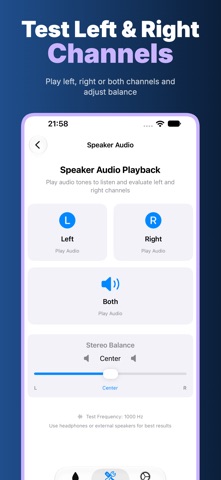
Speaker Tools brings practical audio playback and listening tools together in one place. Generate a tone, compare left and right channel signals, move through a range of frequencies, or view an approximate ambient sound level. An active subscription is required to use the app. LOW-FREQUENCY PLAYBACK Play a 165 Hz tone from the home screen. Choose a 10, 30, 60, or 120 second session, start playback with a tap, and stop whenever you want. The animated waveform shows when audio is playing. This is a simple way to listen to low-frequency output and compare how a device sounds in different settings. Output depends on the speaker, volume, audio route, and surrounding environment. QUICK TONE Need a short session? Quick Tone plays a 165 Hz low-frequency signal for 10 seconds with a visible countdown and progress ring. You can end the session early. It is a playback shortcut, not a cleaning or hardware repair function. FREQUENCY GENERATOR Adjust the frequency slider between 20 Hz and 20 kHz and play a steady tone at your chosen setting. Change the slider while playback is running to hear another frequency. Select a timed session or stop manually. Presets provide a starting point at 60 Hz for bass, 165 Hz for a low tone, 1 kHz for a mid tone, and 18 kHz for a very high tone. The app remembers your last selected frequency. Some frequencies may be inaudible or beyond what your speaker or headphones can reproduce. LEFT AND RIGHT CHANNELS Play a 1 kHz test signal through the left channel, right channel, or both. When both are selected, move the balance control to compare the two sides. Headphones or external stereo speakers are useful for this listening exercise. A phone's built-in speaker layout and audio routing can affect what you hear, so the result is a subjective playback comparison rather than a hardware diagnosis. LISTEN ACROSS FREQUENCIES Step through ten tones from 60 Hz to 16 kHz, including bass, midrange, and higher frequencies. Play, stop, move to the previous or next tone, and note what you personally hear. Use a comfortable volume. Hearing differs between people and audio devices; this tool cannot determine your hearing threshold and is not a medical hearing test. SOUND LEVEL REFERENCE Allow microphone access to view a live approximate sound-level reading and simple level categories. Start or stop monitoring whenever you choose. Readings vary with the device microphone, case, microphone position, and room conditions. The meter is not professionally calibrated and should not be used for regulatory measurements, occupational exposure decisions, or hearing-safety judgments. DESIGNED FOR SIMPLE EXPLORATION The home screen puts low-frequency playback one tap away, while the Tools screen groups the generator, channel playback, frequency listening, quick tone, and sound meter. Clear controls and visible playback states make it easy to repeat a listening comparison. Audio tones are generated on the device. The app does not offer recording, cloud projects, accounts, or automatic speaker diagnosis. SUBSCRIPTION AND SAFETY Access requires an active monthly or yearly auto-renewing subscription. Available plans and local prices appear before purchase; manage or cancel in your Apple account settings, and restore an existing purchase in the app. Keep volume comfortable, especially with headphones. Speaker Tools cannot remove water, clean or repair a speaker, inspect hardware, or replace professional service. If a device is damaged, contact an authorized service provider. If you have hearing concerns, seek qualified medical advice. Privacy Policy: https://5gotogo.github.io/WaterEject-privacy/privacy-policy.html Terms of Use: https://www.apple.com/legal/internet-services/itunes/dev/stdeula/
What's new · 1.0.3
Bug fixes and performance improvements.
Details