

talavo: Video & Music Browser
ABDULBAKI CELEBI · Utilities
Independent analytics for this App Store listing. AppTracker is not affiliated with ABDULBAKI CELEBI.
Chart standing · US
What changed · US
Listing changes AppTracker has observed for this app in this storefront — new versions, price moves, rating shifts, and store copy.
- New floating menu button. Tap it for the menu, hold it to move it. - Edge swipes now work in right-to-left languages. - Fixes and polish.
Price & rating history · US
Reconstructed from the listing changes AppTracker has observed in this storefront. A field is charted once it has changed more than once, and each line starts at the value it moved from.
Average rating · ★ 4.47 now · 9 changes on record
Ratings breakdown · US
The star breakdown behind this app's rating in this storefront.
Screenshots





About
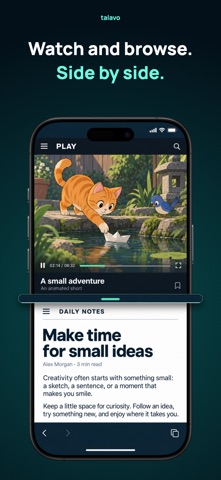
Less distraction. More of what you came for. Watch, listen, and browse with talavo, a video and music browser for iPhone and iPad. Block ads, keep supported audio playing with your screen locked, and focus on what you want to watch. • Find your focus. Zen Mode hides common distractions. With Zen+, hide unwanted page elements and customize what stays and what disappears. • Keep listening. Enjoy background playback, lock-screen controls, adjustable playback speed, and a sleep timer. • Browse side by side. Open two pages at once with split screen. • Make it yours. Choose your theme and app icon to make talavo look the way you like. • Add more privacy. Lock your bookmarks, use incognito browsing, and choose sites that always open privately. • Keep favorites close. Organize bookmarks into folders and switch between tabs with a tap. Try the full talavo Pro experience with a free trial. Enjoy all Pro features without talavo’s ads. After your trial, continue with Pro or use the free version with ads. Privacy first. No account needed. Your browsing history stays on your device. Privacy Policy: https://talavo.app/privacy Terms of Use: https://talavo.app/terms Support: https://talavo.app/support
What's new · 1.4.1
- New floating menu button. Tap it for the menu, hold it to move it. - Edge swipes now work in right-to-left languages. - Fixes and polish.
Details