

Blur It - Face & Text Blur
Avi Shany · Photo & Video
Independent analytics for this App Store listing. AppTracker is not affiliated with Avi Shany.
Chart standing · US
What changed · US
Listing changes AppTracker has observed for this app in this storefront — new versions, price moves, rating shifts, and store copy.
What’s New • A refreshed Liquid Glass controls panel for iOS 26 and later. • Photos now fit and center consistently, whatever their shape or size. • Controls no longer cover your photo, and opening or closing them keeps your editing view steady. • The familiar controls remain unchanged on iOS 18.
In-app purchases · US
What this app sells inside itself, grouped by kind and priced for this storefront.
Screenshots


About
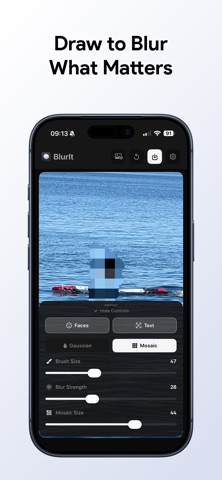
Blur It - Face & Text Blur helps you hide sensitive information in photos in seconds. Keep your privacy protected before sharing screenshots, documents, IDs, chat images, or social photos. Features: • Blur and mosaic tools for manual control • Quick-hide faces with one tap • Quick-hide text with one tap • Blur faces and text directly from the Photos Share Sheet with Blur It Pro • Pinch to zoom and reposition for precise editing • Adjustable brush size and blur strength • Fast export to your Photos library Built for privacy: • No account required • No cloud image processing • No photo uploads to external servers • Everything runs locally on your device Whether you’re posting online, sending work screenshots, or sharing personal images, Blur It makes private editing simple and fast. Terms of use: https://www.apple.com/legal/internet-services/itunes/dev/stdeula/
What's new · 1.8
What’s New • A refreshed Liquid Glass controls panel for iOS 26 and later. • Photos now fit and center consistently, whatever their shape or size. • Controls no longer cover your photo, and opening or closing them keeps your editing view steady. • The familiar controls remain unchanged on iOS 18.
Details