

Filmback - Restore Analog Pics
Veysel AKBALIK · Photo & Video
Independent analytics for this App Store listing. AppTracker is not affiliated with Veysel AKBALIK.
Chart standing · US
What changed · US
Listing changes AppTracker has observed for this app in this storefront — new versions, price moves, rating shifts, and store copy.
A big update to how you scan and pay. • Try it free: your first scans are on us, no trial or card needed. • Simpler plans: pay monthly, or once for lifetime access. • Faster framing: most frames are now found right on your iPhone. • Live tips while you shoot, plus a heads-up when a photo is blurry. • Not cropped right? Adjust the frame yourself on the result. • A new step-by-step guide shows how to photograph a negative. • A refreshed look with smoother animations.
In-app purchases · US
What this app sells inside itself, grouped by kind and priced for this storefront.
Screenshots


About
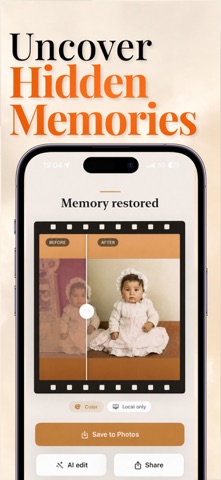
Rediscover the photos hidden inside your old film negatives. FilmBack turns your iPhone into a simple, modern negative film scanner. Place your film negative in front of a bright screen, capture it with the camera, and let FilmBack convert it into a clean, shareable photo in seconds. Whether you have color negatives, black-and-white film, old family memories, forgotten rolls, or archival strips, FilmBack helps bring them back to life with a calm, guided scanning experience. Scan Film Negatives With Your Phone -No dedicated scanner required. FilmBack is designed for a simple at-home setup: -Open a bright white screen on a laptop, tablet, or monitor. -Hold your film negative in front of the light. -Align the negative inside the camera frame. -Capture, crop, and choose the restoration style that fits your photo. -FilmBack automatically inverts the negative and restores the image so you can preview the final photo right away. Built For Color And Black-And-White Film Choose the film type before scanning and let FilmBack adapt the conversion process. The app supports both color negatives and black-and-white negatives, with restoration styles that help you get a natural, polished result. Smart Restoration Tools FilmBack includes tools designed for old film: -Negative-to-photo conversion -Automatic color inversion -Crop and alignment controls -Color and black-and-white film modes -Multiple restoration looks -AI-powered enhancement and editing tools -Save and share restored photos -Scan history for recently converted images A More Thoughtful Way To Restore Memories Old negatives often hold moments that were never digitized: family portraits, travel photos, childhood memories, and everyday scenes worth keeping. FilmBack is built to make that restoration process feel simple, focused, and accessible. The app uses a clean film-lab inspired interface, with guided capture, flexible crop controls, and a preview flow that helps you move from physical negative to restored photo without complicated editing software. Perfect For -Old family film negatives -Color negative strips -Black-and-white negatives -Archiving analog photos -Quickly previewing forgotten film -Sharing restored memories with family and friends Bring your film memories back to life with FilmBack. Questions or feedback? Contact us at support@junnyapps.com Privacy Policy: https://junnyapps.com/privacy/filmback Terms of Use: https://junnyapps.com/terms/filmback
What's new · 1.1.0
A big update to how you scan and pay. • Try it free: your first scans are on us, no trial or card needed. • Simpler plans: pay monthly, or once for lifetime access. • Faster framing: most frames are now found right on your iPhone. • Live tips while you shoot, plus a heads-up when a photo is blurry. • Not cropped right? Adjust the frame yourself on the result. • A new step-by-step guide shows how to photograph a negative. • A refreshed look with smoother animations.
Details