

Sebastian - Daily Assistant
Michael Surratt · Productivity
Independent analytics for this App Store listing. AppTracker is not affiliated with Michael Surratt.
Chart standing · US
What changed · US
Listing changes AppTracker has observed for this app in this storefront — new versions, price moves, rating shifts, and store copy.
Shopping Lists, Built In Turn any Reminders list into a Shopping list. Items are grouped by aisle and show their amount, store and price, with a running total. • Shopping mode: Start Shopping gives you a full-screen checklist in aisle order. Put items in your cart as you go. A Live Activity follows your trip on the Lock Screen and Apple Watch. • Quick to add: type “2 lb apples, milk @Meijer” and each item lands with its amount, aisle and store. Autocomplete suggests things you’ve bought before, plus everyday items. • Suggestions page: pick any number of items from Your Staples, Frequent and Common items by aisle, then add them all in one tap. • Buy Again and Staples: Sebastian learns what you buy, how often, how much and where, and suggests it before you run out. • Smart help: it remembers prices to estimate your total. It assigns aisles automatically and learns from your corrections, with Apple Intelligence for unusual items. It sends items to the store you usually buy them at, tidies names and catches duplicates. • Edit in place: shopping details now sit right on the reminder. • Shared and TaskFlow lists: items keep their details across devices and apps. • Shopping List widget: a new dark design, including Extra Large, with a Store setting so it shows only what to buy at that store. • Control Center and Shortcuts: add items to your list from anywhere. Reminders • List sections: group a list under headings. Drag a reminder under a heading to file it, or use Move to Section. Fold a section with a tap and see its count at a glance. A list with sections shows them whatever your grouping. • Reorder tiles: drag one pinned tile onto another, or use Reorder Tiles. Apple Watch • Live Activities in the Smart Stack are now always dark and easy to read. Fixes and polish • The Shopping widget now shows only the store you chose. • The fasting widgets have been retired. • General stability improvements.
Ratings breakdown · US
The star breakdown behind this app's rating in this storefront.
Screenshots




About
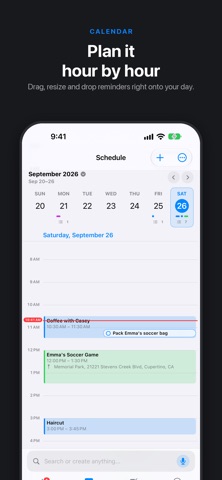
Sebastian — Daily Assistant Sebastian pulls your calendar, reminders, notes, alarms and timers into one place, and keeps them tied to the people they are actually about. THREADS Link a calendar, a reminder list, a note, an alarm or a timer to a person, and Sebastian builds them a thread — one timeline of every appointment, reminder, note and comment involving them. Filter it to one kind of entry, then share it as text or a formatted PDF. It is the fastest way to answer "what has been going on with Mum's care?" without digging through four apps. YOUR DAY • Today: events, due reminders and what needs attention, in a dashboard you arrange yourself. • Reminders: group by list, due date, priority or status. Save Quick Views, act on many at once, and timebox a task straight onto your calendar. • Calendar: day, week and month, with conflict spotting and travel time. • Notes: Markdown, images and attachments, with their own widgets — and with Plus, Notes on the web: read and edit them in any browser, synced through your own iCloud. TIMERS, ALARMS AND FASTING Multiple named timers, full alarm scheduling, and fasting timers that keep running past their target so you can see how long you actually fasted. WIDGETS AND SHORTCUTS Home Screen, Lock Screen and StandBy widgets, launcher cards, Live Activities, Control Center controls, Spotlight search and Siri Shortcuts. DRIVE MODE A large-type, glanceable view of what is next when you are on the road. PRIVACY Your calendar, reminders and contacts stay on your device and in Apple's own apps. Sebastian asks for what it needs and nothing more. There is no account and no sign-up. FREE AND PLUS Free shows every calendar and reminder list you have — nothing is hidden. You can add to and edit any three of each, and tick off or delete a reminder wherever it lives. It includes alarms, timers, severe weather alerts, and the small and medium widgets. Sebastian Plus is a single one-time purchase — no subscription, nothing to renew — and it lifts every limit: editing in all your calendars and lists, unlimited notes, sync across your devices, Notes on the web, full thread history and export, hourly and 10-day forecasts, focus timers, shared tags and the large launcher widgets. It is shareable with your Family Sharing group. New installs get 30 days of everything to try first. https://www.apple.com/legal/internet-services/itunes/dev/stdeula/
What's new · 2.2.4
Shopping Lists, Built In Turn any Reminders list into a Shopping list. Items are grouped by aisle and show their amount, store and price, with a running total. • Shopping mode: Start Shopping gives you a full-screen checklist in aisle order. Put items in your cart as you go. A Live Activity follows your trip on the Lock Screen and Apple Watch. • Quick to add: type “2 lb apples, milk @Meijer” and each item lands with its amount, aisle and store. Autocomplete suggests things you’ve bought before, plus everyday items. • Suggestions page: pick any number of items from Your Staples, Frequent and Common items by aisle, then add them all in one tap. • Buy Again and Staples: Sebastian learns what you buy, how often, how much and where, and suggests it before you run out. • Smart help: it remembers prices to estimate your total. It assigns aisles automatically and learns from your corrections, with Apple Intelligence for unusual items. It sends items to the store you usually buy them at, tidies names and catches duplicates. • Edit in place: shopping details now sit right on the reminder. • Shared and TaskFlow lists: items keep their details across devices and apps. • Shopping List widget: a new dark design, including Extra Large, with a Store setting so it shows only what to buy at that store. • Control Center and Shortcuts: add items to your list from anywhere. Reminders • List sections: group a list under headings. Drag a reminder under a heading to file it, or use Move to Section. Fold a section with a tap and see its count at a glance. A list with sections shows them whatever your grouping. • Reorder tiles: drag one pinned tile onto another, or use Reorder Tiles. Apple Watch • Live Activities in the Smart Stack are now always dark and easy to read. Fixes and polish • The Shopping widget now shows only the store you chose. • The fasting widgets have been retired. • General stability improvements.
Details