

Mdly – Markdown Viewer
Yuta Hoshina · Developer Tools
Independent analytics for this App Store listing. AppTracker is not affiliated with Yuta Hoshina.
Chart standing · US
What changed · US
Listing changes AppTracker has observed for this app in this storefront — new versions, price moves, rating shifts, and store copy.
Ratings breakdown · US
The star breakdown behind this app's rating in this storefront.
In-app purchases · US
No in-app purchases.
Screenshots


Keywords this app targets
Search terms AppTracker associates with this app — estimates, not search volume. ❝ = in the app's title; a highlighted number is its current position for that term.
Similar apps
Competitors and close alternatives, as estimated by AppTracker.
 Md Preview - Markdown Viewer
CyberGame Limited
2 shared topics · 3 shared title words
Md Preview - Markdown Viewer
CyberGame Limited
2 shared topics · 3 shared title words
 OpenMark
Rotate, LLC.
3 shared topics
OpenMark
Rotate, LLC.
3 shared topics
 Markdown Viewer & Editor
Masamichi Ueta
Markdown Viewer & Editor
Masamichi Ueta
 Markdown Viewer Editor
Hefei Yunyilian Intelligent Technology Co., Ltd
3 shared title words
Markdown Viewer Editor
Hefei Yunyilian Intelligent Technology Co., Ltd
3 shared title words
 MeadReader
SHIH-HUNG MICHAEL CHEN
MeadReader
SHIH-HUNG MICHAEL CHEN
 Markdown Reader - Ream
Rakko Inc.
1 shared title word
Markdown Reader - Ream
Rakko Inc.
1 shared title word
 Mandrill - Markdown Editor
Vandan Desai
1 shared topic · 1 shared title word
Mandrill - Markdown Editor
Vandan Desai
1 shared topic · 1 shared title word
 Markdown Editor and Reader
Julian Lau
1 shared topic · 1 shared title word
Markdown Editor and Reader
Julian Lau
1 shared topic · 1 shared title word
About
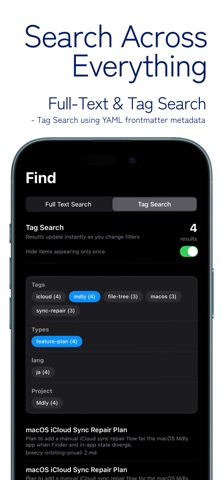
Mdly is a fast, read-only Markdown viewer designed for effortless reading across iPhone, iPad, and Mac. Open your .md files directly from iCloud Drive or local folders and enjoy clean, distraction-free rendering anywhere. Built for developers, writers, and anyone who keeps documentation in Markdown, Mdly focuses on one thing: reading Markdown comfortably. Seamless iCloud Experience Access the same Markdown files across all your Apple devices. Files created on your Mac appear instantly on iPhone and iPad through iCloud sync. Powerful Markdown Rendering Mdly fully supports modern Markdown features: - Headings, lists, tables, blockquotes - Syntax-highlighted code blocks - GitHub-style Markdown rendering Mermaid Diagram Support Render Mermaid diagrams inline, including: - Flowcharts - Sequence diagram - Timelines and more Perfect for viewing technical documentation on the go. Designed for Reading Mdly is intentionally read-only — no editing distractions. - Slide-up Table of Contents navigation - Full-text search across files - Recent files access - Dark and light themes - Clean typography optimized for long reading
What's new · 1.6
- Improved Favorites so items can be removed more smoothly. You can now create folders and reorder items, making Favorites easier to organize. - Reviewed and improved Favorites sync, GitHub sync, and iCloud sync across the app. - Added a contact email link to Settings. If you have questions, requests, or run into a problem, please feel free to contact us.
Details