

AlphaLuma - Film Recipes
罡 丁 · Photo & Video
Independent analytics for this App Store listing. AppTracker is not affiliated with 罡 丁.
Chart standing · US
What changed · US
Listing changes AppTracker has observed for this app in this storefront — new versions, price moves, rating shifts, and store copy.
Connect Without a Cable Three new ways to connect — Bluetooth, Wi-Fi and LAN — join USB in a new Camera Connection card on the home screen, so every way of reaching your camera now starts in the same place. • Bluetooth: put the camera into pairing as the guide shows and the app does the rest, completing the pairing and asking the camera to open its hotspot • Wi-Fi: scan the QR code on the camera screen and the connection starts straight away, or type the hotspot details in by hand • LAN: when the camera and your iPhone are on the same router, pick the camera from the discovery list • Cameras that use Access Authentication get a proper sign-in screen, with the reason shown under the field when a password is wrong • Every method comes with illustrated step-by-step guidance for the camera side, and a failed attempt explains what went wrong and offers the other ways in Switch Recipes and Camera Looks Wirelessly Once connected, a whole recipe goes to the camera without a cable: Creative Look, all eight sub-parameters and both white balance axes in one pass, and it can be stored in the camera's custom look slots. Wireless and USB share the same write sequence, and every setting about to change is still listed for you to confirm first. Recipe Lab Use the camera's live view as your negative: watch the frame while you switch Creative Looks and dial in parameters, or tap a recipe card to apply the whole thing to the camera. Camera Monitor Monitor and Recipe Lab no longer require a cable. If a connection is already up they open straight onto it, and behaviour over USB is unchanged. Also in this release • The camera card on the home screen shows the connected model, how it is connected and the camera battery level, with one-tap disconnect • White balance shift is clamped to the ±7 steps the camera actually accepts before anything is written, so an out-of-range value from an older recipe never reaches the camera
In-app purchases · US
What this app sells inside itself, grouped by kind and priced for this storefront.
Screenshots





About
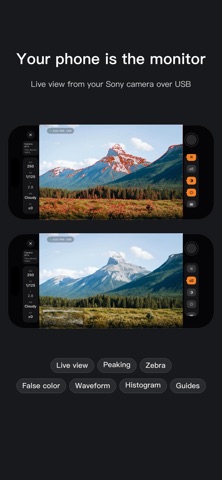
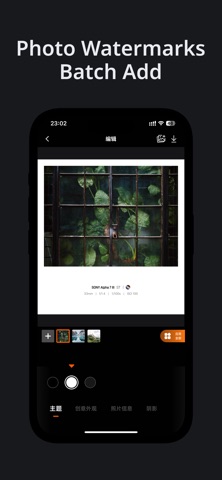
AlphaLuma: Professional Companion Tool for Sony Alpha Camera Users AlphaLuma is designed for Sony Alpha camera users. Simply record and manage Creative Look recipes, add watermarks and borders, and identify Creative Look parameters from your shots. Hundreds of recipes + 100+ border styles included. Thousands of Sony users share recipes here. We also include popular Creative Look presets, free to explore. Apply parameters to your A7/A7C/A6000 series/ZV cameras and achieve stunning straight-out-of-camera results. Important Notice AlphaLuma is NOT a Sony official application! AlphaLuma is a third-party tool for Sony camera enthusiasts, enhancing the Alpha user experience with additional features. Not associated with Sony Group Corporation. [Feature Highlights] Camera Monitor (NEW) An external monitor, over USB or wirelessly: live view with focus peaking, zebra, false color, waveform and histogram, plus ISO, shutter, white balance and exposure control. Requires iOS 16; over USB, set the camera to PC Remote. Send Recipes to Your Camera, Wirelessly or over USB (NEW) Connect by Bluetooth, Wi-Fi, LAN or cable, then write a whole recipe straight into the camera's Creative Look slots — ready to shoot, with nothing to copy by hand. Read Picture Profile from Your Photos (NEW) Pull the in-camera Picture Profile from Sony originals: black level, gamma, knee, color mode, color phase, detail. Currently for original JPEGs from the Sony a7 V. Sony Color Recipe Notebook Save unlimited Creative Look recipes. Record and manage recipes with ease, no longer limited by camera custom settings capacity. Sony JPEG Recipe Recognition One-tap recognition of Creative Look parameters, eliminating manual input. (Note: Recognition varies by camera model/file, with continued expansion.) Complete EXIF Information Read camera model, lens, focal length, shutter speed, ISO, white balance, and other EXIF details for every shot. Sony Style Borders and Watermarks Live preview editing with multiple border and watermark templates. Supports automatic reading and batch adding of shooting info. Creative Look / Cinematic Watermarks Add Creative Look-Cinetone style watermark elements to strengthen your work's Sony Alpha aesthetic. Recipe Community Explore, collect, and adjust others' Creative Look recipes. Share your parameters with fellow enthusiasts. Cloud Backup iCloud backup and auto sync for Pro users. No worries about data loss when switching devices. Recipe Cards Generate personalized recipe cards with one tap. Save and share to any platform. [Free User Benefits] - Record and manage unlimited Sony color recipes locally - One-tap recognition of Sony JPEG Creative Look info - View basic photo EXIF (camera, lens, shutter, ISO, etc.) - Use selected free borders and watermarks - Browse the recipe community - One-tap copy of recipe parameters for sharing Pro membership unlocks more powerful features for managing styles and batch processing images. [Pro Member Benefits] - Comprehensive Sony parameter recognition (Creative Look/PP details) - Quick add/import Sony color recipes - 60+ exclusive border and watermark templates - Batch processing (watermarks/cards, etc.) - Advanced customized recipe cards - iCloud cloud backup and sync [Pro Membership Plans] - Annual: One year subscription with auto-renewal - Monthly: 1 month subscription with auto-renewal - Check App Store for current pricing in your region Auto-Renewal and Subscription Management Payment is charged to your Apple ID upon purchase. Subscription renews 24 hours before expiration. Cancel in Settings > Apple ID > Subscriptions at least 24 hours before period ends. Restore purchases by logging in with the same Apple ID and tapping Restore Purchase. [More Information] Terms of Service https://alphaluma.com/en/policy/terms Privacy Policy https://alphaluma.com/en/policy/privacy Membership Service Agreement https://alphaluma.com/en/policy/membership
What's new · 1.1.3
Connect Without a Cable Three new ways to connect — Bluetooth, Wi-Fi and LAN — join USB in a new Camera Connection card on the home screen, so every way of reaching your camera now starts in the same place. • Bluetooth: put the camera into pairing as the guide shows and the app does the rest, completing the pairing and asking the camera to open its hotspot • Wi-Fi: scan the QR code on the camera screen and the connection starts straight away, or type the hotspot details in by hand • LAN: when the camera and your iPhone are on the same router, pick the camera from the discovery list • Cameras that use Access Authentication get a proper sign-in screen, with the reason shown under the field when a password is wrong • Every method comes with illustrated step-by-step guidance for the camera side, and a failed attempt explains what went wrong and offers the other ways in Switch Recipes and Camera Looks Wirelessly Once connected, a whole recipe goes to the camera without a cable: Creative Look, all eight sub-parameters and both white balance axes in one pass, and it can be stored in the camera's custom look slots. Wireless and USB share the same write sequence, and every setting about to change is still listed for you to confirm first. Recipe Lab Use the camera's live view as your negative: watch the frame while you switch Creative Looks and dial in parameters, or tap a recipe card to apply the whole thing to the camera. Camera Monitor Monitor and Recipe Lab no longer require a cable. If a connection is already up they open straight onto it, and behaviour over USB is unchanged. Also in this release • The camera card on the home screen shows the connected model, how it is connected and the camera battery level, with one-tap disconnect • White balance shift is clamped to the ±7 steps the camera actually accepts before anything is written, so an out-of-range value from an older recipe never reaches the camera
Details