

Doodraw: Animated Drawing
Alexis Gridel · Graphics & Design
Independent analytics for this App Store listing. AppTracker is not affiliated with Alexis Gridel.
Chart standing · US
What changed · US
Listing changes AppTracker has observed for this app in this storefront — new versions, price moves, rating shifts, and store copy.
New in Doodraw 1.1.2: • Merge layers: combine a layer with the one below in one tap • Symmetry: draw in vertical, horizontal, quadrant or radial symmetry • Two new particle brushes: Stardust and Embers • New option to lock canvas rotation • Faster drawing on complex pieces • Fixes: fills appear right away when the animation is paused, sliders no longer reset other brush settings, your selected brush stays selected when you open a drawing Thank you for your reviews, they shape every update!
Price & rating history · US
Reconstructed from the listing changes AppTracker has observed in this storefront. A field is charted once it has changed more than once, and each line starts at the value it moved from.
Average rating · ★ 3.89 now · 29 changes on record
Ratings breakdown · US
The star breakdown behind this app's rating in this storefront.
In-app purchases · US
What this app sells inside itself, grouped by kind and priced for this storefront.
Screenshots



Similar apps
Competitors and close alternatives, as estimated by AppTracker.
 FlipaClip: Draw 2D Animation
Visual Blasters LLC
FlipaClip: Draw 2D Animation
Visual Blasters LLC
 You Doodle Pro - art on the go
Digital Ruby, LLC
You Doodle Pro - art on the go
Digital Ruby, LLC
 FlipArtify - 2D Draw Animation
CEM SOFTWARE LTD
FlipArtify - 2D Draw Animation
CEM SOFTWARE LTD
 Drawing Desk: Sketch Paint Art
Farida Afrose
Drawing Desk: Sketch Paint Art
Farida Afrose
 AR Drawing App - Sketchify
Fitness Training Global
AR Drawing App - Sketchify
Fitness Training Global
 Drawsy: AR Draw for Sketching
EIGEN SOFTWARE LIMITED
Drawsy: AR Draw for Sketching
EIGEN SOFTWARE LIMITED
 Animator Plus
Heng Jia Liang
Animator Plus
Heng Jia Liang
 AR Draw Kids
SENSONET BILISIM TEKNOLOJILERI ELEKTRONIK YAZILIM SANAYI VE TICARET LTD STI
AR Draw Kids
SENSONET BILISIM TEKNOLOJILERI ELEKTRONIK YAZILIM SANAYI VE TICARET LTD STI
About
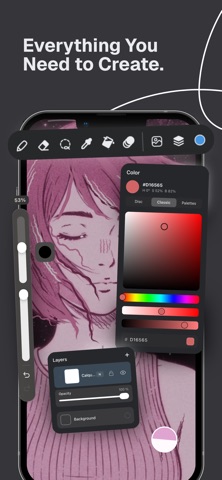
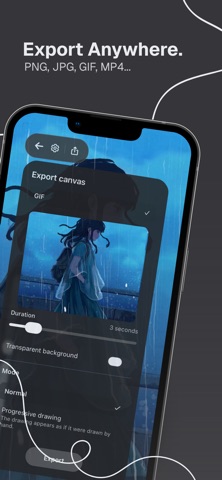
Draw. It moves. Instantly. Doodraw turns your lines into living animations the moment you draw them. Every brush has motion built into the stroke, no timelines, no keyframes, no animation skills needed. Just draw… and watch it come alive. PERFECT FOR CREATING - Animated doodles & GIFs - Handwritten text that moves - Wiggle art for TikTok, Instagram & YouTube - Living illustrations & simple animated characters - Boiling holds and animated accents for 2D animators ANIMATED BRUSHES Each brush comes with its own built-in motion: subtle wiggles, dynamic textures, lively stroke variations. Fine-tune everything, animation intensity, speed, and brush behavior. ANIMATION TOOLS, WITHOUT THE COMPLEXITY - Motion tool to enhance animated strokes - Frame-by-frame animation assistant with onion skin - Per-layer animation controls (intensity & speed) - Duration, playback speed & smoothness settings LAYERS & FULL CONTROL - Flexible layer system, separate elements easily - Edit freely, animate each layer independently EXPORT ANYWHERE - MP4 & GIF & Animated PNG (1080p) - Transparent PNG, drop your art into any project - Progressive drawing export (stroke reveal / timelapse) for a "drawn live" effect - Ready for TikTok, Reels, CapCut, After Effects & more SIMPLE. POWERFUL. The ease of a doodle app. The power of an animation tool. No complexity. No heavy timelines. Just draw, and watch it move. DOODRAW PRO Go further with Pro: watermark-free exports, progressive drawing export, frame-by-frame assistant, per-layer animation controls, and 9 premium animated brushes. Doodraw Pro is available as an auto-renewing subscription (monthly or yearly) or a one-time Lifetime purchase. Subscriptions are billed to your App Store account and renew automatically unless auto-renew is turned off at least 24 hours before the end of the current period. Manage or cancel anytime in your App Store settings; if you cancel, access remains active until the end of the billing period. TERMS & PRIVACY Terms of Use: https://www.doodraw.com/legal/terms-of-use/ Privacy Policy: https://www.doodraw.com/legal/privacy-policy/ SUPPORT Questions? We're here: support@doodraw.com
What's new · 1.1.2
New in Doodraw 1.1.2: • Merge layers: combine a layer with the one below in one tap • Symmetry: draw in vertical, horizontal, quadrant or radial symmetry • Two new particle brushes: Stardust and Embers • New option to lock canvas rotation • Faster drawing on complex pieces • Fixes: fills appear right away when the animation is paused, sliders no longer reset other brush settings, your selected brush stays selected when you open a drawing Thank you for your reviews, they shape every update!
Details