

Fin - Game Emulator
Dylan Mathurin · Entertainment
Independent analytics for this App Store listing. AppTracker is not affiliated with Dylan Mathurin.
Chart standing · US
What changed · US
Listing changes AppTracker has observed for this app in this storefront — new versions, price moves, rating shifts, and store copy.
New in Fin 3.3.0: Operation Health A Smoother Experience With More Ways to Play. Operation Health puts the everyday Fin experience first. Our team focused on responsiveness, stability, and of course, performance. We've massively improved background task handling and reduced unnecessary work on the main thread. navigation smoother, faster, animated & dynamic. The Operation Health Improvements • Improved 3DS controls, shader processing, and compatibility with older iPhone. • Better crash reporting and coverage to help us find and resolve problems. • Optional(on by default) emulator data sharing to improve performance, deletable at any time but does not contain data linked to you. • Corrected translations and text formatting. • easier to understand key setup and guides for once you've ALREADY obtained requirement system files from your consoles & hand helf devices Last update brought 3ds to the party, Fin now also supports DS & DSI play your DS and DSi games on Fin with DualFin. Boot your own DS or DSi games or home Menu, install your DSiWare titles, importing saves and unlock RetroAchievements in supported DS games. Take DS graphics further with full Metal rendering, 10x internal resolution, customize, upscale or replace game textures in Upscale Studio. Connect, Chat & Play Together Link Discord to send private messages, join party voice and text chats, and share your game presence. Open conversations from the Chat page or while playing. Catch up with friends, meet new people, and find your next game together. More Control Over Your Games • Remap controller buttons directly from the in-game Controllers menu. • Explore enhanced handheld audio, emulation speed controls, and frame generation. • Find what you need faster with reorganized settings for each core. • Follow saves, loads, drives, and downloads with new progress cards and notifications. • Get started with guided key and system-file imports. • Give your library a fresh look with the Blizzard theme. Fin 3.3.0 brings new ways to play and a better experience across entire the app.
Price & rating history · US
Reconstructed from the listing changes AppTracker has observed in this storefront. A field is charted once it has changed more than once, and each line starts at the value it moved from.
Average rating · ★ 4.09 now · 16 changes on record
Ratings breakdown · US
The star breakdown behind this app's rating in this storefront.
In-app purchases · US
What this app sells inside itself, grouped by kind and priced for this storefront.
Screenshots




About
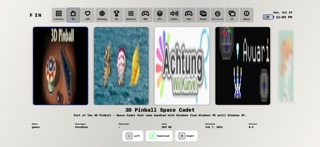
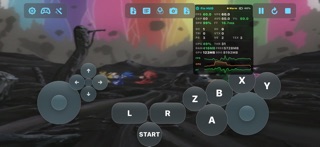
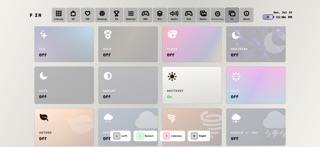
Fin can play GameCube, Wii, Wii U, DS, DSi, 3DS, Triforce, Game Boy Advance, Game Boy Color, and Game Boy on iPhone, iPad & Mac Keep everything in one library and set up each game how you like it. Change the controls, themes, backgrounds, skins, and menu music. Console Menus Launch games across your entire Fin librarty, Ds,DSi,3DS,Wii U, & Wii Menu can launch and play games on any other platform Friends & Discord Sign in with Apple and choose a username. Find friends, see who's online, browse shared libraries and collections, invite friends to games, share RetroAchievements, and link your Discord for game chat & party/voice chat! Controls, Picture & Sound • Remap supported PlayStation, Xbox, Switch Pro, and other controllers directly in-game & Save separate profiles • Move touch controls,motion controls, and make skins from images, video, or animation while Keeping a Global layout or separate layouts for each game! • Choose filters, upscaling, and frame generation • Support for Spatial audio, physical 5.1 and Virtual 7.1 audio playback • Console mode puts the game on your TV and the controls on your phone. Your Library • Games can run directly from external drives. • Save and load states with progress cards. • Add supported cheats, graphic packs, ROM patches, and replacement textures. • Manage amiibo and Skylanders files. • Extract music and videos from supported games. • Download homebrew and launch games or menus with App Shortcuts. • Choose Blizzard and other themes, animated backdrops, and cover animations. • Adjust each core separately, follow setup guides, and choose which notification cards appear. Import Your Own Games Import through Files or Share > Open in Fin. Formats include ISO, GCM, TGC, GCZ, CISO, WBFS, WAD, WIA, RVZ, NKit, DOL, ELF, M3U, WUD, WUX, WUA, RPX, WUHB, NDS, SRL, DSI, IDS, 3DS, CCI, CXI, 3DSX, CIA, GBA, GBC, and GB. Encrypted dumps require your own console keys. System menus require your own system files. DSiWare requires the title's own title.tmd beside its game file. Premium Choose a one-time Premium purchase or Premium Monthly. BOTH include Wii U and 3DS play permanently , more save slots, screenshot previews, quick save, screen filters, Console mode, Upscale Studio, premium themes, custom backdrop video, Gold and Obsidian icons, and ad removal. Premium Monthly also includes Themes+. DS, DSi, and Triforce play is free. Purchases can be restored in the app. Speed and compatibility depend on the game, device, and settings. Wii Remotes and direct connections to physical 3DS systems or Wii U GamePads are not supported. Fin includes no commercial games, firmware, system menus, or encryption keys. Use files you own or have permission to use. Fin is not affiliated with Nintendo. Nintendo and its console names, Triforce, Wii, WiiU,GameCube,GameBoy, and amiibo are Nintendo trademarks. Skylanders is an Activision trademark. [Terms of Use](https://www.apple.com/legal/internet-services/itunes/dev/stdeula/) [Privacy Policy](https://sharkspond.com/privacy/fin)
What's new · 3.3.0
New in Fin 3.3.0: Operation Health A Smoother Experience With More Ways to Play. Operation Health puts the everyday Fin experience first. Our team focused on responsiveness, stability, and of course, performance. We've massively improved background task handling and reduced unnecessary work on the main thread. navigation smoother, faster, animated & dynamic. The Operation Health Improvements • Improved 3DS controls, shader processing, and compatibility with older iPhone. • Better crash reporting and coverage to help us find and resolve problems. • Optional(on by default) emulator data sharing to improve performance, deletable at any time but does not contain data linked to you. • Corrected translations and text formatting. • easier to understand key setup and guides for once you've ALREADY obtained requirement system files from your consoles & hand helf devices Last update brought 3ds to the party, Fin now also supports DS & DSI play your DS and DSi games on Fin with DualFin. Boot your own DS or DSi games or home Menu, install your DSiWare titles, importing saves and unlock RetroAchievements in supported DS games. Take DS graphics further with full Metal rendering, 10x internal resolution, customize, upscale or replace game textures in Upscale Studio. Connect, Chat & Play Together Link Discord to send private messages, join party voice and text chats, and share your game presence. Open conversations from the Chat page or while playing. Catch up with friends, meet new people, and find your next game together. More Control Over Your Games • Remap controller buttons directly from the in-game Controllers menu. • Explore enhanced handheld audio, emulation speed controls, and frame generation. • Find what you need faster with reorganized settings for each core. • Follow saves, loads, drives, and downloads with new progress cards and notifications. • Get started with guided key and system-file imports. • Give your library a fresh look with the Blizzard theme. Fin 3.3.0 brings new ways to play and a better experience across entire the app.
Details