

Subcut: Subscription Manager
Shrenik Choudhary · Finance
Independent analytics for this App Store listing. AppTracker is not affiliated with Shrenik Choudhary.
Chart standing · US
What changed · US
Listing changes AppTracker has observed for this app in this storefront — new versions, price moves, rating shifts, and store copy.
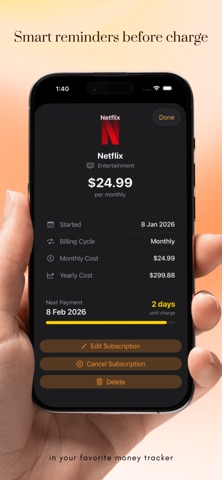
Manual payments and on-the-day reminders For subscriptions you pay yourself, Subcut now shows exactly where each one stands: upcoming, due soon, due today, overdue or paid. Pay a few days early or on the day, catch up on a missed month, and undo if you tap by mistake. Changing a start or payment date no longer marks anything as paid. Reminders can now arrive on the due date itself, at a time you pick, with a nudge if a payment slips by. Mark it as paid, or get reminded tomorrow, right from the notification. Also in this update: • A Payments due card at the top of your subscriptions shows what's waiting and how much • Cancellation guides now show the right steps for each service • Added the Honduran lempira, and fixed exchange rates for 10 currencies that were converting 1 to 1 • Find a currency by name, country or symbol, and change a subscription's currency when you edit it • Fixed a crash some free users saw in Hindi, Japanese, Korean and Turkish
Price & rating history · US
Reconstructed from the listing changes AppTracker has observed in this storefront. A field is charted once it has changed more than once, and each line starts at the value it moved from.
Average rating · ★ 4.95 now · 2 changes on record
Ratings breakdown · US
The star breakdown behind this app's rating in this storefront.
In-app purchases · US
What this app sells inside itself, grouped by kind and priced for this storefront.
Screenshots




Keywords this app targets
Search terms AppTracker associates with this app — estimates, not search volume. ❝ = in the app's title; a highlighted number is its current position for that term.
Similar apps
Competitors and close alternatives, as estimated by AppTracker.
 Subscription Manager: Subo
Gestalt Labs
3 shared topics · 3 shared title words
Subscription Manager: Subo
Gestalt Labs
3 shared topics · 3 shared title words
 Subscription Manager - ReSubs
Christian Krueger
2 shared topics · 3 shared title words
Subscription Manager - ReSubs
Christian Krueger
2 shared topics · 3 shared title words
 Subtract: Cancel Subscriptions
88 BILISIM YAZILIM ANONIM SIRKETI
2 shared topics
Subtract: Cancel Subscriptions
88 BILISIM YAZILIM ANONIM SIRKETI
2 shared topics
 Subscription & Bill Manager
Ryunosuke Nagase
2 shared topics · 2 shared title words
Subscription & Bill Manager
Ryunosuke Nagase
2 shared topics · 2 shared title words
 SnapSub: Subscription Tracker
Hoang Nguyen
1 shared topic · 1 shared title word
SnapSub: Subscription Tracker
Hoang Nguyen
1 shared topic · 1 shared title word
 SubCaddy: Subscription Tracker
DZMITRY ADZIARYKHA
1 shared topic · 1 shared title word
SubCaddy: Subscription Tracker
DZMITRY ADZIARYKHA
1 shared topic · 1 shared title word
 SubTracker: Subscriptions
Saroar Khandoker
SubTracker: Subscriptions
Saroar Khandoker
 Subtle: Subscription Tracker
NORTH STUDIO LLC
Subtle: Subscription Tracker
NORTH STUDIO LLC
About
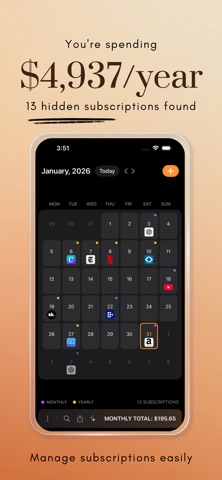
Most people are paying for subscriptions they forgot they had. Subcut helps you find them, then cancel the ones you do not want. Scan a bank or credit card statement and Subcut surfaces the recurring charges hiding inside it. The free trial that quietly started billing. The app you stopped opening months ago. The service you meant to cancel and never did. You see exactly what you are paying, and what it adds up to over a year. Find Forgotten Subscriptions • Bank statement import (CSV and PDF): upload a statement and Subcut picks out the recurring charges in about a minute • Email import (Gmail): scan receipts and confirmation emails to detect services automatically • App Store import: pull in your Apple subscriptions instantly • No manual typing, no guessing How import works: your statement or receipts are sent to a secure service that reads them to find recurring charges. They are used only to detect your subscriptions, and are never sold or shared. See Everything in One Calendar • Monthly calendar of every upcoming bill • Tap any day to see what is due • Color-coded categories • Automatic monthly and yearly totals Know what you pay, when you pay, and how much it really costs. Reminders Before You Get Charged • Alerts before each billing date • Free-trial ending warnings so you can cancel in time • Custom reminder timing • Snooze or turn off per subscription Cancel, With Guidance Subcut helps you actually cancel, not just track. • Step-by-step cancellation instructions • Website links, email templates, and phone numbers • Difficulty rating and estimated time • Savings tracked after you cancel Keep Everything Organized For every subscription you can store the name and icon, price and currency, billing cycle, category, notes, cancellation link, and trial status. Categories include Entertainment, Music, Productivity, Cloud, Gaming, Finance, Fitness, Education, Shopping, Utilities, and more. Understand Your Spending • Monthly and yearly totals • Monthly equivalent for annual plans • History of archived subscriptions • A running total of what you have saved by cancelling Privacy • No account required to start • Your subscription data is stored on your device, with optional iCloud sync • Face ID and Touch ID lock • No ads, no third-party tracking, no selling your data The app works offline for tracking and managing your subscriptions. Import needs a connection, because it reads your statements to find charges. Export Anytime Export to CSV or JSON for spreadsheets and budgeting tools. Subcut Pro • Unlimited subscriptions • Bank statement import • Data export • Custom notification timing • Priority support Free users can track up to 5 subscriptions. Terms of Use (EULA): https://subcut.xyz/terms Privacy Policy: https://subcut.xyz/privacy
What's new · 2.8
Manual payments and on-the-day reminders For subscriptions you pay yourself, Subcut now shows exactly where each one stands: upcoming, due soon, due today, overdue or paid. Pay a few days early or on the day, catch up on a missed month, and undo if you tap by mistake. Changing a start or payment date no longer marks anything as paid. Reminders can now arrive on the due date itself, at a time you pick, with a nudge if a payment slips by. Mark it as paid, or get reminded tomorrow, right from the notification. Also in this update: • A Payments due card at the top of your subscriptions shows what's waiting and how much • Cancellation guides now show the right steps for each service • Added the Honduran lempira, and fixed exchange rates for 10 currencies that were converting 1 to 1 • Find a currency by name, country or symbol, and change a subscription's currency when you edit it • Fixed a crash some free users saw in Hindi, Japanese, Korean and Turkish
Details