

Eye Measure – PD Ruler
Ramkumar Vellaisamy · Medical
Independent analytics for this App Store listing. AppTracker is not affiliated with Ramkumar Vellaisamy.
Chart standing · US
What changed · US
Listing changes AppTracker has observed for this app in this storefront — new versions, price moves, rating shifts, and store copy.
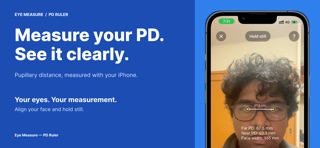
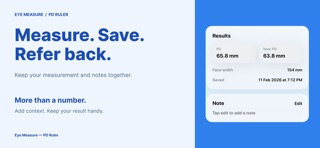
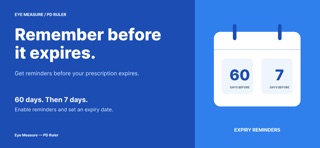
The biggest update yet — Eye Measure is now your complete eye records app: • All-new guided measuring — a face guide, live scan and clear "ready" signal make accurate PD effortless • Prescription Vault — snap the front and back of your paper prescription, add notes, and keep everything next to your PD • Expiry reminders — get notified 60 and 7 days before your prescription runs out • PDF Report — export an optician-ready report with your exact PD and prescription photos • Beautiful new design — refreshed onboarding, home screen and animations throughout • Premium now includes Family Sharing — one purchase covers the whole family • Fully localized in 40+ languages Questions or feedback? Email us from Settings — we read everything.
Ratings breakdown · US
The star breakdown behind this app's rating in this storefront.
In-app purchases · US
What this app sells inside itself, grouped by kind and priced for this storefront.
Screenshots



Keywords this app targets
Search terms AppTracker associates with this app — estimates, not search volume. ❝ = in the app's title; a highlighted number is its current position for that term.
Similar apps
Competitors and close alternatives, as estimated by AppTracker.
 PD Meter – Pupil Distance
MUHAMMET USLU
PD Meter – Pupil Distance
MUHAMMET USLU
 PD Meter - Pupillary Distance
MITSUKO MARGOT KUBOTA ONO
PD Meter - Pupillary Distance
MITSUKO MARGOT KUBOTA ONO
 Pupillary Distance
My Call Bag LLC
Pupillary Distance
My Call Bag LLC
 Optical Measurements for ECPs
Lens Shapers Inc.
Optical Measurements for ECPs
Lens Shapers Inc.
 Pupil Distance PD Measure
GlassifyMe
Pupil Distance PD Measure
GlassifyMe
 Eye MeasureーPupillary Distance
Aleksei Metelkin
Eye MeasureーPupillary Distance
Aleksei Metelkin
 Pupillary Distance Measure X
VisTech.Projects LLC
Pupillary Distance Measure X
VisTech.Projects LLC
 Pupillary Distance Measure
VisTech.Projects LLC
Pupillary Distance Measure
VisTech.Projects LLC
About
Eye Measure – PD Ruler measures your pupillary distance (PD) in seconds with your iPhone's front camera — and keeps all your eye records in one private place. Measure PD in seconds • Align your face in the on-screen guide • The live scan detects both pupils and tells you when it's ready • Tap Save to store the result with a photo for reference Key Features • Far and near PD in millimeters, decimal-precise • Prescription Vault: photograph the front and back of your prescription and keep it next to your PD • Expiry reminders 60 and 7 days before your prescription runs out • PDF Report: export an optician-ready report with your PD and prescription photos • Full history with photos, notes and search • Share your results with your optician or online store • On-device processing: no photos uploaded, no account required • Available in 40+ languages Designed for everyday use Whether you're ordering glasses online, setting up a VR headset or keeping your family's prescriptions organized, Eye Measure makes it easy. Eye Measure Premium Measuring is free. Your exact PD, the Prescription Vault, PDF reports and sharing are part of Eye Measure Premium, available as an auto-renewing subscription or a one-time lifetime purchase. Premium supports Family Sharing, so one purchase covers the whole family. Subscriptions renew automatically unless cancelled at least 24 hours before the end of the current period; manage them anytime in your App Store account settings. Eye Measure is not a medical device. Always confirm your PD and prescription with an eye care professional. Support: support@reku.dev Privacy Policy: https://reku-indie.notion.site/Privacy-Policy-3038c096503c80099cabf39c57a32696?source=copy_link Terms of Use: https://reku-indie.notion.site/Terms-of-Service-3038c096503c8073abf7fc3d1449326d?source=copy_link
What's new · 1.0.2
The biggest update yet — Eye Measure is now your complete eye records app: • All-new guided measuring — a face guide, live scan and clear "ready" signal make accurate PD effortless • Prescription Vault — snap the front and back of your paper prescription, add notes, and keep everything next to your PD • Expiry reminders — get notified 60 and 7 days before your prescription runs out • PDF Report — export an optician-ready report with your exact PD and prescription photos • Beautiful new design — refreshed onboarding, home screen and animations throughout • Premium now includes Family Sharing — one purchase covers the whole family • Fully localized in 40+ languages Questions or feedback? Email us from Settings — we read everything.
Details