

Daily Traction
KALEB MICHAEL ROGAN SOFER · Productivity
Independent analytics for this App Store listing. AppTracker is not affiliated with KALEB MICHAEL ROGAN SOFER.
Chart standing · US
What changed · US
Listing changes AppTracker has observed for this app in this storefront — new versions, price moves, rating shifts, and store copy.
The widget keeps up. Change a habit or task on another device and the widget catches up without you opening Traction, and it turns over to the new day at the time your day starts. Widget • A finished day stays on screen, so the last tick can still be undone • Turns over at your day-start time, with the week ahead already prepared • Picks up changes made elsewhere in the background Getting started • Two checklists on Home take a new account from the first habit to the community: Getting started, then Join the Community • Onboarding is shorter: add one habit, or skip straight in Feedback • One form for bugs, ideas and anything else, with screenshots • Your reports: see where each report stands and read my replies • Shake your phone to report a problem (switch it off in Settings) Also • A short note from me, shown once • Logging a value habit from a group screen opens it on Home instead of a missing page • Signing out stops this phone receiving the old account's notifications
In-app purchases · US
No in-app purchases.
Screenshots




Keywords this app targets
Search terms AppTracker associates with this app — estimates, not search volume. ❝ = in the app's title; a highlighted number is its current position for that term.
Similar apps
Competitors and close alternatives, as estimated by AppTracker.
 Arise: Ascend
Surender Yerram
Arise: Ascend
Surender Yerram
 Habit Road - Habit Tracker
LMWA HOLDINGS LLC
Habit Road - Habit Tracker
LMWA HOLDINGS LLC
 HabitTap Daily Tracker
SHOTA MIYAHIRA
HabitTap Daily Tracker
SHOTA MIYAHIRA
 Streaker - Habit Tracker
Ian Sheldon
Streaker - Habit Tracker
Ian Sheldon
 Habit Grid - Track your Habits
Eyeline Tech LLC
Habit Grid - Track your Habits
Eyeline Tech LLC
 Habito: Habit Tracker Offline
Amir Fahd Hadji Usop
Habito: Habit Tracker Offline
Amir Fahd Hadji Usop
 CREATE7 - Motivation Calendar
DENIS MICHEL
CREATE7 - Motivation Calendar
DENIS MICHEL
 Habit Tracker Widget
Le Giang Nam
Habit Tracker Widget
Le Giang Nam
About
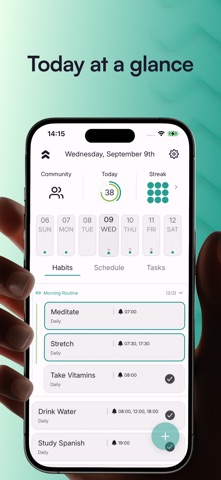
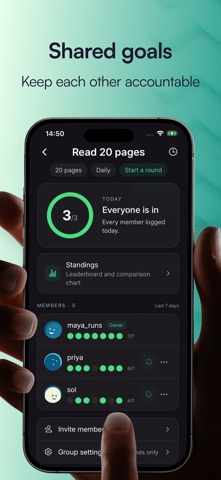
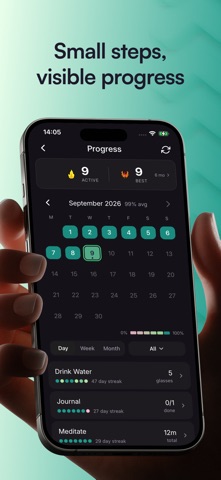
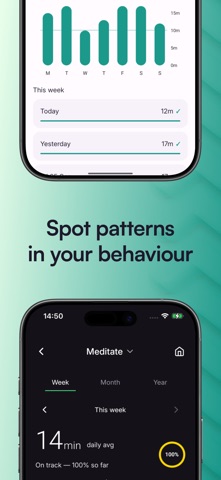
Whether you're on a solo mission to build consistency or part of a group keeping each other accountable, Traction is a low-friction interface for setting goals and tracking progress. TODAY Open Traction and instantly see what's up next. • Your daily dashboard keeps priorities and habits front and center. • Quickly swipe items in the app or create a widget for your home screen. • Finish the day with a clean slate. GROUP GOALS Some goals are better accomplished when you're not alone. • Create or join a group around a shared goal. • Track each other's progress over a month, a year or however long you need. • React, comment and engage with your group's progress. • Adjust the targets for the next round. FORM ROUTINES Linking habits is proven to improve permanence in habit formation. • Chain habits together to form solid routines. • View and check off routines from your home screen. • Edit and grow routines as your habits take hold. BUILT FOR LOW FRICTION Sometimes we forget to log progress. • Sync Traction with your devices to capture progress in the background. • Logged habits sync back to your device so your records agree. • Get notified about high-priority tasks. • Complete items through notifications or a home screen widget. • Missed a day? Edit your history to tell the real story. MOMENTUM THAT MOTIVATES Traction prioritizes momentum over streaks. • Build momentum by showing up consistently over a 14-day period. • Metrics, graphics and calendars help identify patterns in your behavior. • See which habits are sticking and which need attention. PERSONALIZATION Set up Traction around the way you live. • Choose when your day starts, so a late night still counts as today. • Keep low-priority notifications to a minimum. • Set quiet hours so nothing lands at the wrong time. • Snooze, complete or skip a reminder without opening the app. • Customize the way others see you through avatars, nicknames and more. TAKE A BREAK Taking time off shouldn't erase your progress. • Pause streaks while you're away. • Pick up where you left off when you return.
What's new · 1.0.14
The widget keeps up. Change a habit or task on another device and the widget catches up without you opening Traction, and it turns over to the new day at the time your day starts. Widget • A finished day stays on screen, so the last tick can still be undone • Turns over at your day-start time, with the week ahead already prepared • Picks up changes made elsewhere in the background Getting started • Two checklists on Home take a new account from the first habit to the community: Getting started, then Join the Community • Onboarding is shorter: add one habit, or skip straight in Feedback • One form for bugs, ideas and anything else, with screenshots • Your reports: see where each report stands and read my replies • Shake your phone to report a problem (switch it off in Settings) Also • A short note from me, shown once • Logging a value habit from a group screen opens it on Home instead of a missing page • Signing out stops this phone receiving the old account's notifications
Details