

Chronote: Timestamp Notes
Martin Pietrowski · Utilities
Independent analytics for this App Store listing. AppTracker is not affiliated with Martin Pietrowski.
Chart standing · US
What changed · US
Listing changes AppTracker has observed for this app in this storefront — new versions, price moves, rating shifts, and store copy.
Your notes can now leave this device — and find their way back. iCloud sync Notes sync automatically across every device signed in to the same Apple Account. Settings shows you whether sync is on. Export and share Share one entry, one note, or everything at once — as Markdown, plain text, CSV for Numbers and Excel, or a complete backup archive. Nothing disappears by accident Deleted notes and entries move to Recently Deleted and stay there for 30 days. Every deletion offers an immediate Undo, and deleting a note that already holds entries now asks first. Bring a backup back Import a backup archive at any time. Importing only ever adds — nothing already on your device is replaced or removed.
Ratings breakdown · US
The star breakdown behind this app's rating in this storefront.
Screenshots


About
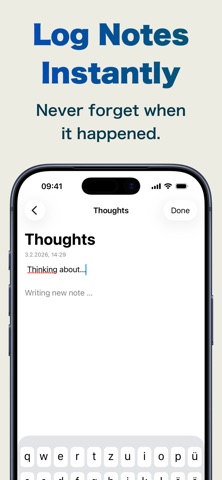
Never forget when it happened. Chronote captures your thoughts instantly — with automatic timestamps on every note. Quick, clean, and chronological: perfect for journaling moments, logging activities, tracking ideas, or building a reliable daily log. Jot down anything in seconds: a fleeting idea, meeting takeaway, symptom, habit, or random memory. Chronote adds the exact date & time automatically — no manual entry needed. Review your notes in a beautiful timeline view, organized by time and grouped into custom topics. Whether you're reflecting on life, documenting projects, or simply never wanting to wonder "when did I write that?", Chronote keeps your thoughts dated, organized, and always accessible.
What's new · 2026.2
Your notes can now leave this device — and find their way back. iCloud sync Notes sync automatically across every device signed in to the same Apple Account. Settings shows you whether sync is on. Export and share Share one entry, one note, or everything at once — as Markdown, plain text, CSV for Numbers and Excel, or a complete backup archive. Nothing disappears by accident Deleted notes and entries move to Recently Deleted and stay there for 30 days. Every deletion offers an immediate Undo, and deleting a note that already holds entries now asks first. Bring a backup back Import a backup archive at any time. Importing only ever adds — nothing already on your device is replaced or removed.
Details