

Punch Clock: Hours & Pay
Dave Oakley · Business
Independent analytics for this App Store listing. AppTracker is not affiliated with Dave Oakley.
Chart standing · US
What changed · US
Listing changes AppTracker has observed for this app in this storefront — new versions, price moves, rating shifts, and store copy.
Punch Clock 2.1 — Your pay, handled • Weekly Pay Summary: when your week ends, see hours, pay, overtime and your best day on the clock screen — and share it as text. Pro sends it as a PDF timesheet. • Automatic backups: Punch Clock now keeps a daily backup of your hours. Restore or import from Settings → Data. • Forgot to punch out? A reminder after 10 hours, and a Fix shift sheet on your next open — nothing changes without you. • Widgets and Control Center now show your running shift. • Pro plans: Yearly (7-day free trial), Monthly, or Lifetime. Everything you track stays yours and exportable, free. • Fixes: iCloud sync turns on after you go Pro; a failed punch-out never removes your shift.
Screenshots




About
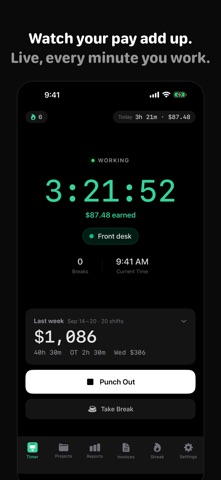
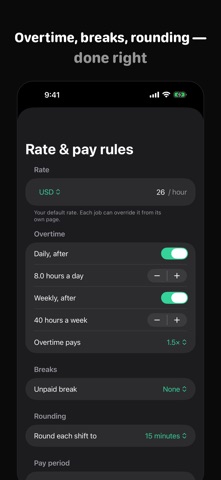
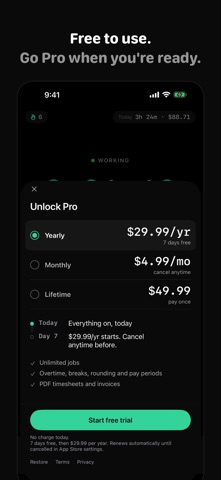
Punch Clock is a time clock and hours tracker for anyone paid by the hour. Punch in with one tap, watch your pay add up while you work, and send a clean timesheet when the week is done, with overtime, breaks and rounding worked out for you. Free on iPhone, iPad and Mac. No account, no ads. CLOCK IN. SEE WHAT YOU'VE EARNED. • One tap to punch in, one tap to punch out • Set your hourly rate and see your earnings live, on the clock, the Lock Screen and the Mac menu bar • Today and this week: hours and pay at a glance • Weekly Pay Summary: when your week ends, see hours, pay, overtime and your best day, and share it as text PAY RULES DONE RIGHT (PRO) • Overtime after 8 hours a day or 40 a week: you set the threshold and the multiplier • Unpaid breaks deducted automatically • Round to 6 or 15 minutes the way your employer does • Weekly, biweekly, semimonthly or monthly pay periods • Your hourly rate and currency are free; overtime, breaks, rounding and pay periods are Pro TIMESHEETS YOU CAN SEND • Share your timesheet as text or CSV, free • Pro: a PDF timesheet with date, job, in, out, break, regular hours, overtime and pay, per-day subtotals and a signature line, or an Excel file with real dates and numbers • Edit any entry after the fact and fill gaps in the Day view NEVER MISS A PUNCH • Live Activity on the Lock Screen, widgets and a Control Center button • Siri and Shortcuts: punch in and out by voice • Forgot to punch out? A reminder after 10 hours, and a Fix shift sheet on your next open. Nothing changes without you • Automatic daily backups you can restore from Settings A TIME CLOCK IN YOUR MAC MENU BAR • The Mac app is free: a menu bar clock that shows elapsed time and earnings, like 3:20 · $83 • Away detection: step away while punched in and choose Keep or Don't count it when you return • With Pro, iCloud keeps your Mac and iPhone in sync FREELANCING? TURN HOURS INTO INVOICES (PRO) • Create an invoice from your timesheet in a few taps • Taxes, a discount and a payment link on every invoice • Recurring invoices and an overdue reminder when a client hasn't paid PRIVATE BY DESIGN Your hours stay on your devices and in your own iCloud. No account, no ads, no location tracking. FREE, OR PRO WHEN YOU NEED MORE Free: the time clock with live earnings at your hourly rate, one job, Lock Screen and Live Activity, widgets, Control Center, Siri, Weekly Pay Summary, text and CSV timesheets, automatic backups, the forgotten-punch fix, and the Mac menu bar clock with away detection. New installs can browse the last 14 days of history; older entries are kept and exports are always free. Punch Clock Pro: unlimited jobs and per-job rates, pay rules (overtime, breaks, rounding, pay periods), PDF and Excel timesheets, invoices, iCloud sync between Mac and iPhone, and your full history. Pro is $4.99 per month, $29.99 per year with a 7-day free trial, or $49.99 once for Lifetime. Prices are in US dollars and vary by country. Payment is charged to your Apple Account when you confirm the purchase. Subscriptions renew automatically unless cancelled at least 24 hours before the end of the current period, and your account is charged for renewal within 24 hours before the period ends. Manage or cancel in your App Store account settings. Any unused part of a free trial is forfeited when you buy a subscription. Support: https://www.punchclockapp.com/support.html Privacy: https://www.punchclockapp.com/privacy.html Terms: https://www.punchclockapp.com/terms.html
What's new · 2.1.0
Punch Clock 2.1 — Your pay, handled • Weekly Pay Summary: when your week ends, see hours, pay, overtime and your best day on the clock screen — and share it as text. Pro sends it as a PDF timesheet. • Automatic backups: Punch Clock now keeps a daily backup of your hours. Restore or import from Settings → Data. • Forgot to punch out? A reminder after 10 hours, and a Fix shift sheet on your next open — nothing changes without you. • Widgets and Control Center now show your running shift. • Pro plans: Yearly (7-day free trial), Monthly, or Lifetime. Everything you track stays yours and exportable, free. • Fixes: iCloud sync turns on after you go Pro; a failed punch-out never removes your shift.
Details