
Chart standing · US
Ratings breakdown · US
The star breakdown behind this app's rating in this storefront.
Screenshots





About
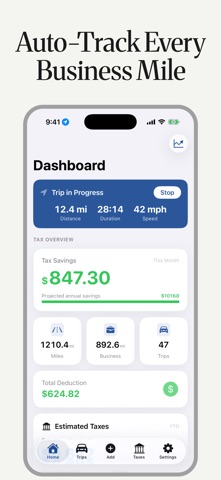
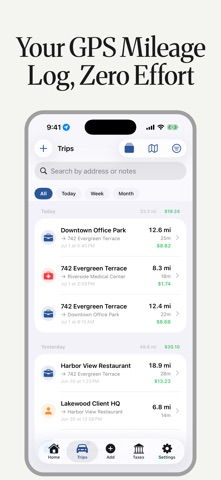
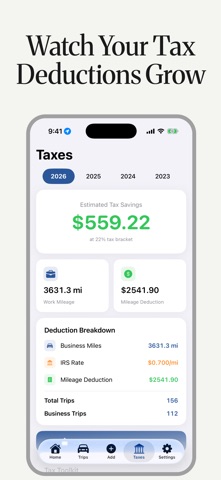
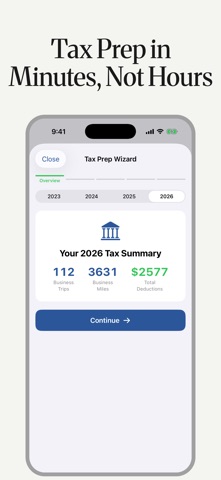
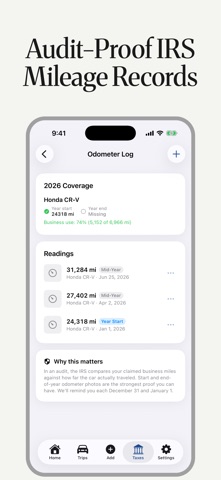
Stop losing money on unclaimed mileage deductions. TaxMiles automatically detects every business drive, tracks your miles in the background, and tells you exactly what you'll save — and what to set aside for taxes. No manual logging needed. The average self-employed professional misses $6,500/year in mileage deductions. TaxMiles makes sure you don't. AUTO-DETECT EVERY TRIP • Automatic trip detection using GPS + motion sensors • Runs silently in the background — no buttons to press • Plug-N-Go and car Bluetooth auto-start triggers • CarPlay — start or stop a trip right from your car's screen (Pro) • Live Activity, Dynamic Island, and Home Screen widgets • Missed trip recovery catches drives you forgot KNOW WHAT YOU OWE • Real-time tax estimate — see exactly how much to set aside, updated with every mile • Log income or import your gig app earnings • Deduction Finder — every Schedule C write-off, tailored to your line of work • True Hourly Wage — what you really make per hour after vehicle costs, by platform • AI tax assistant answers your mileage and tax questions 24/7 MAXIMIZE YOUR DEDUCTIONS • Current IRS mileage rates built in, updated automatically • Swipe right = business, left = personal — categorize in seconds • AI auto-categorization learns your patterns • Commute Shield automatically excludes non-deductible commutes AUDIT-READY DOCUMENTATION • Audit Shield score shows your IRS readiness (0–100) • Odometer log with dated dashboard photos — the proof the IRS asks for • Attach trip photos and voice notes for evidence • Calendar integration matches trips to meetings • CPA Export Package — one tap to your accountant, or link your CPA with a code SMART EXPENSE TRACKING • Log tolls, parking, gas, and maintenance • Receipt scanning extracts amounts automatically (Pro) • Expenses link directly to trips • Fuel economy analytics track your MPG trends PROFESSIONAL REPORTS • IRS-ready PDF mileage log and CSV export • CPA tax package with cover letter • Mileage invoicing for client billing • Client profit analysis — see which clients pay off SWITCHING FROM ANOTHER APP? • Import your history from MileIQ, Everlance, or Stride — even Google location history (Pro) PLAN, OPTIMIZE & STAY MOTIVATED • Route planner and trip templates for frequent routes • Deduction Velocity — your $/hour and $/mile efficiency • Forecast your projected annual savings • Savings goals, monthly challenges, streaks, and Year in Review • Invite friends — they get 10 bonus trips, you earn free Pro FREE INCLUDES: 40 trips/month • Auto trip detection • Real-time tax estimate • Deduction Finder • True Hourly Wage • Odometer log • AI tax assistant (5 questions/mo) • Expense tracking • Savings goals & challenges • Trip templates (3) • Route planner • IRS rate alerts PRO UNLOCKS ($39.99/yr, $5.99/mo, or $79.99 lifetime — 7-day free trial): Unlimited trips • Unlimited AI assistant • AI categorization • Receipt scanning • Cloud sync • CPA exports • Calendar integration • Voice notes • Trip splitting • CarPlay • Trip history import • Full Year in Review • Audit certificates • Client analytics Questions? Reach us at support@taxmilesapp.com TAXMILES PRO — SUBSCRIPTION DETAILS • TaxMiles Pro (Monthly): $5.99/month • TaxMiles Pro (Annual): $39.99/year ($3.33/month — save 44%) • TaxMiles Pro (Lifetime): $79.99 one-time purchase — not a subscription, nothing renews Monthly and Annual plans include a 7-day free trial. Payment will be charged to your Apple ID account at the end of the free trial period. Subscriptions automatically renew unless canceled at least 24 hours before the end of the current period. You can manage and cancel your subscription at any time in your Apple ID account settings. Terms of Use (EULA): https://taxmilesapp.com/terms.html Privacy Policy: https://taxmilesapp.com/privacy.html TaxMiles uses background location to automatically detect and record your drives. Continued use of GPS running in the background can decrease battery life.
What's new · 3.0
TaxMiles 3.0 is our biggest update ever - every screen redesigned, and TaxMiles is now on CarPlay. CarPlay - Start or stop a trip right from your car's screen and glance at today's miles and this month's deduction. A cleaner, faster design • Home now leads with what matters: your tax savings, live • Trip details show your route as a start-to-finish timeline • Trips are grouped by day with miles and deductions per day • Swipe-to-classify got clearer: right = business, left = personal, with live totals Smarter reports • One-tap date ranges (This Month, Last Quarter, Year to Date) • See exactly how many trips your export includes before you send it More to love • Year in Review, reimagined as a story you'll want to share • Invite friends: they get 10 bonus trips, you get a month of Pro free • Prices now shown in your local currency Under the hood • More reliable tracking in battery-saver mode • Trips no longer end early in slow traffic • Better battery life when you're not driving • Quarterly tax estimates now match IRS payment periods exactly • Widgets stay accurate after every trip • Many VoiceOver improvements Love TaxMiles? A quick review helps more drivers keep more of what they earn.
Details