

Narratorr - Audiobook & TTS
Raghav Anand Nath · Books
Independent analytics for this App Store listing. AppTracker is not affiliated with Raghav Anand Nath.
Chart standing · US
What changed · US
Listing changes AppTracker has observed for this app in this storefront — new versions, price moves, rating shifts, and store copy.
CARPLAY Narratorr now has its own CarPlay app. Pick up where you left off, browse your library by chapter and change the speed on the car's screen, even when the app is closed on your iPhone. AI VOICES THAT WORK OFFLINE Natural AI voices that run on your iPhone, in 7 languages. One download of about 111 MB, then listen free with no limit and no internet, even with the screen locked. Needs an A15 or M1 chip or newer. Speech Settings > Offline AI. UP NEXT Line up books, chapters and web pages. Touch and hold one, then choose Play Next or Add to Up Next. Each starts by itself when the last one ends. WEB PAGES IN CONTINUE The pages you read or listen to in the browser now show up in Continue Reading, in CarPlay and in the widget, and reopen at the paragraph you left, even offline. RESEARCH PAPERS Paper PDFs read in the right order, column by column, and the text inside tables and figures is skipped. Narration skips citations, footnote markers and references; the text stays on screen. Speech Settings > Skip While Reading. EASIER READING A reading ruler that follows the narration, Bold Word Starts, and the OpenDyslexic and Atkinson Hyperlegible fonts. Themes & Settings > Customize. SMOOTHER Text runs edge to edge under the status bar, long web chapters open much faster, and every voice, device voices included, highlights the word it speaks. EPUB chapters follow the book's table of contents. ALSO NEW • Design your own theme: colors, fonts and spacing, or let any AI app make one • Bookmarks with search, sorting and notes • A compact, Safari-style browser menu • The mini player shows the author or website, and has an AirPlay button • Export chapters as M4A, or a whole book as one M4B audiobook with chapters • Scan printed pages or photos into a book, or paste any text • Continue Listening widget and a Control Center control • Clean PDF reading skips headers, footers and page numbers • Better web parsing: code blocks, AO3, Royal Road • Pause Between Paragraphs setting • Using Narratorr on more than one device? Update it on all of them so your library syncs correctly
Ratings breakdown · US
The star breakdown behind this app's rating in this storefront.
In-app purchases · US
What this app sells inside itself, grouped by kind and priced for this storefront.
Screenshots


About
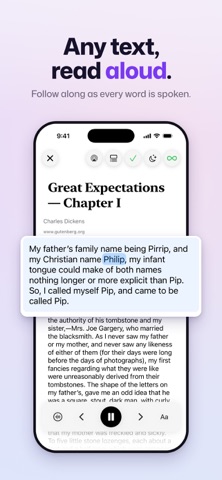
Your reading list, finally finished. You've got ebooks you've been meaning to read for years. Fanfics bookmarked in seventeen tabs. Articles saved for later. The problem isn't wanting to read — it's finding the time to sit down and do it. Narratorr turns all of it into audio, with natural AI voices you can use for free, even offline. Keep up with your list while you commute, cook, fold laundry, fall asleep. AI VOICES THAT WORK OFFLINE Offline AI runs natural AI voices on your iPhone itself. One download of about 111 MB covers all 7 languages: English (US and UK accents), Spanish, French, Hindi, Italian, Brazilian Portuguese and Mandarin. After that, listen free with no time limit and no internet, even with the screen locked. Needs an iPhone or iPad with an A15 or M1 chip or newer. WORKS WITH EVERYTHING YOU READ • EPUBs, PDFs and TXT files from the Files app; links and text from the Share sheet. • Webpages, fanfics and webnovels in the built-in browser, with clean reading for AO3, Royal Road, code blocks and more. • Paste any text, or scan printed pages and photos. Text recognition runs on your device, and nothing is uploaded. • Clean PDF reading skips headers, footers, page numbers and footnote markers, and rejoins words split across lines. • Research papers are read column by column in whole paragraphs, skipping citations, footnote markers and references. Choose what to skip in Skip While Reading. TAKE YOUR AUDIO ANYWHERE Export chapters as M4A files, or a whole book as one M4B audiobook with chapter markers, using Offline AI or device voices. Play them in any audiobook app. THREE VOICE ENGINES, ONE APP • Offline AI: free and private, right on your device. • Online AI: 45+ premium AI voices in the same 7 languages, with Mandarin in Beta. • Device voices: dozens of free built-in iOS voices. No account, no subscription. • Mixed-language text reads naturally: English inside Chinese and Chinese inside English, and Hindi with English. • Open a book in another language and Narratorr notices, then offers a matching voice. • Speed from 0.5x to 2x with Offline AI and device voices, up to 4x with Online AI, plus a Pause Between Paragraphs setting for your own pace. FIX HOW ANY WORD IS SPOKEN Tired of the voice butchering "Hermione"? Select the word, tap Pronounce, type how it should sound, save. Done. Works on every voice, AI and built-in, and syncs across your devices so you only teach it once. A READER WORTH READING IN 5 built-in themes, or design your own, with help from any AI app if you like, and share it as a file or link. 11 fonts. Adjustable size, spacing, margins. Sleep timer, by the minute or at the end of a chapter. Auto-play through chapters, and an Up Next queue for books, chapters and web pages. Plays through AirPlay and Bluetooth. ONE TAP BACK TO YOUR BOOK A Continue Listening widget for your Home Screen and Lock Screen, and play/pause in Control Center. In the car, CarPlay shows your recent books and your whole library, chapter by chapter. Or ask Siri: "Resume reading in Narratorr" or "Speed up Narratorr." SYNCED AND SAVED Books, progress, bookmarks, pronunciations and settings sync via iCloud: start on your iPad, finish on your phone. Bookmark any line, add notes and search them, and track your listening time and streaks in stats. BUILT FOR EVERYONE Works with VoiceOver and Voice Control. Reading aids: a reading ruler that follows the narration, Bold Word Starts, and the OpenDyslexic and Atkinson Hyperlegible fonts. PRICING • Offline AI voices: free, with no time limit. • Device voices: free forever. No account required. • 1 hour of premium Online AI voices free to try. • Unlimited Online AI voices: monthly or yearly subscription, at the price shown in the app. One subscription covers all your devices. Billed by Apple, cancel any time. • No ads. Ever. Terms of Use: https://www.apple.com/legal/internet-services/itunes/dev/stdeula/ Privacy Policy: https://narratorr.app/privacy
What's new · 1.11
CARPLAY Narratorr now has its own CarPlay app. Pick up where you left off, browse your library by chapter and change the speed on the car's screen, even when the app is closed on your iPhone. AI VOICES THAT WORK OFFLINE Natural AI voices that run on your iPhone, in 7 languages. One download of about 111 MB, then listen free with no limit and no internet, even with the screen locked. Needs an A15 or M1 chip or newer. Speech Settings > Offline AI. UP NEXT Line up books, chapters and web pages. Touch and hold one, then choose Play Next or Add to Up Next. Each starts by itself when the last one ends. WEB PAGES IN CONTINUE The pages you read or listen to in the browser now show up in Continue Reading, in CarPlay and in the widget, and reopen at the paragraph you left, even offline. RESEARCH PAPERS Paper PDFs read in the right order, column by column, and the text inside tables and figures is skipped. Narration skips citations, footnote markers and references; the text stays on screen. Speech Settings > Skip While Reading. EASIER READING A reading ruler that follows the narration, Bold Word Starts, and the OpenDyslexic and Atkinson Hyperlegible fonts. Themes & Settings > Customize. SMOOTHER Text runs edge to edge under the status bar, long web chapters open much faster, and every voice, device voices included, highlights the word it speaks. EPUB chapters follow the book's table of contents. ALSO NEW • Design your own theme: colors, fonts and spacing, or let any AI app make one • Bookmarks with search, sorting and notes • A compact, Safari-style browser menu • The mini player shows the author or website, and has an AirPlay button • Export chapters as M4A, or a whole book as one M4B audiobook with chapters • Scan printed pages or photos into a book, or paste any text • Continue Listening widget and a Control Center control • Clean PDF reading skips headers, footers and page numbers • Better web parsing: code blocks, AO3, Royal Road • Pause Between Paragraphs setting • Using Narratorr on more than one device? Update it on all of them so your library syncs correctly
Details