

Coloring Book - Drawing pages
Ilya Klimenko · Entertainment
Independent analytics for this App Store listing. AppTracker is not affiliated with Ilya Klimenko.
Chart standing · US
What changed · US
Listing changes AppTracker has observed for this app in this storefront — new versions, price moves, rating shifts, and store copy.
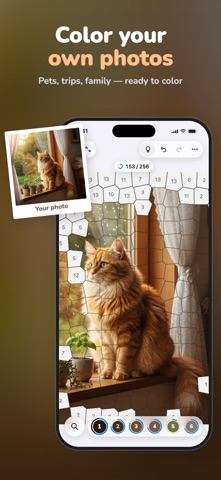
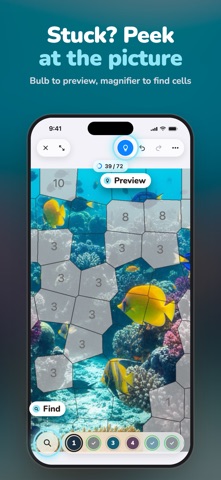
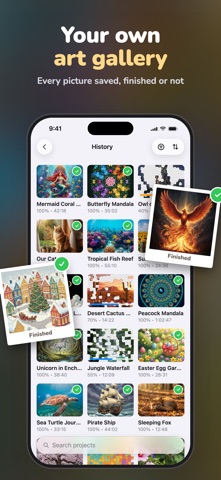
Our biggest update yet! Finish a picture to celebrate with confetti, see your stats, and watch a time-lapse video of your coloring. Save the video or the picture to Photos, or share it. Choose a level: from Easy (about 100 big cells) to Expert (about 800 tiny ones). Your Photos: crop any photo, pick a level, and start coloring. Random Canvas: smooth color gradients, any palette you like, and a square, portrait, landscape, or full-screen canvas. Stuck? The bulb lets the picture show through, and the magnifier finds cells you haven't colored yet. Clearer palettes with no look-alike colors. When you finish a color, the next one is picked for you. A fresh look for iOS 26 and a new landscape layout on iPhone and iPad. A new tutorial: learn by coloring your first picture. A new For Grown-ups section in Settings, with a simpler parental check. Smoother zooming, faster canvas creation, and reliable saving of your progress.
Screenshots




About
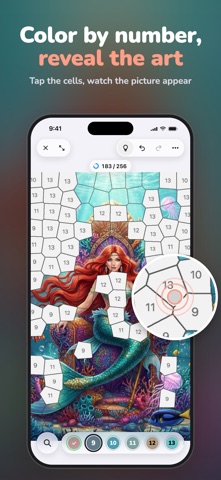
Introducing ColoringBook, a creative coloring experience that transforms any image into a beautiful numbered canvas. With advanced on-device processing and intuitive controls, enjoy relaxing coloring sessions with stunning results in seconds. Turn your device into a personal coloring studio with three powerful modes: generate unique random canvases, explore our curated image library, or transform your own photos into custom coloring pages. ColoringBook's smart algorithms analyze colors and create perfectly balanced regions, delivering professional-quality coloring experiences tailored to your preferences. The future of digital coloring is here with ColoringBook, offering a growing collection of images and features that will continually enhance your creative relaxation. For iPad and iPhone users, ColoringBook integrates seamlessly with your device, taking full advantage of the display and touch capabilities. Experience smooth performance with an app designed for the ultimate coloring workflow. Key features: - Three Creative Modes: Generate random canvases, browse the curated library, or import your own photos to color. - Smart Color Analysis: Automatic palette extraction creates harmonious color schemes from any image. - Adjustable Complexity: Choose from multiple detail levels to match your skill and patience — from simple relaxation to intricate challenges. - Intuitive Touch Controls: Tap to fill, pinch to zoom, and rotate freely with natural gesture support. - Apple Pencil Support: Precise coloring experience for iPad users with full stylus compatibility. - Progress Tracking: Monitor your completion percentage and pick up right where you left off. - Undo & Redo: Experiment freely with full undo/redo support for every action. - Minimap Navigation: Easily navigate large canvases with the built-in overview map. - Auto-Save: Your progress is automatically saved, so you never lose your work. - Photo Import: Use your camera, photo library, or Files app to create personalized coloring pages. Experience the perfect blend of creativity and relaxation with ColoringBook. Transform any moment into a calming artistic journey and make ColoringBook your go-to creative escape today. Privacy Policy: https://tactmk.github.io/ColoringBook/ Terms of Use: https://www.apple.com/legal/internet-services/itunes/dev/stdeula
What's new · 1.1
Our biggest update yet! Finish a picture to celebrate with confetti, see your stats, and watch a time-lapse video of your coloring. Save the video or the picture to Photos, or share it. Choose a level: from Easy (about 100 big cells) to Expert (about 800 tiny ones). Your Photos: crop any photo, pick a level, and start coloring. Random Canvas: smooth color gradients, any palette you like, and a square, portrait, landscape, or full-screen canvas. Stuck? The bulb lets the picture show through, and the magnifier finds cells you haven't colored yet. Clearer palettes with no look-alike colors. When you finish a color, the next one is picked for you. A fresh look for iOS 26 and a new landscape layout on iPhone and iPad. A new tutorial: learn by coloring your first picture. A new For Grown-ups section in Settings, with a simpler parental check. Smoother zooming, faster canvas creation, and reliable saving of your progress.
Details