

AirCodum Agentum
Priyankar Kumar · Developer Tools
Independent analytics for this App Store listing. AppTracker is not affiliated with Priyankar Kumar.
Chart standing · US
What changed · US
Listing changes AppTracker has observed for this app in this storefront — new versions, price moves, rating shifts, and store copy.
Cline now has a dedicated tab with interactive sessions, menus and approval controls. Save and switch between named computers and Agentum instances. Pair with an optional QR code or manual details. Desktop mode gains pinch zoom, pan, scroll, drag, right-click and a text composer. Improved connection recovery, secure pairing and desktop responsiveness. Use Agentum 2 on your computer for the new features; older servers remain available through explicit legacy connection settings.
In-app purchases · US
No in-app purchases.
Screenshots


Similar apps
Competitors and close alternatives, as estimated by AppTracker.
 AgentsRoom: Dev Remote Control
CHAUVIN Jean-Baptiste Thibault
AgentsRoom: Dev Remote Control
CHAUVIN Jean-Baptiste Thibault
 Happy: Codex & Claude Code App
Bulka, LLC
Happy: Codex & Claude Code App
Bulka, LLC
 Tactic Remote: AI Coding
Shanghai TacticSpace Technology Co., Ltd.
Tactic Remote: AI Coding
Shanghai TacticSpace Technology Co., Ltd.
 Build Remote Agent
LineSpotting AB
Build Remote Agent
LineSpotting AB
 Alpha Overmind: Run AI Agents
Pied Apps AB
Alpha Overmind: Run AI Agents
Pied Apps AB
 Mobile IDE for Codex AI GPT
Uladzsislau Luchkouski
Mobile IDE for Codex AI GPT
Uladzsislau Luchkouski
 Agent Code Pager
Jacob Hargus
Agent Code Pager
Jacob Hargus
 Orca IDE
Lovecast LLC
Orca IDE
Lovecast LLC
About
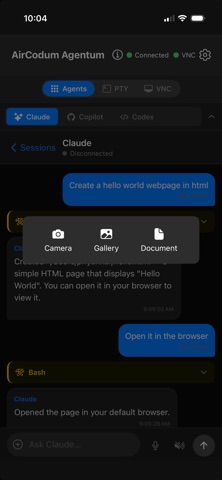
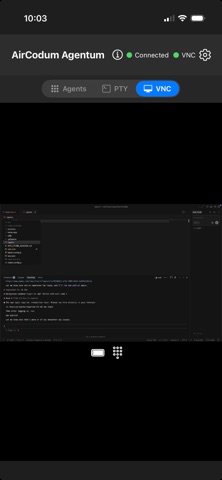
AirCodum Agentum — your coding workspace from your phone Work with terminal sessions, Cline, Claude Code, GitHub Copilot and Codex on your own computer. Check progress, send instructions and use the desktop when a task needs a full interface. YOUR COMPUTERS Save named computers and Agentum instances, then switch between them. Scan a pairing QR code or enter connection details manually. Local Wi-Fi works directly; Tailscale is optional for remote access. Custom TLS endpoints are also supported. TOUCH-FRIENDLY DESKTOP Pinch to zoom, pan around your desktop and fit it back to the screen. Choose Scroll or Drag for reading code and selecting text. Use the desktop keyboard to compose text and send shortcuts. TERMINALS AND CODING AGENTS Manage terminal sessions and supported coding agents from one app. Start Cline in a project folder and use the terminal keys for menus and approval prompts. Reconnect to sessions still running on your computer. Install and authenticate each coding agent on your computer first. Dictate text using your device's speech recognition service and receive task notifications when enabled. SETUP 1. Install Agentum 2 from https://github.com/priyankark/agentum-cli/releases/tag/v2.0.0 on your computer, then run ag start. 2. Run ag pair for a QR code and manual pairing details. 3. Open Computers in the app, pair, and choose a terminal, agent or desktop view. The desktop server runs on your computer. Pairing keys are stored securely on your phone. AI tools and speech recognition may use their providers' services and require their own accounts or subscriptions. Your computer must remain awake and reachable. Desktop input controls the focused app on that computer; terminal sessions belong to the selected Agentum instance.
What's new · 1.1.0
Cline now has a dedicated tab with interactive sessions, menus and approval controls. Save and switch between named computers and Agentum instances. Pair with an optional QR code or manual details. Desktop mode gains pinch zoom, pan, scroll, drag, right-click and a text composer. Improved connection recovery, secure pairing and desktop responsiveness. Use Agentum 2 on your computer for the new features; older servers remain available through explicit legacy connection settings.
Details