

Home Inventory: Whateren
Lucio Duran · Productivity
Independent analytics for this App Store listing. AppTracker is not affiliated with Lucio Duran.
Chart standing · US
What changed · US
Listing changes AppTracker has observed for this app in this storefront — new versions, price moves, rating shifts, and store copy.
• Lock Location: hide items in a location and its sub-locations from lists, search, reports and exports on this device. A 4- or 6-digit PIN, or optional Face ID or Touch ID, lets you view them privately while browsing that location. They remain hidden elsewhere until all protection affecting them is removed. • View Options: in What, open Filters, then View Options to choose which details appear for each item, including photos, category and purchase date. Your choices are remembered on this device. • Reliability improvements for private viewing, Spotlight, Siri, widgets, iCloud reconciliation and restoring backups.
Ratings breakdown · US
The star breakdown behind this app's rating in this storefront.
In-app purchases · US
What this app sells inside itself, grouped by kind and priced for this storefront.
Screenshots




Keywords this app targets
Search terms AppTracker associates with this app — estimates, not search volume. ❝ = in the app's title; a highlighted number is its current position for that term.
Similar apps
Competitors and close alternatives, as estimated by AppTracker.
 Itemido: Manage Home Inventory
Maciej Opalko
1 shared topic · 3 shared title words
Itemido: Manage Home Inventory
Maciej Opalko
1 shared topic · 3 shared title words
 Rorg - AI Home Inventory
Alejandro Pacheco
1 shared topic · 3 shared title words
Rorg - AI Home Inventory
Alejandro Pacheco
1 shared topic · 3 shared title words
 My Inventory Tracker
Watts Life Technologies, LLC
1 shared title word
My Inventory Tracker
Watts Life Technologies, LLC
1 shared title word
 HomeAIQ
David Kline
1 shared topic
HomeAIQ
David Kline
1 shared topic
 Nest Egg - Inventory
Nest Egg Labs, Inc
1 shared topic · 1 shared title word
Nest Egg - Inventory
Nest Egg Labs, Inc
1 shared topic · 1 shared title word
 Noah360 – Home Management
Joseph Evitts
1 shared title word
Noah360 – Home Management
Joseph Evitts
1 shared title word
 Habitalog
Anick Groleau
Habitalog
Anick Groleau
 PackQR: House Move Box Scanner
Ross Williams
PackQR: House Move Box Scanner
Ross Williams
About
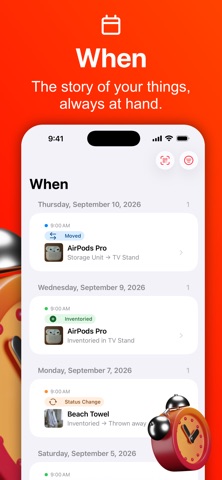
Whateren is a beautiful, private home inventory app that runs on your device by default. Finally know what you own, where it is, and when you got it. Preparing for a move, documenting your belongings for insurance, or just tired of asking "where did I put that?": Whateren catalogs every item, room and piece of furniture in your home. WHAT · WHERE · WHEN • What: every item you own, searchable and filterable • Where: your properties, rooms, furniture and boxes, organized in a hierarchy • When: a timeline of every change to your inventory QR LABELS FOR BOXES AND ROOMS Print a label for any box, drawer or room, or label a whole home in one PDF, on plain paper or on Avery sheets. Scan a label with the iPhone's own Camera and that place opens in the app. The larger labels can list what is inside, and the code itself carries nothing but an anonymous identifier. PHOTOS THAT STAY WITH YOU Take a photo of any item as you add it. Images are optimized on your device to keep storage small. Press and hold a photo to remove its background: the item is cut out and centred on white, on your device, offline, at no cost. AI IDENTIFICATION (OPTIONAL) Add photos without AI and enter details yourself, or choose optional Premium AI (Anthropic Claude) to suggest names, descriptions, categories, brands, models and estimated values. Premium uses credit packs with no subscription, or your own Anthropic API key with provider charges. Your choice is remembered. BARCODE SCANNING Scan a book, food item, or tagged product to auto-fill its details from public catalogs. RECEIPTS AND DOCUMENTS Photograph a purchase receipt and Premium AI reads every product on it: name, price, quantity, category, and the serial number or warranty when the receipt prints them. Choose where the items go and each one lands in your Inbox waiting for its own photo, with the receipt attached to it as a document. One credit per item you import. You can also attach a receipt, an invoice or a manual yourself. INSURANCE REPORTS AND INVENTORY LISTS Turn any room, property, or box into a PDF report for your insurer: everything inside it and its sub-places, with photos, serial numbers, and prices. Or choose a plain inventory list, with the statuses you pick and none of the insurance details. LENDING & WARRANTIES Lend an item and note who has it and when it is due back, then get a reminder. Every item keeps its loan history and its warranty date. FIND IT FROM ANYWHERE A Search tab answers one query across items and places at once: names, serial numbers, barcodes, categories, even the title of an attached document, so a shop's name finds what you bought on that receipt. Search from the Home Screen with Spotlight too, or ask Siri to add an item or find where something is, in your own language. Open an item on one device and it waits for you on the other, in the Dock and the app switcher. iCLOUD SYNC & FAMILY SHARING (OPTIONAL) Turn on iCloud sync to keep your inventory across your Apple devices. If iCloud already holds something, you choose which side is right: combine both, keep what is in iCloud, or keep what is on this device. The app names what each choice costs before you make it, and what was on this device is set aside so you can change your mind. Share a property with family, choosing view-only or full-edit access. TEAM CAPTURE Everyone you share a property with can help capture it: each photo is saved instantly as a draft, AI identifies it as it arrives, and everything lands in the Inbox to review and confirm. YOUR DATA STAYS YOURS Export to CSV or JSON. Full backups, including photos, require removing all location protection. PRIVATE BY DESIGN Whateren has no account, no ads, no analytics, and no tracking. Every network request it makes is named in our privacy policy. Privacy Policy: https://www.whateren.com/privacy
What's new · 2.12
• Lock Location: hide items in a location and its sub-locations from lists, search, reports and exports on this device. A 4- or 6-digit PIN, or optional Face ID or Touch ID, lets you view them privately while browsing that location. They remain hidden elsewhere until all protection affecting them is removed. • View Options: in What, open Filters, then View Options to choose which details appear for each item, including photos, category and purchase date. Your choices are remembered on this device. • Reliability improvements for private viewing, Spotlight, Siri, widgets, iCloud reconciliation and restoring backups.
Details