

InkCraft: AI Tattoo Preview
Uladzimir Tumanau · Graphics & Design
Independent analytics for this App Store listing. AppTracker is not affiliated with Uladzimir Tumanau.
Chart standing · US
What changed · US
Listing changes AppTracker has observed for this app in this storefront — new versions, price moves, rating shifts, and store copy.
• Much faster photo try-on and 3D model try-on. • Smarter, faster design search: finds designs as you type, even with typos or in your own language. • New: placement inspiration — over 1,300 tattoos shown on the body, by body part. • 3D model: we now tell you when no person is found in the photo. • Photo try-on: we now warn you if the picture is a tattoo design rather than a photo of your body.
Price & rating history · US
Reconstructed from the listing changes AppTracker has observed in this storefront. A field is charted once it has changed more than once, and each line starts at the value it moved from.
Average rating · ★ 5.00 now · 3 changes on record
Ratings breakdown · US
The star breakdown behind this app's rating in this storefront.
In-app purchases · US
What this app sells inside itself, grouped by kind and priced for this storefront.
Screenshots



About
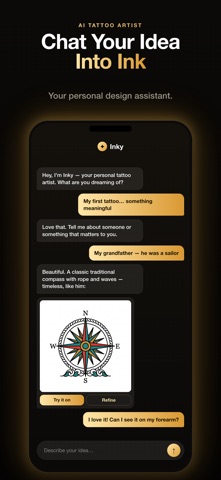
See it on your own skin, before it's permanent. Not a stock body model. Not a sticker pasted on a photo. Upload a photo of yourself and InkCraft warps the tattoo onto your actual body — following the curve of your arm, the light on your skin, the way ink really sits. No sign-up. No account. Open the app and start, free for 3 days with unlimited access. How it works: 1. Take or upload a photo of the spot you're thinking about 2. Choose a design — from the library, or make one in seconds 3. Drag, scale and rotate it into place 4. See it on your skin, photorealistic Your photo, in 3D Turn your own photo into a 3D body model, place a tattoo anywhere on it, and walk around it. See how a piece wraps a shoulder, how a sleeve reads from behind, whether that spine piece works at an angle you can't photograph yourself. Built from your body, not a mannequin. Four ways to get a design LIBRARY — Thousands of free, ready-to-wear designs, sorted by style and subject. No generating, no waiting. Just browse and try one on. GENERATE — Describe what you want and the AI draws it. 30 styles: minimalist, realism, Japanese, geometric, watercolor, tribal, blackwork, fine line, traditional, dotwork and more. LETTERING — Names, dates, quotes, verses. 59 real tattoo lettering faces. Curve the text along an arc, tune the spacing, place it anywhere. Latin, Cyrillic, Greek and more. EXTRACT — Seen a tattoo you love? Photograph it and InkCraft lifts the artwork cleanly off the skin as a design you can use on yourself. You can also import your own drawing and place it like any other design. Nothing gets lost Every design and every try-on is saved to your profile. Close the app mid-way and it's still there when you come back — same photo, same placement, right where you stopped. Build a shortlist over weeks and compare it all when you're ready to book. An AI artist in your pocket Ask anything about styles, placement, sizing or aftercare. The built-in AI artist also designs for you, tweaks what you already have, changes a detail, or adapts a design to a different spot. Just say what you want changed. Try it first, free, in your browser at inkcraftapp.com/try — any photo, no download, no account. Who this is for: - First-timers who want to see how it will really look - Anyone planning their next piece, or a cover-up - Artists showing clients a realistic mockup before booking Privacy Your photos are never stored. They are processed to create your preview and are not kept on our servers — never used to train AI models, never shared, never sold. Free trial and subscription terms New users get a 3-day free trial with unlimited access. After the trial, InkCraft continues as an auto-renewing weekly or annual subscription. The price for your country is shown before you confirm. Payment is charged to your Apple ID at confirmation of purchase. Subscriptions auto-renew unless cancelled at least 24 hours before the end of the current period. Manage or cancel anytime in your Apple ID settings. If you do not cancel before the trial ends, the unused portion is forfeited when the subscription begins. Your next tattoo deserves more than imagination. Terms of Use: https://inkcraftapp.com/terms Privacy Policy: https://inkcraftapp.com/privacy
What's new · 1.026
• Much faster photo try-on and 3D model try-on. • Smarter, faster design search: finds designs as you type, even with typos or in your own language. • New: placement inspiration — over 1,300 tattoos shown on the body, by body part. • 3D model: we now tell you when no person is found in the photo. • Photo try-on: we now warn you if the picture is a tattoo design rather than a photo of your body.
Details