

CD Wally: Album Player
DGR Labs, LLC · Music
Independent analytics for this App Store listing. AppTracker is not affiliated with DGR Labs, LLC.
Chart standing · US
What changed · US
Listing changes AppTracker has observed for this app in this storefront — new versions, price moves, rating shifts, and store copy.
IPHONE DUO • Open your iPhone Duo like a book and the wallet's spine lands right on the fold. Play an album and the disc spins on one screen while the track list sits on the other. • Stand it up half open and the disc plays on the top screen, with the tracks and controls on the bottom one, right under your thumbs. ROOM TO GROW • Wallet full? The last sleeve now stays open. Tap its + to see the bigger wallets. BUG FIXES • Fixed double-tapping the wallet cover to riffle to the front or back on iPhone SE.
Price & rating history · US
Reconstructed from the listing changes AppTracker has observed in this storefront. A field is charted once it has changed more than once, and each line starts at the value it moved from.
Average rating · ★ 4.77 now · 5 changes on record
Ratings breakdown · US
The star breakdown behind this app's rating in this storefront.
In-app purchases · US
What this app sells inside itself, grouped by kind and priced for this storefront.
Screenshots



About
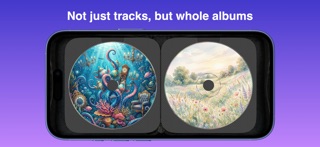
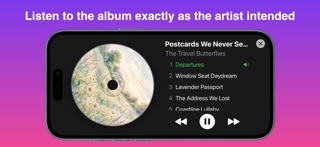
JUST YOUR MUSIC, NOT THE ENDLESS CATALOG Streaming is infinite. CD Wally is personal. Pick the albums that matter to you right now, and they appear as discs in a CD wallet you flip through on your iPhone, iPad, Apple TV, or Mac—and now in CarPlay. Tap an album, hear the whole thing. Not every track ever recorded. Just your albums, right now. THE CD WALLET EXPERIENCE, BROUGHT TO LIFE CD Wally recreates the tactile experience of a zippered CD wallet, complete with translucent woven sleeves and realistic disc rendering. Flip through your albums by cover art, memory, and mood, not by searching a bottomless catalog. ALBUMS, PLAYED WHOLE CD Wally is built around the album as a complete work. No shuffle. No algorithmic reordering. Tap a disc, and it plays front to back, the way the artist intended. It gently pulls you away from single-track grazing and back into the full-album experience. YOUR "RIGHT NOW" COLLECTION Build a wallet for the season you're in: summer drives, comfort albums, a workout rotation, late-night headphones, road-trip essentials. Swap albums in and out whenever you want by updating your "CDs" playlist in Apple Music. REQUIRES APPLE MUSIC CD Wally works with your existing Apple Music subscription. Create a playlist titled "CDs" and add at least one track from each album you want in your wallet. That's it. Your collection builds itself. A PLAYER WITH REAL CD VIBES Tap a disc and CD Wally opens its own player: • Your CD spins up and plays • Full track list with the current track highlighted • Player controls for listening, not grazing CD WALLY IN CARPLAY The car is where albums belong. CD Wally brings your wallet to CarPlay, so you pick a CD and let it play the whole way. • Your collection as a grid of album covers on the CarPlay screen • Tap a cover to play the album front to back • Now Playing shows the full track list with the current track highlighted • Rolls into the next disc when an album ends • Built for spotty coverage: playback rides through brief signal drops and picks back up when you're back online FOR THOSE WITH AN EYE FOR THE DETAILS • Subtle iridescent highlights on the disc edge and clamp ring respond naturally to device motion • Discs spin at Red Book–accurate constant linear velocity • Buttery-smooth 120fps animations on devices with ProMotion ONE WALLET, EVERY SCREEN CD Wally is a universal app for iPhone, iPad, Apple TV, and Mac. Your collection stays in sync across all of them with iCloud, and a wallet upgrade unlocks everywhere. FREE TO DOWNLOAD The free version includes a 6-disc wallet with full functionality. Upgrade to unlock larger wallets (24, 48, or 96 discs). One-time purchase -- no subscription.
What's new · 3.5.0
IPHONE DUO • Open your iPhone Duo like a book and the wallet's spine lands right on the fold. Play an album and the disc spins on one screen while the track list sits on the other. • Stand it up half open and the disc plays on the top screen, with the tracks and controls on the bottom one, right under your thumbs. ROOM TO GROW • Wallet full? The last sleeve now stays open. Tap its + to see the bigger wallets. BUG FIXES • Fixed double-tapping the wallet cover to riffle to the front or back on iPhone SE.
Details