

Kids Audio
Urs Jaeggi · Music
Independent analytics for this App Store listing. AppTracker is not affiliated with Urs Jaeggi.
Chart standing · US
What changed · US
Listing changes AppTracker has observed for this app in this storefront — new versions, price moves, rating shifts, and store copy.
New - Kids Audio now works in the car with CarPlay! Play children's music and audiobooks in the car. - Radio stations and podcast episodes now show up on the lock screen and in Control Center, with artwork and the station or episode name. - Podcasts got previous and next buttons. The episode list you started from becomes the queue, so you can move through a series without going back to the list — including from the lock screen, headphones, or CarPlay. - Once you've bought the full version, Settings now confirms it with a "Full Version Unlocked" section and a "Restore Purchases" button. Improved - Albums and audiobooks now play gapless. Fixed - Track changes no longer stall when the app is in the background or the screen is locked — audiobooks keep running from chapter to chapter with the device in a pocket.
In-app purchases · US
What this app sells inside itself, grouped by kind and priced for this storefront.
Screenshots




About
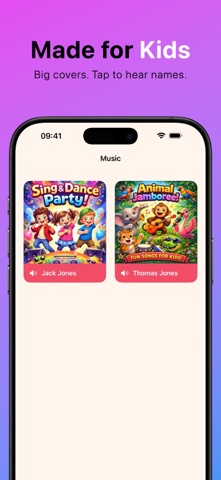
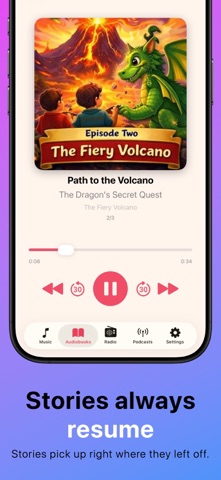
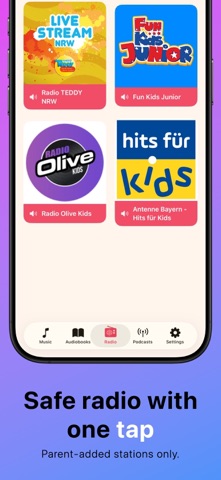
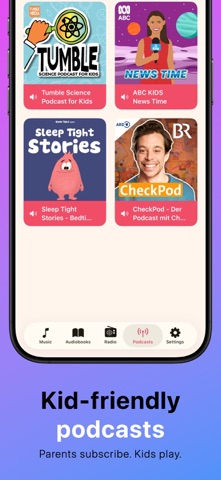
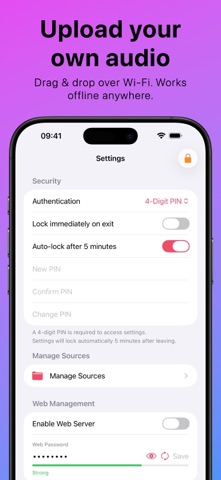
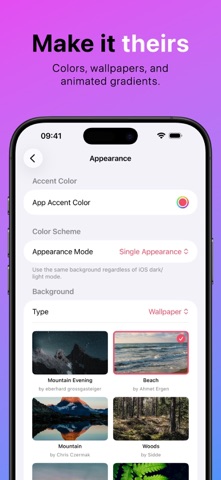
Your child wants music and stories — not random taps, skipped chapters, and settings chaos. Kids Audio is a simple, kid-friendly audio player built for small hands, while you stay in control. Set it up once. Then hand it over. Made for kids • Big, colorful album covers that are easy to spot and tap • Oversized play/pause/skip buttons • No reading required — perfect for pre-readers • Simple flow: tap an artist, pick an album, and listening starts instantly Offline-first (no streaming, no surprises) Kids Audio is built around your own audio library. There’s no streaming integration — so there are no ads, no subscriptions, and no unexpected content. Add audio directly to the device and everything works completely offline — perfect for travel, long car rides, grandparents’ houses, and screen-free quiet time. Supports: MP3, M4A, AAC, WAV, FLAC, AIFF Easy Wi-Fi upload: open the upload page in your browser, drag and drop files or folders, and they appear instantly in Kids Audio. Audiobooks that always resume Kids Audio remembers the exact listening position for every audiobook, album, and long track — so your child can pause anytime and pick up right where they left off. • Automatic resume • Progress bars for what’s in progress or finished • Mark albums as played/unplayed Podcasts + Radio (parent-managed) Parents can subscribe to kid-friendly podcasts and add safe radio stations. Kids only see what you approve. Parent controls that actually work Lock Settings with: • PIN code • Face ID • A fun math challenge Enable or hide music, audiobooks, podcasts, or radio — and customize controls for each section. Make it theirs Choose accent colors, wallpapers, gradients, and even your own images. Works beautifully on iPhone and iPad in portrait or landscape.
What's new · 1.3
New - Kids Audio now works in the car with CarPlay! Play children's music and audiobooks in the car. - Radio stations and podcast episodes now show up on the lock screen and in Control Center, with artwork and the station or episode name. - Podcasts got previous and next buttons. The episode list you started from becomes the queue, so you can move through a series without going back to the list — including from the lock screen, headphones, or CarPlay. - Once you've bought the full version, Settings now confirms it with a "Full Version Unlocked" section and a "Restore Purchases" button. Improved - Albums and audiobooks now play gapless. Fixed - Track changes no longer stall when the app is in the background or the screen is locked — audiobooks keep running from chapter to chapter with the device in a pocket.
Details