

Split Screen Player: 36 Videos
Weiping Huang · Utilities
Independent analytics for this App Store listing. AppTracker is not affiliated with Weiping Huang.
Chart standing · US
What changed · US
Listing changes AppTracker has observed for this app in this storefront — new versions, price moves, rating shifts, and store copy.
• Introducing Focus Playback: watch the current video in a large view while browsing others in a thumbnail list. Tap to switch, and optionally let audio follow the main view. • Added foldable screen support, with improved split-screen layouts, toolbars, and dialogs when folding and unfolding, plus smoother transitions between inner and outer displays and portrait and landscape orientations. • Added automatic subtitles and translation for complete local videos, with original, translated, or bilingual text, customizable styles, search, and tap-to-seek. Requires iOS 26 or later and a supported device. • Added Video Annotations with freehand drawing, arrows, shapes, and angle and distance measurements. Set annotation duration and playback emphasis, and export videos with annotations. • Added body skeletons and Pose Compare to compare joint angles and curves in two local videos, synchronize movements, align manually, and export review videos and data. • Added Smart Segments to locate segments by visual features, with preview seeking, segment-only playback, split-screen playback of multiple segments, and batch export. Analysis runs on your device. • Added Counterflow: arrange videos in independent tracks that automatically scroll in opposite directions, horizontally or vertically. • Added Display Transform with horizontal and vertical mirroring, multiple copies of one video, and mirrored two-view combinations. • Added video frame previews to playlists. Quickly browse video content and tap a preview frame to start playback at that point. • Improved subtitles, annotations, and body skeletons on external displays, along with playback restoration after backgrounding, and toolbar interactions.
Price & rating history · US
Reconstructed from the listing changes AppTracker has observed in this storefront. A field is charted once it has changed more than once, and each line starts at the value it moved from.
Average rating · ★ 4.66 now · 21 changes on record
Screenshots


About
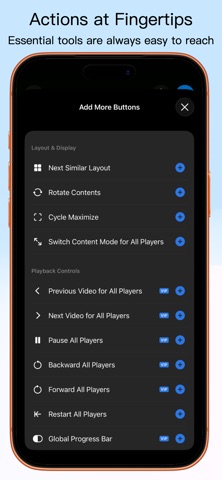
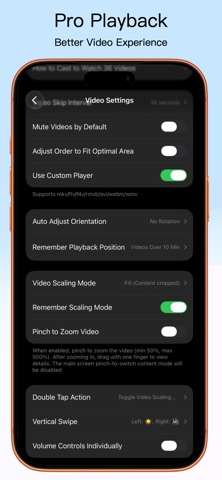
Play, sync, and compare up to 36 videos with Split Screen Player. Arrange views, annotate details, and export split-screen videos to share. Use it for: ⊙ Comparing sports, dance, fitness, and lesson videos. ⊙ Reviewing edits, takes, camera angles, and reference clips. ⊙ Creating comparisons, tutorials, reactions, and shorts. ⊙ Viewing streams, web pages, PDFs, photos, and local videos together. ⊙ Learning languages and revisiting lessons with bilingual subtitles. ⊙ Practicing with a live camera view beside a reference video. ⊙ Annotating movements and comparing joint angles for training reviews. ⊙ Showing travel, family, and event galleries on a TV or projector. Highlights Playback & Flexible Layouts ⊙ Choose from 144 layouts for portrait, landscape, and foldable screens. Resize panes, create and share layouts, or use Smart Layout to fit your videos. ⊙ Focus Playback keeps one video large while you browse others. Tap to switch and let audio follow the main view. ⊙ Sort, shuffle, or repeat playlists. Browse frame previews and tap a frame to play from that moment. ⊙ Drag videos to rearrange them; use floating, speed, and global controls. Lightweight playback previews; original sources for export. Sync & Motion Analysis ⊙ Align action moments with Sync Points, Sync Lock, and multiple Sync Groups. Set playback ranges and loop key movements. ⊙ Step frame by frame with millisecond time. Compare using overlays, opacity, A/B blinking, or a swipe divider. ⊙ Draw arrows, lines, and shapes; measure angles and distances. Set annotation duration and slow or pause near annotations. ⊙ Show body skeletons and compare joint angles and curves in two local videos. Sync movements or align manually, then export review videos and joint data. Automatic Subtitles & Translation ⊙ Generate original, translated, or bilingual subtitles for complete local videos. Recognition and translation run on your device. ⊙ Customize styles, search text, and tap subtitles to seek. Generate subtitles for playlist videos one at a time. Requires iOS 26 or later and a supported device. Language downloads may be needed on first use. Export & Share ⊙ Turn your split screen into one video for comparisons, lessons, or multi-angle presentations, with optional annotations. ⊙ Set each clip's range, speed, crop, zoom, and rotation. Add music, choose audio sources, adjust volume, and apply fades. ⊙ Set aspect ratio, resolution, frame rate, background, borders, and watermark. Galleries & Viewing Modes ⊙ Combine photos and videos in a Dynamic Gallery with templates, frames, crops, and captions. Enjoy slideshows, themed transitions, and adjustable Media Looks. ⊙ Scroll horizontally or vertically in Waterfall, or let neighboring Counterflow tracks scroll in opposite directions. ⊙ Mirror horizontally or vertically, display multiple copies, or pair normal and mirrored views of one video. More Media, One Screen ⊙ Play MP4, MOV, MKV, AVI, WebM, local audio files, and audio folders. Browse images, PDFs, and web pages in split screen. ⊙ Open detected web videos in panes or playlists, play HLS/M3U8/RTSP streams, or connect your own IPTV / Xtream Codes service to find channels. ⊙ Place live camera views beside reference videos. Supported devices can use multiple lenses with focus, exposure, and zoom controls. ⊙ Use split-screen output or device mirroring on a TV or projector, including subtitles, annotations, and body skeletons. ⊙ Bookmark media, layouts, framing, and sync settings. Customize the bottom toolbar for quick access. Free & Premium Features Download free and try basic features; selected advanced features offer trials. Premium has weekly, monthly, annual, or one-time unlock options. Cancel subscriptions anytime. See the app for trial allowances and benefits. Need help? Email us: daysinyear@foxmail.com User Agreement: https://splitscreenplayer.com/terms/ Privacy Policy: https://splitscreenplayer.com/privacy/
What's new · 1.0.30
• Introducing Focus Playback: watch the current video in a large view while browsing others in a thumbnail list. Tap to switch, and optionally let audio follow the main view. • Added foldable screen support, with improved split-screen layouts, toolbars, and dialogs when folding and unfolding, plus smoother transitions between inner and outer displays and portrait and landscape orientations. • Added automatic subtitles and translation for complete local videos, with original, translated, or bilingual text, customizable styles, search, and tap-to-seek. Requires iOS 26 or later and a supported device. • Added Video Annotations with freehand drawing, arrows, shapes, and angle and distance measurements. Set annotation duration and playback emphasis, and export videos with annotations. • Added body skeletons and Pose Compare to compare joint angles and curves in two local videos, synchronize movements, align manually, and export review videos and data. • Added Smart Segments to locate segments by visual features, with preview seeking, segment-only playback, split-screen playback of multiple segments, and batch export. Analysis runs on your device. • Added Counterflow: arrange videos in independent tracks that automatically scroll in opposite directions, horizontally or vertically. • Added Display Transform with horizontal and vertical mirroring, multiple copies of one video, and mirrored two-view combinations. • Added video frame previews to playlists. Quickly browse video content and tap a preview frame to start playback at that point. • Improved subtitles, annotations, and body skeletons on external displays, along with playback restoration after backgrounding, and toolbar interactions.
Details